All Scenarios

36

Passed Scenarios

27

Failed Scenarios

1

Skipped Scenarios

8

Execution Time: 7m 41s 507ms

Expand All | Collapse All

In order to use the product
I want to be sure to use a sane environment

Then "server" should have a FQDN 382ms

And reverse resolution should work for "server" 613ms

And the clock from "server" should be exact 672ms

And service "apache2" is enabled on "server" 618ms

And service "apache2" is active on "server" 618ms

And service "cobblerd" is enabled on "server" 641ms

And service "cobblerd" is active on "server" 655ms

And service "rhn-search" is enabled on "server" 646ms

And service "rhn-search" is active on "server" 648ms

And service "salt-api" is enabled on "server" 741ms

And service "salt-api" is active on "server" 625ms

And service "salt-master" is enabled on "server" 667ms

And service "salt-master" is active on "server" 661ms

And service "taskomatic" is enabled on "server" 631ms

And service "taskomatic" is active on "server" 621ms

And socket "tftp" is enabled on "server" 637ms

And socket "tftp" is active on "server" 615ms

And service "tomcat" is enabled on "server" 635ms

And service "tomcat" is active on "server" 619ms

Then "proxy" should have a FQDN 2s 962ms

And reverse resolution should work for "proxy" 278ms

And "proxy" should communicate with the server using public interface 957ms

And the clock from "proxy" should be exact 269ms

Then "sle_minion" should have a FQDN 4s 417ms

And reverse resolution should work for "sle_minion" 451ms

And "sle_minion" should communicate with the server using public interface 1s 81ms

And the clock from "sle_minion" should be exact 404ms

Then "build_host" should have a FQDN 2s 456ms

And reverse resolution should work for "build_host" 245ms

And "build_host" should communicate with the server using public interface 1s 10ms

And the clock from "build_host" should be exact 227ms

Then "ssh_minion" should have a FQDN 4s 199ms

And reverse resolution should work for "ssh_minion" 399ms

And "ssh_minion" should communicate with the server using public interface 1s 71ms

And the clock from "ssh_minion" should be exact 391ms

Then "rhlike_minion" should have a FQDN 1s 905ms

And reverse resolution should work for "rhlike_minion" 187ms

And "rhlike_minion" should communicate with the server using public interface 858ms

And the clock from "rhlike_minion" should be exact 179ms

Then "deblike_minion" should have a FQDN 4s 585ms

And reverse resolution should work for "deblike_minion" 224ms

And "deblike_minion" should communicate with the server using public interface 892ms

And the clock from "deblike_minion" should be exact 213ms

Then it should be possible to reach the test packages 0s

And it should be possible to reach the build sources 0s

And it should be possible to reach the Docker profiles 0s

Then it should be possible to use the HTTP proxy 0s

Then it should be possible to reach the authenticated registry 651ms

Then it should be possible to reach the not authenticated registry 642ms

Then it should be possible to use the custom download endpoint 636ms

In order to use the product
As the admin user
I want to create the organisation, the first users and set the HTTP proxy

When I run "rm -Rf /srv/salt/*" on "server" 640ms

Given I access the host the first time 0s

When I go to the home page 0s

And I enter "SUSE Test" as "orgName" 0s

And I enter "admin" as "login" 0s

And I enter "admin" as "desiredpassword" 0s

And I enter "admin" as "desiredpasswordConfirm" 0s

And I select "Mr." from "prefix" 0s

And I enter "Admin" as "firstNames" 0s

And I enter "Admin" as "lastName" 0s

And I enter "galaxy-noise@localhost" as "email" 0s

And I click on "Create Organization" 0s

Then I am logged in 0s

Given I am authorized for the "Admin" section 40s 65ms

When I wait until mgr-sync refresh is finished 3s 320ms

When I follow the left menu "Users > User List > Active" 192ms

And I follow "Create User" 601ms

And I enter "testing" as "login" 58ms

And I enter "testing" as "desiredpassword" 55ms

And I enter "testing" as "desiredpasswordConfirm" 60ms

And I select "Mr." from "prefix" 47ms

And I enter "Test" as "firstNames" 54ms

And I enter "User" as "lastName" 54ms

And I enter "galaxy-noise@localhost" as "email" 73ms

And I click on "Create Login" 69ms

Then I should see a "Account testing created, login information sent to galaxy-noise@localhost" text 61ms

And I should see a "testing" link 12ms

When I follow the left menu "Users > User List > Active" 75ms

And I follow "testing" 542ms

And I check "role_org_admin" 84ms

And I check "role_system_group_admin" 77ms

And I check "role_channel_admin" 77ms

And I check "role_activation_key_admin" 83ms

And I check "role_config_admin" 82ms

And I click on "Update" 636ms

Then I should see a "User information updated" text 67ms

And I should see a "testing" text 63ms

When I follow the left menu "Admin > Setup Wizard > HTTP Proxy" 0s

Then I should see a "HTTP Proxy Hostname" text 0s

And I should see a "HTTP Proxy Username" text 0s

And I should see a "HTTP Proxy Password" text 0s

When I enter the address of the HTTP proxy as "HTTP Proxy Hostname" 0s

And I enter "suma3" as "HTTP Proxy Username" 0s

And I enter "P4$$w/ord With%and&" as "HTTP Proxy Password" 0s

And I click on "Save and Verify" 0s

Then HTTP proxy verification should have succeeded 0s

* Wed Jan 14 2026 Marek Czernek
- Use internal deb classes instead of external aptsource lib
- Speed up wheel key.finger call (bsc#1240532)
- Add security patches (bsc#1254903,bsc#1254905,bsc#1254904)
- Simplify and speed up utils.find_json function (bsc#1246130)
- Added:
* use-internal-salt.utils.pkg.deb-classes-instead-of-a.patch
* speedup-wheel-key.finger-call-bsc-1240532-713.patch
* fixes-for-security-issues-cve-2025-13836-cve-2025-67.patch
* simplify-utils.json.find_json-function.patch

* Thu Jan 08 2026 Marek Czernek
- Extend warn_until period to 2027
- Added:
* extend-fails-to-warnings-until-2027-742.patch

When I query latest Salt changes on "server" 746ms

In order to test the product using shortcuts
As root user
I want to add pillar data to disable that feature

When I turn off disable_local_repos for all clients 3s 671ms

Given I am authorized for the "Admin" section 0s

When I follow the left menu "Admin > Setup Wizard > Organization Credentials" 0s

And I ask to add new credentials 0s

And I enter the SCC credentials 0s

And I click on "Save" 0s

And I wait until the SCC credentials are valid 0s

In order to set up my personal preferences
As admin
I want to navigate through "Home" submenus changing some settings

Given I am authorized as "admin" with password "admin" 473ms

When I follow the left menu "Home > My Preferences" 68ms

And I select "100" from "pagesize" 67ms

And I click on "Save Preferences" 63ms

Then I should see a "Preferences modified" text 93ms

Given I am authorized as "testing" with password "testing" 2s 641ms

When I follow the left menu "Home > My Preferences" 60ms

And I select "100" from "pagesize" 51ms

And I click on "Save Preferences" 546ms

Then I should see a "Preferences modified" text 94ms

New user kiwikiwi created with roles: image_admin

Given I am authorized for the "Admin" section 2s 28ms

When I create a user with name "kiwikiwi" and password "kiwikiwi" with roles "image_admin" 1s 883ms

New user docker created with roles: image_admin

Given I am authorized for the "Admin" section 465ms

When I create a user with name "docker" and password "docker" with roles "image_admin" 1s 588ms

When I follow the left menu "Images > Stores" 118ms

And I follow "Create" 566ms

And I enter "galaxy-registry" as "label" 95ms

And I enter the URI of the registry as "uri" 129ms

And I click on "create-btn" 160ms

Then I wait until table row contains a "galaxy-registry" text 4m 9s 998ms Show Error +
                                            
Unable to find xpath "//div[@class=\"table-responsive\"]/table/tbody/tr[.//td[contains(.,'galaxy-registry')]]" (Capybara::ElementNotFound) ./features/step_definitions/navigation_steps.rb:569:in `/^I wait until table row contains a "([^"]*)" text$/' features/core/srv_docker.feature:20:in `I wait until table row contains a "galaxy-registry" text'

And I should see a "Items 1 - 1 of 1" text 0s

13s 392ms Show Info +
15:12:57:000 - 15:17:08:000 | Current URL: https://uyuni-master-server.sumaci.aws/rhn/manager/cm/imagestores
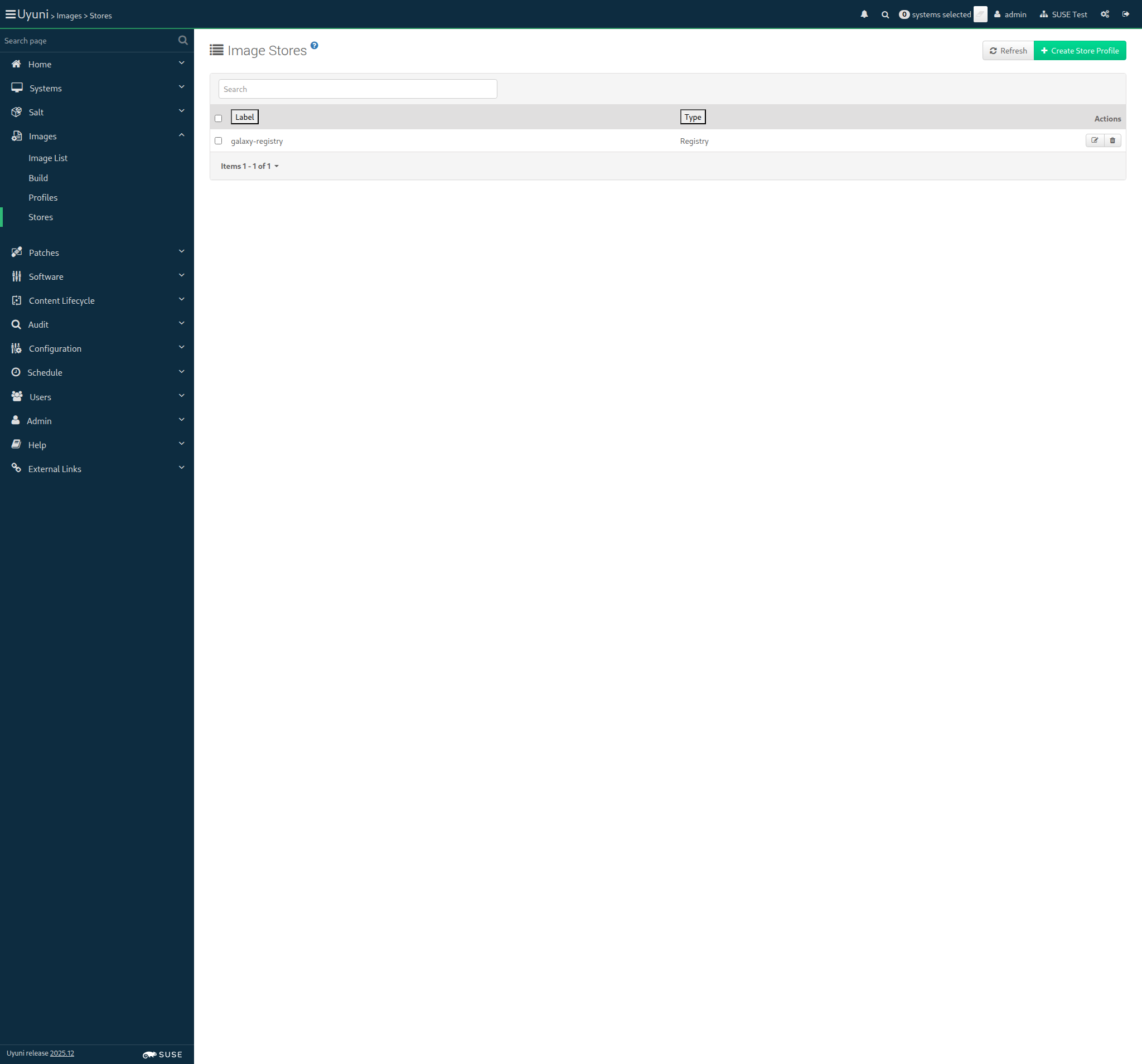
Screenshot +


In order for the server to behave correctly after a reboot
I want to be sure that there is no wrong SELinux label

Then files on container volumes should all have the proper SELinux label 0s

When I execute spacewalk-debug on the server 9s 623ms

Then the tomcat logs should not contain errors 641ms

Then the salt event log on server should contain no failures 1s 690ms

Then the taskomatic logs should not contain errors 641ms

Then the log messages should not contain out of memory errors 662ms

Then the word "scc.suse.com" does not occur more than 100 times in "/var/log/rhn/rhn_web_ui.log" on "server" 0s

Then the word "scc.suse.com" does not occur more than 50 times in "/var/log/rhn/rhn_taskomatic_daemon.log" on "server" 0s