All Scenarios

148

Passed Scenarios

112

Failed Scenarios

6

Skipped Scenarios

30

Execution Time: 25m 58s 841ms

Expand All | Collapse All

In order to use the product
I want to be sure to use a sane environment

Then "server" should have a FQDN 395ms

And reverse resolution should work for "server" 655ms

And the clock from "server" should be exact 812ms

And service "apache2" is enabled on "server" 716ms

And service "apache2" is active on "server" 635ms

And service "cobblerd" is enabled on "server" 623ms

And service "cobblerd" is active on "server" 633ms

And service "rhn-search" is enabled on "server" 623ms

And service "rhn-search" is active on "server" 628ms

And service "salt-api" is enabled on "server" 636ms

And service "salt-api" is active on "server" 636ms

And service "salt-master" is enabled on "server" 625ms

And service "salt-master" is active on "server" 635ms

And service "taskomatic" is enabled on "server" 622ms

And service "taskomatic" is active on "server" 646ms

And socket "tftp" is enabled on "server" 639ms

And socket "tftp" is active on "server" 643ms

And service "tomcat" is enabled on "server" 635ms

And service "tomcat" is active on "server" 648ms

Then "proxy" should have a FQDN 2s 990ms

And reverse resolution should work for "proxy" 370ms

And "proxy" should communicate with the server using public interface 929ms

And the clock from "proxy" should be exact 275ms

Then "sle_minion" should have a FQDN 4s 253ms

And reverse resolution should work for "sle_minion" 427ms

And "sle_minion" should communicate with the server using public interface 1s 51ms

And the clock from "sle_minion" should be exact 393ms

Then "build_host" should have a FQDN 2s 484ms

And reverse resolution should work for "build_host" 220ms

And "build_host" should communicate with the server using public interface 1s 27ms

And the clock from "build_host" should be exact 222ms

Then "ssh_minion" should have a FQDN 4s 468ms

And reverse resolution should work for "ssh_minion" 444ms

And "ssh_minion" should communicate with the server using public interface 1s 54ms

And the clock from "ssh_minion" should be exact 405ms

Then "rhlike_minion" should have a FQDN 2s

And reverse resolution should work for "rhlike_minion" 189ms

And "rhlike_minion" should communicate with the server using public interface 862ms

And the clock from "rhlike_minion" should be exact 176ms

Then "deblike_minion" should have a FQDN 4s 577ms

And reverse resolution should work for "deblike_minion" 221ms

And "deblike_minion" should communicate with the server using public interface 859ms

And the clock from "deblike_minion" should be exact 224ms

Then it should be possible to reach the test packages 0s

And it should be possible to reach the build sources 0s

And it should be possible to reach the Docker profiles 0s

Then it should be possible to use the HTTP proxy 0s

Then it should be possible to reach the authenticated registry 655ms

Then it should be possible to reach the not authenticated registry 637ms

Then it should be possible to use the custom download endpoint 645ms

In order to use the product
As the admin user
I want to create the organisation, the first users and set the HTTP proxy

When I run "rm -Rf /srv/salt/*" on "server" 669ms

Given I access the host the first time 0s

When I go to the home page 0s

And I enter "SUSE Test" as "orgName" 0s

And I enter "admin" as "login" 0s

And I enter "admin" as "desiredpassword" 0s

And I enter "admin" as "desiredpasswordConfirm" 0s

And I select "Mr." from "prefix" 0s

And I enter "Admin" as "firstNames" 0s

And I enter "Admin" as "lastName" 0s

And I enter "galaxy-noise@localhost" as "email" 0s

And I click on "Create Organization" 0s

Then I am logged in 0s

Given I am authorized for the "Admin" section 39s 770ms

When I wait until mgr-sync refresh is finished 3s 833ms

When I follow the left menu "Users > User List > Active" 179ms

And I follow "Create User" 584ms

And I enter "testing" as "login" 52ms

And I enter "testing" as "desiredpassword" 53ms

And I enter "testing" as "desiredpasswordConfirm" 55ms

And I select "Mr." from "prefix" 44ms

And I enter "Test" as "firstNames" 50ms

And I enter "User" as "lastName" 50ms

And I enter "galaxy-noise@localhost" as "email" 64ms

And I click on "Create Login" 1s 42ms

Then I should see a "Account testing created, login information sent to galaxy-noise@localhost" text 61ms

And I should see a "testing" link 11ms

When I follow the left menu "Users > User List > Active" 72ms

And I follow "testing" 548ms

And I check "role_org_admin" 76ms

And I check "role_system_group_admin" 71ms

And I check "role_channel_admin" 71ms

And I check "role_activation_key_admin" 71ms

And I check "role_config_admin" 70ms

And I click on "Update" 594ms

Then I should see a "User information updated" text 66ms

And I should see a "testing" text 66ms

When I follow the left menu "Admin > Setup Wizard > HTTP Proxy" 0s

Then I should see a "HTTP Proxy Hostname" text 0s

And I should see a "HTTP Proxy Username" text 0s

And I should see a "HTTP Proxy Password" text 0s

When I enter the address of the HTTP proxy as "HTTP Proxy Hostname" 0s

And I enter "suma3" as "HTTP Proxy Username" 0s

And I enter "P4$$w/ord With%and&" as "HTTP Proxy Password" 0s

And I click on "Save and Verify" 0s

Then HTTP proxy verification should have succeeded 0s

* Mon Nov 24 2025 Alexander Graul
- Add minimum_auth_version to enforce security (CVE-2025-62349)
- Backport security fixes for vendored tornado
* BDSA-2024-3438
* BDSA-2024-3439
* BDSA-2024-9026
- Junos module yaml loader fix (CVE-2025-62348)
- Added:
* backport-3006.17-security-fixes-739.patch

* Thu Nov 13 2025 Marek Czernek
- Require Python dependencies only for used Python version

* Tue Nov 11 2025 Marek Czernek
- Fix TLS and x509 modules for OSes with older cryptography module

When I query latest Salt changes on "server" 718ms

In order to test the product using shortcuts
As root user
I want to add pillar data to disable that feature

When I turn off disable_local_repos for all clients 3s 684ms

Given I am authorized for the "Admin" section 0s

When I follow the left menu "Admin > Setup Wizard > Organization Credentials" 0s

And I ask to add new credentials 0s

And I enter the SCC credentials 0s

And I click on "Save" 0s

And I wait until the SCC credentials are valid 0s

In order to set up my personal preferences
As admin
I want to navigate through "Home" submenus changing some settings

Given I am authorized as "admin" with password "admin" 512ms

When I follow the left menu "Home > My Preferences" 64ms

And I select "100" from "pagesize" 66ms

And I click on "Save Preferences" 603ms

Then I should see a "Preferences modified" text 92ms

Given I am authorized as "testing" with password "testing" 2s 924ms

When I follow the left menu "Home > My Preferences" 57ms

And I select "100" from "pagesize" 49ms

And I click on "Save Preferences" 636ms

Then I should see a "Preferences modified" text 85ms

New user kiwikiwi created with roles: image_admin

Given I am authorized for the "Admin" section 2s 72ms

When I create a user with name "kiwikiwi" and password "kiwikiwi" with roles "image_admin" 1s 857ms

New user docker created with roles: image_admin

Given I am authorized for the "Admin" section 445ms

When I create a user with name "docker" and password "docker" with roles "image_admin" 1s 668ms

When I follow the left menu "Images > Stores" 109ms

And I follow "Create" 496ms

And I enter "galaxy-registry" as "label" 115ms

And I enter the URI of the registry as "uri" 125ms

And I click on "create-btn" 122ms

Then I wait until table row contains a "galaxy-registry" text 1s 838ms

And I should see a "Items 1 - 1 of 1" text 54ms

Given I am authorized for the "Admin" section 26s 770ms

When I follow the left menu "Admin > Task Schedules" 135ms

And I follow "mgr-sync-refresh-default" 1s 311ms

And I choose "disabled" 59ms

And I click on "Update Schedule" 1s 537ms

And I click on "Disable Schedule" 1s 655ms

When I follow the left menu "Admin > Task Schedules" 60ms

And I follow "cobbler-sync-default" 1s 283ms

And I choose "disabled" 44ms

And I click on "Update Schedule" 1s 482ms

And I click on "Disable Schedule" 1s 622ms

In order to use software channels
As root user
I want to list available channels and enable them

When I refresh SCC 28s 276ms

And I execute mgr-sync "list channels -e" with user "admin" and password "admin" 2s 324ms

Then I should get "[ ] SLE-Product-SLES15-SP7-Pool for x86_64 SUSE Linux Enterprise Server 15 SP7 x86_64 [sle-product-sles15-sp7-pool-x86_64]" < 1ms

And I should get " [ ] SLE-Product-SLES15-SP7-Updates for x86_64 SUSE Linux Enterprise Server 15 SP7 x86_64 [sle-product-sles15-sp7-updates-x86_64]" < 1ms

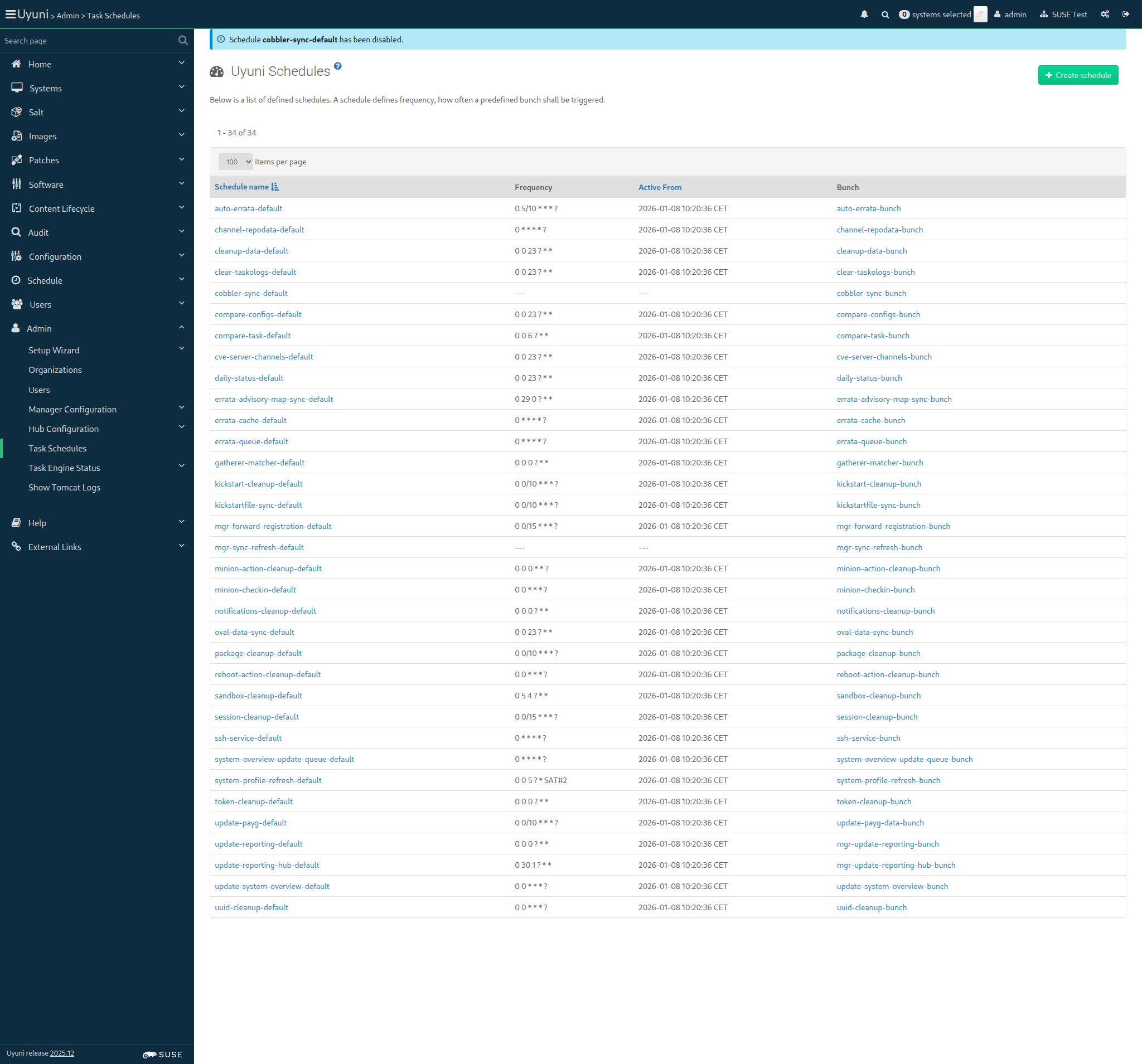
And I should get " [ ] SLE15-SP7-Installer-Updates for x86_64 SUSE Linux Enterprise Server 15 SP7 x86_64 [sle15-sp7-installer-updates-x86_64]" < 1ms Show Error +
                                            
' [ ] SLE15-SP7-Installer-Updates for x86_64 SUSE Linux Enterprise Server 15 SP7 x86_64 [sle15-sp7-installer-updates-x86_64]' not found in output 'Available Channels (full): Status: - [I] - channel is installed - [ ] - channel is not installed, but is available - [U] - channel is unavailable [ ] EL9-Pool for x86_64 RHEL and Liberty 9 Base [el9-pool-x86_64] [ ] RHEL7-Pool for x86_64 RHEL7 Base x86_64 [rhel7-pool-x86_64] [ ] RHEL8-Pool for x86_64 RHEL and Liberty 8 Base [rhel8-pool-x86_64] [ ] SLE-Micro-5.3-Pool for x86_64 SUSE Linux Enterprise Micro 5.3 x86_64 [sle-micro-5.3-pool-x86_64] [ ] SLE-Micro-5.3-Updates for x86_64 SUSE Linux Enterprise Micro 5.3 x86_64 [sle-micro-5.3-updates-x86_64] [ ] SLE-Module-Live-Patching15-SP4-Pool for x86_64 Micro 5.3 SUSE Linux Enterprise Live Patching 15 SP4 x86_64 [sle-module-live-patching15-sp4-pool-x86_64-micro-5.3] [ ] SLE-Module-Live-Patching15-SP4-Updates for x86_64 Micro 5.3 SUSE Linux Enterprise Live Patching 15 SP4 x86_64 [sle-module-live-patching15-sp4-updates-x86_64-micro-5.3] [ ] SLE-Product-SLED15-SP4-Pool for x86_64 SUSE Linux Enterprise Desktop 15 SP4 x86_64 [sle-product-sled15-sp4-pool-x86_64] [ ] SLE-15-SP4-Desktop-NVIDIA-Driver for x86_64 SUSE Linux Enterprise Workstation Extension 15 SP4 x86_64 [sle-15-sp4-desktop-nvidia-driver-x86_64] [ ] SLE-Module-Basesystem15-SP4-Pool for x86_64 SLED Basesystem Module 15 SP4 x86_64 [sle-module-basesystem15-sp4-pool-x86_64-sled] [ ] SLE-Module-Basesystem15-SP4-Updates for x86_64 SLED Basesystem Module 15 SP4 x86_64 [sle-module-basesystem15-sp4-updates-x86_64-sled] [ ] SLE-Module-Desktop-Applications15-SP4-Pool for x86_64 SLED Desktop Applications Module 15 SP4 x86_64 [sle-module-desktop-applications15-sp4-pool-x86_64-sled] [ ] SLE-Module-Desktop-Applications15-SP4-Updates for x86_64 SLED Desktop Applications Module 15 SP4 x86_64 [sle-module-desktop-applications15-sp4-updates-x86_64-sled] [ ] SLE-Module-DevTools15-SP4-Pool for x86_64 SLED Development Tools Module 15 SP4 x86_64 [sle-module-devtools15-sp4-pool-x86_64-sled] [ ] SLE-Module-DevTools15-SP4-Updates for x86_64 SLED Development Tools Module 15 SP4 x86_64 [sle-module-devtools15-sp4-updates-x86_64-sled] [ ] SLE-Product-SLED15-SP4-Updates for x86_64 SUSE Linux Enterprise Desktop 15 SP4 x86_64 [sle-product-sled15-sp4-updates-x86_64] [ ] SLE-Product-WE15-SP4-Pool for x86_64 SLED SUSE Linux Enterprise Workstation Extension 15 SP4 x86_64 [sle-product-we15-sp4-pool-x86_64-sled] [ ] SLE-Product-WE15-SP4-Updates for x86_64 SLED SUSE Linux Enterprise Workstation Extension 15 SP4 x86_64 [sle-product-we15-sp4-updates-x86_64-sled] [ ] SLE-Product-SLES15-SP4-Pool for x86_64 SUSE Linux Enterprise Server 15 SP4 x86_64 [sle-product-sles15-sp4-pool-x86_64] [ ] SLE-15-SP4-Desktop-NVIDIA-Driver for x86_64 WE SUSE Linux Enterprise Workstation Extension 15 SP4 x86_64 [sle-15-sp4-desktop-nvidia-driver-x86_64-we] [ ] SLE-Module-Basesystem15-SP4-Pool for x86_64 Basesystem Module 15 SP4 x86_64 [sle-module-basesystem15-sp4-pool-x86_64] [ ] SLE-Module-Basesystem15-SP4-Updates for x86_64 Basesystem Module 15 SP4 x86_64 [sle-module-basesystem15-sp4-updates-x86_64] [ ] SLE-Module-Containers15-SP4-Pool for x86_64 Containers Module 15 SP4 x86_64 [sle-module-containers15-sp4-pool-x86_64] [ ] SLE-Module-Containers15-SP4-Updates for x86_64 Containers Module 15 SP4 x86_64 [sle-module-containers15-sp4-updates-x86_64] [ ] SLE-Module-Desktop-Applications15-SP4-Pool for x86_64 Desktop Applications Module 15 SP4 x86_64 [sle-module-desktop-applications15-sp4-pool-x86_64] [ ] SLE-Module-Desktop-Applications15-SP4-Updates for x86_64 Desktop Applications Module 15 SP4 x86_64 [sle-module-desktop-applications15-sp4-updates-x86_64] [ ] SLE-Module-DevTools15-SP4-Pool for x86_64 Development Tools Module 15 SP4 x86_64 [sle-module-devtools15-sp4-pool-x86_64] [ ] SLE-Module-DevTools15-SP4-Updates for x86_64 Development Tools Module 15 SP4 x86_64 [sle-module-devtools15-sp4-updates-x86_64] [ ] SLE-Module-Live-Patching15-SP4-Pool for x86_64 SUSE Linux Enterprise Live Patching 15 SP4 x86_64 [sle-module-live-patching15-sp4-pool-x86_64] [ ] SLE-Module-Live-Patching15-SP4-Updates for x86_64 SUSE Linux Enterprise Live Patching 15 SP4 x86_64 [sle-module-live-patching15-sp4-updates-x86_64] [ ] SLE-Module-Public-Cloud15-SP4-Pool for x86_64 Public Cloud Module 15 SP4 x86_64 [sle-module-public-cloud15-sp4-pool-x86_64] [ ] SLE-Module-Public-Cloud15-SP4-Updates for x86_64 Public Cloud Module 15 SP4 x86_64 [sle-module-public-cloud15-sp4-updates-x86_64] [ ] SLE-Module-Server-Applications15-SP4-Pool for x86_64 Server Applications Module 15 SP4 x86_64 [sle-module-server-applications15-sp4-pool-x86_64] [ ] SLE-Module-Server-Applications15-SP4-Updates for x86_64 Server Applications Module 15 SP4 x86_64 [sle-module-server-applications15-sp4-updates-x86_64] [ ] SLE-Module-Web-Scripting15-SP4-Pool for x86_64 Web and Scripting Module 15 SP4 x86_64 [sle-module-web-scripting15-sp4-pool-x86_64] [ ] SLE-Module-Web-Scripting15-SP4-Updates for x86_64 Web and Scripting Module 15 SP4 x86_64 [sle-module-web-scripting15-sp4-updates-x86_64] [ ] SLE-Product-SLES15-SP4-LTSS-Updates for x86_64 SUSE Linux Enterprise Server LTSS 15 SP4 x86_64 [sle-product-sles15-sp4-ltss-updates-x86_64] [ ] SLE-Product-SLES15-SP4-Updates for x86_64 SUSE Linux Enterprise Server 15 SP4 x86_64 [sle-product-sles15-sp4-updates-x86_64] [ ] SLE-Product-WE15-SP4-Pool for x86_64 SUSE Linux Enterprise Workstation Extension 15 SP4 x86_64 [sle-product-we15-sp4-pool-x86_64] [ ] SLE-Product-WE15-SP4-Updates for x86_64 SUSE Linux Enterprise Workstation Extension 15 SP4 x86_64 [sle-product-we15-sp4-updates-x86_64] [ ] SLE15-SP4-Installer-Updates for x86_64 SUSE Linux Enterprise Server 15 SP4 x86_64 [sle15-sp4-installer-updates-x86_64] [ ] SLE-Product-SLES15-SP5-Pool for x86_64 SUSE Linux Enterprise Server 15 SP5 x86_64 [sle-product-sles15-sp5-pool-x86_64] [ ] SLE-Module-Basesystem15-SP5-Pool for x86_64 Basesystem Module 15 SP5 x86_64 [sle-module-basesystem15-sp5-pool-x86_64] [ ] SLE-Module-Basesystem15-SP5-Updates for x86_64 Basesystem Module 15 SP5 x86_64 [sle-module-basesystem15-sp5-updates-x86_64] [ ] SLE-Module-Containers15-SP5-Pool for x86_64 Containers Module 15 SP5 x86_64 [sle-module-containers15-sp5-pool-x86_64] [ ] SLE-Module-Containers15-SP5-Updates for x86_64 Containers Module 15 SP5 x86_64 [sle-module-containers15-sp5-updates-x86_64] [ ] SLE-Module-Desktop-Applications15-SP5-Pool for x86_64 Desktop Applications Module 15 SP5 x86_64 [sle-module-desktop-applications15-sp5-pool-x86_64] [ ] SLE-Module-Desktop-Applications15-SP5-Updates for x86_64 Desktop Applications Module 15 SP5 x86_64 [sle-module-desktop-applications15-sp5-updates-x86_64] [ ] SLE-Module-DevTools15-SP5-Pool for x86_64 Development Tools Module 15 SP5 x86_64 [sle-module-devtools15-sp5-pool-x86_64] [ ] SLE-Module-DevTools15-SP5-Updates for x86_64 Development Tools Module 15 SP5 x86_64 [sle-module-devtools15-sp5-updates-x86_64] [ ] SLE-Module-Live-Patching15-SP5-Pool for x86_64 SUSE Linux Enterprise Live Patching 15 SP5 x86_64 [sle-module-live-patching15-sp5-pool-x86_64] [ ] SLE-Module-Live-Patching15-SP5-Updates for x86_64 SUSE Linux Enterprise Live Patching 15 SP5 x86_64 [sle-module-live-patching15-sp5-updates-x86_64] [ ] SLE-Module-Public-Cloud15-SP5-Pool for x86_64 Public Cloud Module 15 SP5 x86_64 [sle-module-public-cloud15-sp5-pool-x86_64] [ ] SLE-Module-Public-Cloud15-SP5-Updates for x86_64 Public Cloud Module 15 SP5 x86_64 [sle-module-public-cloud15-sp5-updates-x86_64] [ ] SLE-Module-Server-Applications15-SP5-Pool for x86_64 Server Applications Module 15 SP5 x86_64 [sle-module-server-applications15-sp5-pool-x86_64] [ ] SLE-Module-Server-Applications15-SP5-Updates for x86_64 Server Applications Module 15 SP5 x86_64 [sle-module-server-applications15-sp5-updates-x86_64] [ ] SLE-Module-Web-Scripting15-SP5-Pool for x86_64 Web and Scripting Module 15 SP5 x86_64 [sle-module-web-scripting15-sp5-pool-x86_64] [ ] SLE-Module-Web-Scripting15-SP5-Updates for x86_64 Web and Scripting Module 15 SP5 x86_64 [sle-module-web-scripting15-sp5-updates-x86_64] [ ] SLE-Product-SLES15-SP5-Updates for x86_64 SUSE Linux Enterprise Server 15 SP5 x86_64 [sle-product-sles15-sp5-updates-x86_64] [ ] SLE15-SP5-Installer-Updates for x86_64 SUSE Linux Enterprise Server 15 SP5 x86_64 [sle15-sp5-installer-updates-x86_64] [ ] SLE-Product-SLES15-SP6-Pool for x86_64 SUSE Linux Enterprise Server 15 SP6 x86_64 [sle-product-sles15-sp6-pool-x86_64] [ ] SLE-Module-Basesystem15-SP6-Pool for x86_64 Basesystem Module 15 SP6 x86_64 [sle-module-basesystem15-sp6-pool-x86_64] [ ] SLE-Module-Basesystem15-SP6-Updates for x86_64 Basesystem Module 15 SP6 x86_64 [sle-module-basesystem15-sp6-updates-x86_64] [ ] SLE-Module-Containers15-SP6-Pool for x86_64 Containers Module 15 SP6 x86_64 [sle-module-containers15-sp6-pool-x86_64] [ ] SLE-Module-Containers15-SP6-Updates for x86_64 Containers Module 15 SP6 x86_64 [sle-module-containers15-sp6-updates-x86_64] [ ] SLE-Module-Desktop-Applications15-SP6-Pool for x86_64 Desktop Applications Module 15 SP6 x86_64 [sle-module-desktop-applications15-sp6-pool-x86_64] [ ] SLE-Module-Desktop-Applications15-SP6-Updates for x86_64 Desktop Applications Module 15 SP6 x86_64 [sle-module-desktop-applications15-sp6-updates-x86_64] [ ] SLE-Module-DevTools15-SP6-Pool for x86_64 Development Tools Module 15 SP6 x86_64 [sle-module-devtools15-sp6-pool-x86_64] [ ] SLE-Module-DevTools15-SP6-Updates for x86_64 Development Tools Module 15 SP6 x86_64 [sle-module-devtools15-sp6-updates-x86_64] [ ] SLE-Module-Live-Patching15-SP6-Pool for x86_64 SUSE Linux Enterprise Live Patching 15 SP6 x86_64 [sle-module-live-patching15-sp6-pool-x86_64] [ ] SLE-Module-Live-Patching15-SP6-Updates for x86_64 SUSE Linux Enterprise Live Patching 15 SP6 x86_64 [sle-module-live-patching15-sp6-updates-x86_64] [ ] SLE-Module-Public-Cloud15-SP6-Pool for x86_64 Public Cloud Module 15 SP6 x86_64 [sle-module-public-cloud15-sp6-pool-x86_64] [ ] SLE-Module-Public-Cloud15-SP6-Updates for x86_64 Public Cloud Module 15 SP6 x86_64 [sle-module-public-cloud15-sp6-updates-x86_64] [ ] SLE-Module-Server-Applications15-SP6-Pool for x86_64 Server Applications Module 15 SP6 x86_64 [sle-module-server-applications15-sp6-pool-x86_64] [ ] SLE-Module-Server-Applications15-SP6-Updates for x86_64 Server Applications Module 15 SP6 x86_64 [sle-module-server-applications15-sp6-updates-x86_64] [ ] SLE-Module-Web-Scripting15-SP6-Pool for x86_64 Web and Scripting Module 15 SP6 x86_64 [sle-module-web-scripting15-sp6-pool-x86_64] [ ] SLE-Module-Web-Scripting15-SP6-Updates for x86_64 Web and Scripting Module 15 SP6 x86_64 [sle-module-web-scripting15-sp6-updates-x86_64] [ ] SLE-Product-SLES15-SP6-Updates for x86_64 SUSE Linux Enterprise Server 15 SP6 x86_64 [sle-product-sles15-sp6-updates-x86_64] [ ] SLE-Product-SLES15-SP7-Pool for x86_64 SUSE Linux Enterprise Server 15 SP7 x86_64 [sle-product-sles15-sp7-pool-x86_64] [ ] SLE-Module-Basesystem15-SP7-Pool for x86_64 Basesystem Module 15 SP7 x86_64 [sle-module-basesystem15-sp7-pool-x86_64] [ ] SLE-Module-Basesystem15-SP7-Updates for x86_64 Basesystem Module 15 SP7 x86_64 [sle-module-basesystem15-sp7-updates-x86_64] [ ] SLE-Module-Containers15-SP7-Pool for x86_64 Containers Module 15 SP7 x86_64 [sle-module-containers15-sp7-pool-x86_64] [ ] SLE-Module-Containers15-SP7-Updates for x86_64 Containers Module 15 SP7 x86_64 [sle-module-containers15-sp7-updates-x86_64] [ ] SLE-Module-Desktop-Applications15-SP7-Pool for x86_64 Desktop Applications Module 15 SP7 x86_64 [sle-module-desktop-applications15-sp7-pool-x86_64] [ ] SLE-Module-Desktop-Applications15-SP7-Updates for x86_64 Desktop Applications Module 15 SP7 x86_64 [sle-module-desktop-applications15-sp7-updates-x86_64] [ ] SLE-Module-DevTools15-SP7-Pool for x86_64 Development Tools Module 15 SP7 x86_64 [sle-module-devtools15-sp7-pool-x86_64] [ ] SLE-Module-DevTools15-SP7-Updates for x86_64 Development Tools Module 15 SP7 x86_64 [sle-module-devtools15-sp7-updates-x86_64] [ ] SLE-Module-Live-Patching15-SP7-Pool for x86_64 SUSE Linux Enterprise Live Patching 15 SP7 x86_64 [sle-module-live-patching15-sp7-pool-x86_64] [ ] SLE-Module-Live-Patching15-SP7-Updates for x86_64 SUSE Linux Enterprise Live Patching 15 SP7 x86_64 [sle-module-live-patching15-sp7-updates-x86_64] [ ] SLE-Module-Public-Cloud15-SP7-Pool for x86_64 Public Cloud Module 15 SP7 x86_64 [sle-module-public-cloud15-sp7-pool-x86_64] [ ] SLE-Module-Public-Cloud15-SP7-Updates for x86_64 Public Cloud Module 15 SP7 x86_64 [sle-module-public-cloud15-sp7-updates-x86_64] [ ] SLE-Module-Server-Applications15-SP7-Pool for x86_64 Server Applications Module 15 SP7 x86_64 [sle-module-server-applications15-sp7-pool-x86_64] [ ] SLE-Module-Server-Applications15-SP7-Updates for x86_64 Server Applications Module 15 SP7 x86_64 [sle-module-server-applications15-sp7-updates-x86_64] [ ] SLE-Module-Web-Scripting15-SP7-Pool for x86_64 Web and Scripting Module 15 SP7 x86_64 [sle-module-web-scripting15-sp7-pool-x86_64] [ ] SLE-Module-Web-Scripting15-SP7-Updates for x86_64 Web and Scripting Module 15 SP7 x86_64 [sle-module-web-scripting15-sp7-updates-x86_64] [ ] SLE-Product-SLES15-SP7-Updates for x86_64 SUSE Linux Enterprise Server 15 SP7 x86_64 [sle-product-sles15-sp7-updates-x86_64] [ ] SUSE-MicroOS-5.2-Pool for x86_64 SUSE Linux Enterprise Micro 5.2 x86_64 [suse-microos-5.2-pool-x86_64] [ ] SUSE-MicroOS-5.2-Updates for x86_64 SUSE Linux Enterprise Micro 5.2 x86_64 [suse-microos-5.2-updates-x86_64] ' (ScriptError) ./features/step_definitions/command_steps.rb:191:in `/^I should get "([^"]*)"$/' features/reposync/srv_sync_channels.feature:16:in `I should get " [ ] SLE15-SP7-Installer-Updates for x86_64 SUSE Linux Enterprise Server 15 SP7 x86_64 [sle15-sp7-installer-updates-x86_64]"'

13s 860ms Show Info +
10:34:18:000 - 10:34:49:000 | Current URL: https://uyuni-master-server.sumaci.aws/rhn/admin/SatSchedules.do
Screenshot +


When I execute mgr-sync "list channels -e --no-optional" 1s 503ms

Then I should get "[ ] SLE-Product-SLES15-SP7-Pool for x86_64 SUSE Linux Enterprise Server 15 SP7 x86_64 [sle-product-sles15-sp7-pool-x86_64]" < 1ms

And I should get " [ ] SLE-Product-SLES15-SP7-Updates for x86_64 SUSE Linux Enterprise Server 15 SP7 x86_64 [sle-product-sles15-sp7-updates-x86_64]" < 1ms

And I shouldn't get " [ ] SLE15-SP7-Installer-Updates for x86_64 SUSE Linux Enterprise Server 15 SP7 x86_64 [sle15-sp7-installer-updates-x86_64]" < 1ms

When I execute mgr-sync "list products" 1s 544ms

Then I should get "[ ] SUSE Linux Enterprise Server 15 SP7 x86_64" < 1ms

When I execute mgr-sync "list products --expand" 0s

Then I should get "[ ] SUSE Linux Enterprise Server 15 SP7 x86_64" 0s

And I should get " [ ] SUSE Multi-Linux Manager Proxy Extension 5.1 x86_64" 0s

And I should get " [ ] SUSE Multi-Linux Manager Proxy Extension for SLE 5.1 x86_64" 0s

And I should get " [ ] (R) SUSE Multi-Linux Manager Client Tools for SUSE Liberty Linux 7, RHEL and clones 7 x86_64" 0s

And I should get " [ ] (R) SUSE Multi-Linux Manager Client Tools for SLE 15 x86_64" 0s

When I execute mgr-sync "list products --expand --filter x86_64" 1s 466ms

Then I should get "[ ] SUSE Linux Enterprise Server 15 SP7 x86_64" < 1ms

And I shouldn't get "ppc64" < 1ms

And I shouldn't get "s390x" < 1ms

When I remove the mgr-sync cache file 634ms

And I execute mgr-sync refresh 1m 769ms

Then I should get "Timeout. No user input for 60 seconds. Exiting..." < 1ms

When I refresh SCC 25s 381ms

Given I am authorized for the "Admin" section 450ms

When I follow the left menu "Admin > Setup Wizard > Products" 184ms

And I wait until I see "Product Description" text 1s 133ms

Then I should see a "Arch" text 108ms

And I should see a "Channels" text 107ms

And I should not see a "WebYaST 1.3" text 107ms

When I follow the left menu "Admin > Setup Wizard > Products" 89ms

And I wait until I do not see "currently running" text 67ms

And I wait until I do not see "Loading" text 868ms

And I enter "RHEL and Liberty" as the filtered product description 140ms

Then I should see a "RHEL and Liberty 8 Base" text 76ms

When I select "x86_64" from "product-arch-filter" 1s 123ms

Then I should see a "RHEL and Liberty 8 Base" text 76ms

When I follow the left menu "Admin > Setup Wizard > Products" 0s

And I wait until I do not see "currently running" text 0s

And I wait until I do not see "Loading" text 0s

And I enter "SUSE Linux Enterprise Server for SAP Applications 15 x86_64" as the filtered product description 0s

And I click the channel list of product "SUSE Linux Enterprise Server for SAP Applications 15 x86_64" 0s

Then I should see a "Product Channels" text 0s

And I should see a "Mandatory Channels" text 0s

And I should see a "Optional Channels" text 0s

When I close the modal dialog 0s

Given I am authorized for the "Admin" section 0s

When I follow the left menu "Admin > Setup Wizard > Products" 0s

And I wait until I do not see "currently running" text 0s

And I wait until I do not see "Loading" text 0s

And I enter "SUSE Linux Enterprise Server 15 SP7" as the filtered product description 0s

And I wait until I see "SUSE Linux Enterprise Server 15 SP7 x86_64" text 0s

And I open the sub-list of the product "SUSE Linux Enterprise Server 15 SP7 x86_64" 0s

And I open the sub-list of the product "Basesystem Module 15 SP7 x86_64" 0s

And I open the sub-list of the product "Desktop Applications Module 15 SP7 x86_64" 0s

And I open the sub-list of the product "SUSE Multi-Linux Manager Client Tools for SLE 15 x86_64" if present 0s

Then I should see that the "Basesystem Module 15 SP7 x86_64" product is "recommended" 0s

And I should see that the "Server Applications Module 15 SP7 x86_64" product is "recommended" 0s

And I should see that the "SUSE Multi-Linux Manager Client Tools for SLE 15 x86_64" product is "recommended" 0s

When I select "SUSE Linux Enterprise Server 15 SP7 x86_64" as a product 0s

Then I should see the "SUSE Linux Enterprise Server 15 SP7 x86_64" selected 0s

And I should see the "Basesystem Module 15 SP7 x86_64" selected 0s

And I should see the "Server Applications Module 15 SP7 x86_64" selected 0s

And I should see the "SUSE Multi-Linux Manager Client Tools for SLE 15 x86_64" selected 0s

When I select "Desktop Applications Module 15 SP7 x86_64" as a product 0s

And I select "Development Tools Module 15 SP7 x86_64" as a product 0s

Then I should see the "Desktop Applications Module 15 SP7 x86_64" selected 0s

And I should see the "Development Tools Module 15 SP7 x86_64" selected 0s

When I select "Python 3 Module 15 SP7 x86_64" as a product 0s

Then I should see the "Python 3 Module 15 SP7 x86_64" selected 0s

When I select "Containers Module 15 SP7 x86_64" as a product 0s

Then I should see the "Containers Module 15 SP7 x86_64" selected 0s

When I click the Add Product button 0s

And I wait until I see "SUSE Linux Enterprise Server 15 SP7 x86_64" product has been added 0s

Then the SLE15 SP7 product should be added 0s

When I wait until all synchronized channels for "sles15-sp7" have finished 0s

Reposync of channel opensuse_tumbleweed-x86_64 killed
Channel opensuse_tumbleweed-uyuni-client-x86_64 added
Channel opensuse_tumbleweed-uyuni-client-devel-x86_64 added

When I use spacewalk-common-channel to add channel "opensuse_tumbleweed" with arch "x86_64" 7s 491ms

And I kill running spacewalk-repo-sync for "opensuse_tumbleweed-x86_64" channel 1s 515ms

And I use spacewalk-repo-sync to sync channel "opensuse_tumbleweed-x86_64" including only client tools dependencies 1m 45s 86ms

And I use spacewalk-common-channel to add all "tumbleweed-client-tools-x86_64" channels with arch "x86_64" 15s 952ms

Channel opensuse_tumbleweed-x86_64 added
Channel opensuse_tumbleweed-uyuni-client-devel-x86_64 added
Channel uyuni-proxy-devel-tumbleweed-x86_64 added
Channel opensuse_tumbleweed-x86_64 finished reposync
Channel opensuse_tumbleweed-uyuni-client-devel-x86_64 finished reposync
Channel uyuni-proxy-devel-tumbleweed-x86_64 finished reposync
All channels for uyuni-proxy have been fully synced

When I use spacewalk-common-channel to add all "uyuni-proxy" channels with arch "x86_64" 24s 931ms

And I wait until all synchronized channels for "uyuni-proxy" have finished 52s 957ms

Products list: Available Channels: Status: - [I] - channel is installed - [ ] - channel is not installed, but is available - [U] - channel is unavailable [ ] EL9-Pool for x86_64 RHEL and Liberty 9 Base [el9-pool-x86_64] [ ] RHEL7-Pool for x86_64 RHEL7 Base x86_64 [rhel7-pool-x86_64] [ ] RHEL8-Pool for x86_64 RHEL and Liberty 8 Base [rhel8-pool-x86_64] [ ] SLE-Micro-5.3-Pool for x86_64 SUSE Linux Enterprise Micro 5.3 x86_64 [sle-micro-5.3-pool-x86_64] [ ] SLE-Product-SLED15-SP4-Pool for x86_64 SUSE Linux Enterprise Desktop 15 SP4 x86_64 [sle-product-sled15-sp4-pool-x86_64] [ ] SLE-Product-SLES15-SP4-Pool for x86_64 SUSE Linux Enterprise Server 15 SP4 x86_64 [sle-product-sles15-sp4-pool-x86_64] [ ] SLE-Product-SLES15-SP5-Pool for x86_64 SUSE Linux Enterprise Server 15 SP5 x86_64 [sle-product-sles15-sp5-pool-x86_64] [ ] SLE-Product-SLES15-SP6-Pool for x86_64 SUSE Linux Enterprise Server 15 SP6 x86_64 [sle-product-sles15-sp6-pool-x86_64] [I] SLE-Product-SLES15-SP7-Pool for x86_64 SUSE Linux Enterprise Server 15 SP7 x86_64 [sle-product-sles15-sp7-pool-x86_64] [I] SLE-Module-Basesystem15-SP7-Pool for x86_64 Basesystem Module 15 SP7 x86_64 [sle-module-basesystem15-sp7-pool-x86_64] [I] SLE-Module-Basesystem15-SP7-Updates for x86_64 Basesystem Module 15 SP7 x86_64 [sle-module-basesystem15-sp7-updates-x86_64] [ ] SLE-Module-Containers15-SP7-Pool for x86_64 Containers Module 15 SP7 x86_64 [sle-module-containers15-sp7-pool-x86_64] [ ] SLE-Module-Containers15-SP7-Updates for x86_64 Containers Module 15 SP7 x86_64 [sle-module-containers15-sp7-updates-x86_64] [I] SLE-Module-Desktop-Applications15-SP7-Pool for x86_64 Desktop Applications Module 15 SP7 x86_64 [sle-module-desktop-applications15-sp7-pool-x86_64] [I] SLE-Module-Desktop-Applications15-SP7-Updates for x86_64 Desktop Applications Module 15 SP7 x86_64 [sle-module-desktop-applications15-sp7-updates-x86_64] [I] SLE-Module-DevTools15-SP7-Pool for x86_64 Development Tools Module 15 SP7 x86_64 [sle-module-devtools15-sp7-pool-x86_64] [I] SLE-Module-DevTools15-SP7-Updates for x86_64 Development Tools Module 15 SP7 x86_64 [sle-module-devtools15-sp7-updates-x86_64] [ ] SLE-Module-Live-Patching15-SP7-Pool for x86_64 SUSE Linux Enterprise Live Patching 15 SP7 x86_64 [sle-module-live-patching15-sp7-pool-x86_64] [ ] SLE-Module-Live-Patching15-SP7-Updates for x86_64 SUSE Linux Enterprise Live Patching 15 SP7 x86_64 [sle-module-live-patching15-sp7-updates-x86_64] [ ] SLE-Module-Public-Cloud15-SP7-Pool for x86_64 Public Cloud Module 15 SP7 x86_64 [sle-module-public-cloud15-sp7-pool-x86_64] [ ] SLE-Module-Public-Cloud15-SP7-Updates for x86_64 Public Cloud Module 15 SP7 x86_64 [sle-module-public-cloud15-sp7-updates-x86_64] [I] SLE-Module-Server-Applications15-SP7-Pool for x86_64 Server Applications Module 15 SP7 x86_64 [sle-module-server-applications15-sp7-pool-x86_64] [I] SLE-Module-Server-Applications15-SP7-Updates for x86_64 Server Applications Module 15 SP7 x86_64 [sle-module-server-applications15-sp7-updates-x86_64] [ ] SLE-Module-Web-Scripting15-SP7-Pool for x86_64 Web and Scripting Module 15 SP7 x86_64 [sle-module-web-scripting15-sp7-pool-x86_64] [ ] SLE-Module-Web-Scripting15-SP7-Updates for x86_64 Web and Scripting Module 15 SP7 x86_64 [sle-module-web-scripting15-sp7-updates-x86_64] [I] SLE-Product-SLES15-SP7-Updates for x86_64 SUSE Linux Enterprise Server 15 SP7 x86_64 [sle-product-sles15-sp7-updates-x86_64] [ ] SUSE-MicroOS-5.2-Pool for x86_64 SUSE Linux Enterprise Micro 5.2 x86_64 [suse-microos-5.2-pool-x86_64]

Given I am authorized for the "Admin" section 442ms

When I follow the left menu "Admin > Setup Wizard > Products" 149ms

And I wait until I do not see "currently running" text 74ms

And I wait until I do not see "Loading" text 901ms

And I enter "SUSE Linux Enterprise Server 15 SP7 x86_64" as the filtered product description 120ms

And I select "SUSE Linux Enterprise Server 15 SP7 x86_64" as a product 65ms

Then I should see the "SUSE Linux Enterprise Server 15 SP7 x86_64" selected 26ms

When I open the sub-list of the product "SUSE Linux Enterprise Server 15 SP7 x86_64" 50ms

And I open the sub-list of the product "Basesystem Module 15 SP7 x86_64" 49ms

And I select "Desktop Applications Module 15 SP7 x86_64" as a product 58ms

Then I should see the "Desktop Applications Module 15 SP7 x86_64" selected 21ms

When I open the sub-list of the product "Desktop Applications Module 15 SP7 x86_64" 47ms

And I select "Development Tools Module 15 SP7 x86_64" as a product 58ms

Then I should see the "Development Tools Module 15 SP7 x86_64" selected 36ms

When I click the Add Product button 52ms

And I wait until I see "Selected channels/products were scheduled successfully for syncing." text 5s 143ms

Then the SLE15 SP7 product should be added 2s 537ms

When I use spacewalk-common-channel to add channel "sles15-sp7-devel-uyuni-client" with arch "x86_64" 8s 556ms

And I wait until I see "SUSE Linux Enterprise Server 15 SP7 x86_64" product has been added 11ms

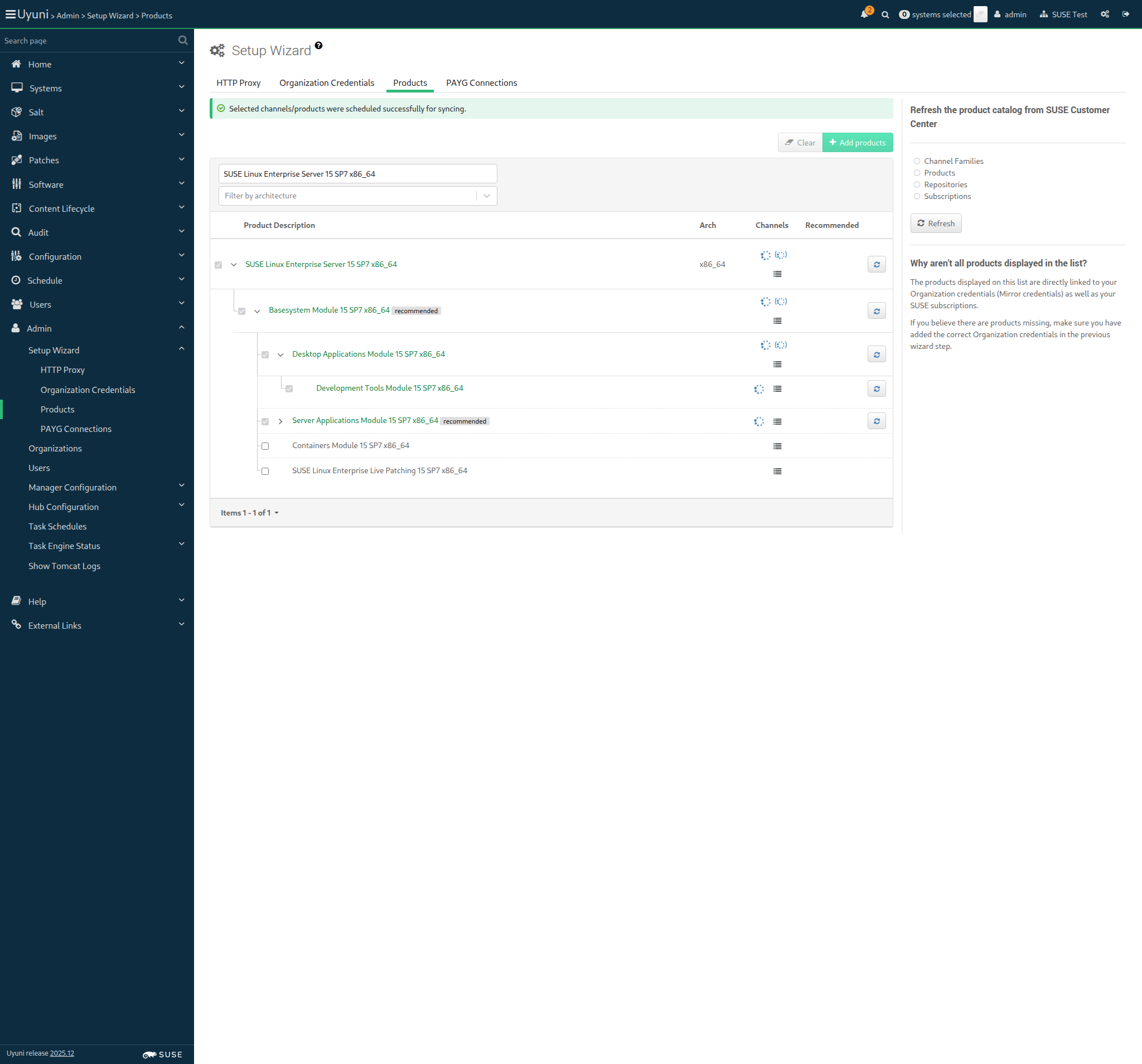
And I wait until all synchronized channels for "sles15-sp7" have finished 1s 58ms Show Error +
                                            
Error during reposync: unknown error - API failure: No such channel: sle15-sp7-installer-updates-x86_64 Reposync for these channels did not complete: ["sle-product-sles15-sp7-pool-x86_64", "sle-product-sles15-sp7-updates-x86_64", "sle15-sp7-installer-updates-x86_64", "sle-module-basesystem15-sp7-pool-x86_64", "sle-module-basesystem15-sp7-updates-x86_64", "sle-module-python3-15-sp7-pool-x86_64", "sle-module-python3-15-sp7-updates-x86_64", "sle-module-server-applications15-sp7-pool-x86_64", "sle-module-server-applications15-sp7-updates-x86_64", "sle-module-desktop-applications15-sp7-pool-x86_64", "sle-module-desktop-applications15-sp7-updates-x86_64", "sle-module-devtools15-sp7-updates-x86_64", "sle-module-devtools15-sp7-pool-x86_64", "sle-module-systems-management-15-sp7-pool-x86_64", "sle-module-systems-management-15-sp7-updates-x86_64", "sles15-sp7-devel-uyuni-client-x86_64"] (ScriptError) ./features/step_definitions/command_steps.rb:486:in `rescue in block in (top (required))' ./features/step_definitions/command_steps.rb:462:in `/^I wait until all synchronized channels for "([^"]*)" have finished$/' features/reposync/srv_sync_products.feature:113:in `I wait until all synchronized channels for "sles15-sp7" have finished'

14s 137ms Show Info +
10:40:08:000 - 10:40:29:000 | Current URL: https://uyuni-master-server.sumaci.aws/rhn/manager/admin/setup/products
Screenshot +


@proxy @susemanager @transactional_server
Scenario:
Add SL Micro 6.1 as base OS for proxy
< 1ms 13

Given I am authorized for the "Admin" section 0s

When I follow the left menu "Admin > Setup Wizard > Products" 0s

And I wait until I do not see "currently running" text 0s

And I wait until I do not see "Loading" text 0s

And I enter "SUSE Linux Micro 6.1" as the filtered product description 0s

And I select "SUSE Linux Micro 6.1 x86_64" as a product 0s

Then I should see the "SUSE Linux Micro 6.1 x86_64" selected 0s

When I open the sub-list of the product "SUSE Linux Micro 6.1 x86_64" 0s

And I open the sub-list of the product "SUSE Multi-Linux Manager Client Tools for SL Micro 6 x86_64" if present 0s

And I click the Add Product button 0s

And I wait until I see "Selected channels/products were scheduled successfully for syncing." text 0s

And I wait until I see "SUSE Linux Micro 6.1 x86_64" product has been added 0s

And I wait until all synchronized channels for "sl-micro-6.1" have finished 0s

@proxy @susemanager @skip_if_transactional_server
Scenario:
Add SLES 15 SP7 as base OS for proxy
< 1ms 11

Given I am authorized for the "Admin" section 0s

When I follow the left menu "Admin > Setup Wizard > Products" 0s

And I wait until I do not see "currently running" text 0s

And I wait until I do not see "Loading" text 0s

And I enter "SUSE Linux Enterprise Server 15 SP7" as the filtered product description 0s

And I select "SUSE Linux Enterprise Server 15 SP7 (BETA)" as a product 0s

Then I should see the "SUSE Linux Enterprise Server 15 SP7 (BETA)" selected 0s

When I click the Add Product button 0s

And I wait until I see "Selected channels/products were scheduled successfully for syncing." text 0s

And I wait until I see "SUSE Linux Enterprise Server 15 SP7 (BETA)" product has been added 0s

And I wait until all synchronized channels for "sles15-sp7" have finished 0s

Given I am authorized for the "Admin" section 0s

When I follow the left menu "Admin > Setup Wizard > Products" 0s

And I wait until I do not see "currently running" text 0s

And I wait until I do not see "Loading" text 0s

And I enter "SUSE Linux Micro 6.1" as the filtered product description 0s

When I open the sub-list of the product "SUSE Linux Micro 6.1 x86_64" 0s

And I select "SUSE Linux Micro 6.1 x86_64" as a product 0s

And I select "SUSE Multi-Linux Manager Proxy Extension 5.1 x86_64" as a product 0s

Then I should see the "SUSE Multi-Linux Manager Proxy Extension 5.1 x86_64" selected 0s

When I click the Add Product button 0s

And I wait until I see "Selected channels/products were scheduled successfully for syncing." text 0s

And I wait until I see "SUSE Multi-Linux Manager Proxy Extension 5.1 x86_64" product has been added 0s

And I wait until all synchronized channels for "suse-multi-linux-manager-proxy-51" have finished 0s

Given I am authorized for the "Admin" section 0s

When I follow the left menu "Admin > Setup Wizard > Products" 0s

And I wait until I do not see "currently running" text 0s

And I wait until I do not see "Loading" text 0s

And I enter "SUSE Linux Enterprise Server 15 SP7" as the filtered product description 0s

When I open the sub-list of the product "SUSE Linux Enterprise Server 15 SP7 x86_64" 0s

And I select "SUSE Multi-Linux Manager Proxy Extension 5.1 x86_64" as a product 0s

Then I should see the "SUSE Multi-Linux Manager Proxy Extension 5.1 x86_64" selected 0s

When I click the Add Product button 0s

And I wait until I see "Selected channels/products were scheduled successfully for syncing." text 0s

And I wait until I see "SUSE Multi-Linux Manager Proxy Extension 5.1 x86_64" product has been added 0s

And I wait until all synchronized channels for "suse-multi-linux-manager-proxy-51-sp7" have finished 0s

Given I am authorized for the "Admin" section 0s

When I follow the left menu "Admin > Setup Wizard > Products" 0s

And I wait until I do not see "currently running" text 0s

And I wait until I do not see "Loading" text 0s

And I enter "SUSE Linux Micro 6.1" as the filtered product description 0s

When I open the sub-list of the product "SUSE Linux Micro 6.1 x86_64" 0s

And I select "SUSE Linux Micro 6.1 x86_64" as a product 0s

And I select "SUSE Multi-Linux Manager Retail Branch Server Extension 5.1 x86_64" as a product 0s

Then I should see the "SUSE Multi-Linux Manager Retail Branch Server Extension 5.1 x86_64" selected 0s

When I click the Add Product button 0s

And I wait until I see "Selected channels/products were scheduled successfully for syncing." text 0s

And I wait until I see "SUSE Multi-Linux Manager Retail Branch Server Extension 5.1 x86_64" product has been added 0s

And I wait until all synchronized channels for "suse-multi-linux-manager-retail-branch-server-51" have finished 0s

Given I am authorized for the "Admin" section 0s

When I follow the left menu "Admin > Setup Wizard > Products" 0s

And I wait until I do not see "currently running" text 0s

And I wait until I do not see "Loading" text 0s

And I enter "SUSE Linux Enterprise Server 15 SP7" as the filtered product description 0s

When I open the sub-list of the product "SUSE Linux Enterprise Server 15 SP7 x86_64" 0s

And I select "SUSE Multi-Linux Manager Retail Branch Server Extension 5.1 x86_64" as a product 0s

Then I should see the "SUSE Multi-Linux Manager Retail Branch Server Extension 5.1 x86_64" selected 0s

When I click the Add Product button 0s

And I wait until I see "Selected channels/products were scheduled successfully for syncing." text 0s

And I wait until I see "SUSE Multi-Linux Manager Retail Branch Server Extension 5.1 x86_64" product has been added 0s

And I wait until all synchronized channels for "suma-retail-branch-server-extension-51-sp7" have finished 0s

When I execute mgr-sync "list channels" with user "admin" and password "admin" 0s

And I should get " [I] SLE15-SP7-Installer-Updates for x86_64 SUSE Linux Enterprise Server 15 SP7 x86_64 [sle15-sp7-installer-updates-x86_64]" 0s

@scc_credentials @skip_if_github_validation
Scenario:
Detect product loading issues from the UI
23s 342ms 7 1

Given I am authorized for the "Admin" section 474ms

When I follow the left menu "Admin > Setup Wizard > Products" 182ms

And I wait until I see "Setup Wizard" text 65ms

And I wait until I do not see "Loading" text 4s 891ms

Then I should not see a "Operation not successful" text 104ms

And I select "250" from "pageSize" 1s 123ms

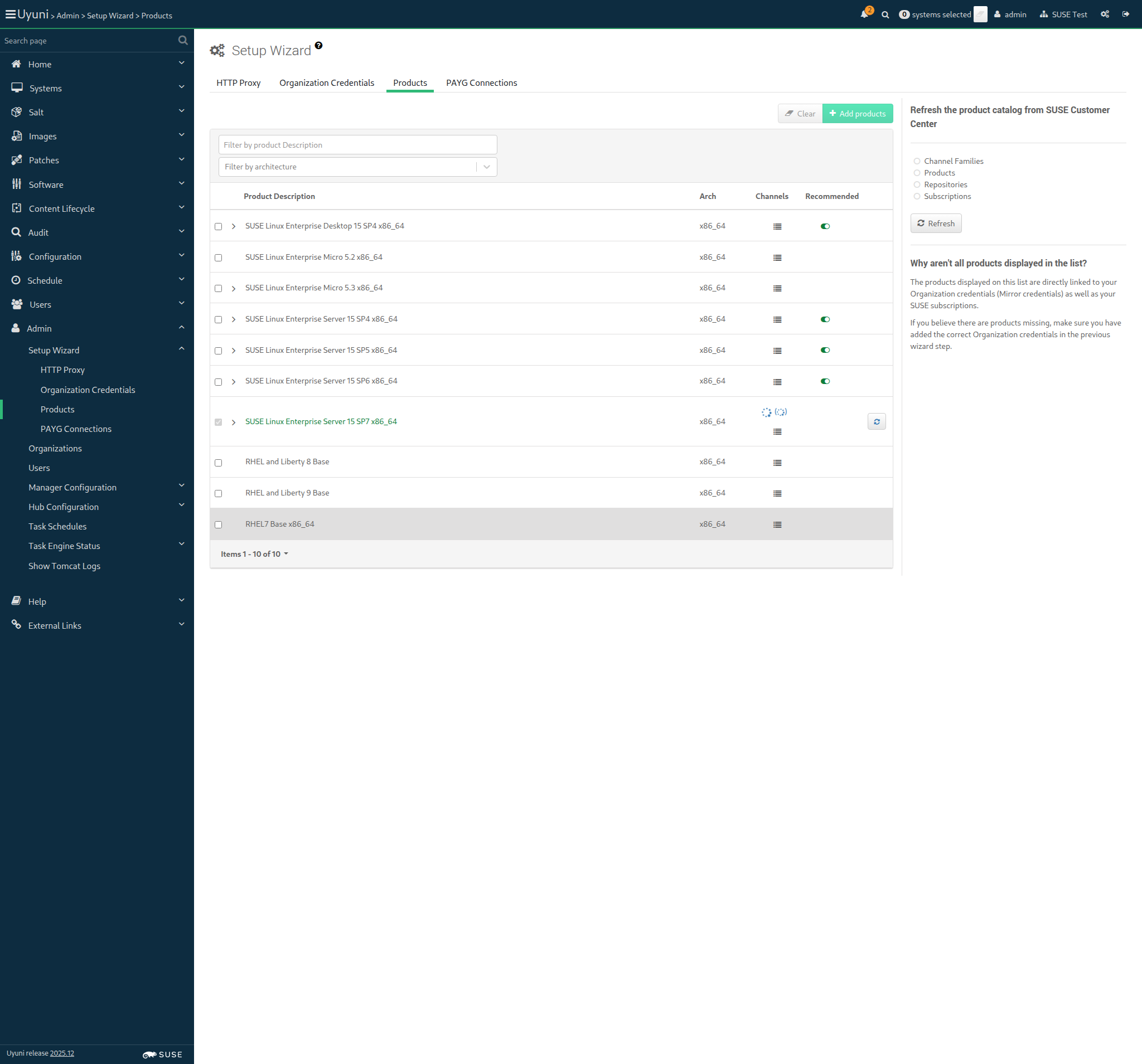
And I should only see success signs in the product list 2s 356ms Show Error +
                                            
No product synchronized (ScriptError) ./features/step_definitions/navigation_steps.rb:854:in `/^I should only see success signs in the product list$/' features/reposync/srv_sync_products.feature:236:in `I should only see success signs in the product list'

14s 143ms Show Info +
10:40:43:000 - 10:40:53:000 | Current URL: https://uyuni-master-server.sumaci.aws/rhn/manager/admin/setup/products
Screenshot +


When I report the synchronization duration for "sles15-sp7" < 1ms

In Order to distribute software to the clients
As an authorized user
I want to create fake channels for each distribution

Given I am authorized for the "Admin" section 547ms

When I follow the left menu "Software > Manage > Channels" 164ms

And I follow "Create Channel" 426ms

And I enter "Fake-Base-Channel-SUSE-like" as "Channel Name" 85ms

And I enter "fake-base-channel-suse-like" as "Channel Label" 75ms

And I select "None" from "Parent Channel" 50ms

And I select "x86_64" from "Architecture:" 42ms

And I enter "Base channel for testing" as "Channel Summary" 74ms

And I enter "No more description for base channel." as "Channel Description" 80ms

And I click on "Create Channel" 742ms

Then I should see a "Channel Fake-Base-Channel-SUSE-like created." text 65ms

When I follow the left menu "Software > Manage > Channels" 69ms

And I follow "Create Channel" 363ms

And I enter "Fake-Child-Channel-SUSE-like" as "Channel Name" 76ms

And I enter "fake-child-channel-suse-like" as "Channel Label" 72ms

And I select "Fake-Base-Channel-SUSE-like" from "Parent Channel" 62ms

And I select "x86_64" from "Architecture:" 34ms

And I enter "Child channel for testing" as "Channel Summary" 68ms

And I enter "Description for Fake Child Channel SUSE like." as "Channel Description" 80ms

And I click on "Create Channel" 57ms

Then I should see a "Channel Fake-Child-Channel-SUSE-like created." text 66ms

When I follow the left menu "Software > Manage > Channels" 68ms

And I follow "Create Channel" 341ms

And I enter "Fake-RPM-SUSE-Channel" as "Channel Name" 67ms

And I enter "fake-rpm-suse-channel" as "Channel Label" 62ms

And I select the parent channel for the "sle_minion" from "Parent Channel" 41ms

And I select "x86_64" from "Architecture:" 31ms

And I enter "Fake-RPM-SUSE-Channel for testing" as "Channel Summary" 83ms

And I enter "Description for Fake-RPM-SUSE-Channel Child Channel." as "Channel Description" 86ms

And I click on "Create Channel" 52ms

Then I should see a "Channel Fake-RPM-SUSE-Channel created." text 603ms

When I follow the left menu "Software > Manage > Channels" 71ms

And I follow "Create Channel" 308ms

And I enter "Fake-Base-Channel-i586" as "Channel Name" 71ms

And I enter "fake-base-channel-i586" as "Channel Label" 66ms

And I select "None" from "Parent Channel" 40ms

And I select "IA-32" from "Architecture:" 52ms

And I enter "Fake-Base-Channel-i586 channel for testing" as "Channel Summary" 86ms

And I enter "No more description for base channel." as "Channel Description" 76ms

And I click on "Create Channel" 624ms

Then I should see a "Channel Fake-Base-Channel-i586 created." text 64ms

When I follow the left menu "Software > Manage > Channels" 66ms

And I follow "Create Channel" 300ms

And I enter "Fake-Child-Channel-i586" as "Channel Name" 67ms

And I enter "fake-child-channel-i586" as "Channel Label" 65ms

And I select "Fake-Base-Channel-i586" from "Parent Channel" 59ms

And I select "IA-32" from "Architecture:" 32ms

And I enter "Fake Child Channel i586 for testing" as "Channel Summary" 76ms

And I enter "Description for Fake Child Channel i586." as "Channel Description" 77ms

And I click on "Create Channel" 52ms

Then I should see a "Channel Fake-Child-Channel-i586 created." text 72ms

When I follow the left menu "Software > Manage > Channels" 68ms

And I follow "Create Channel" 378ms

And I enter "Test-Base-Channel-x86_64" as "Channel Name" 70ms

And I enter "test-base-channel-x86_64" as "Channel Label" 69ms

And I select "None" from "Parent Channel" 38ms

And I select "x86_64" from "Architecture:" 32ms

And I enter "Test-Base-Channel-x86_64 channel for testing" as "Channel Summary" 83ms

And I enter "No more description for base channel." as "Channel Description" 75ms

And I click on "Create Channel" 55ms

Then I should see a "Channel Test-Base-Channel-x86_64 created." text 535ms

When I follow the left menu "Software > Manage > Channels" 69ms

And I follow "Create Channel" 320ms

And I enter "Test-Child-Channel-x86_64" as "Channel Name" 71ms

And I enter "test-child-channel-x86_64" as "Channel Label" 68ms

And I select "Test-Base-Channel-x86_64" from "Parent Channel" 59ms

And I select "x86_64" from "Architecture:" 33ms

And I enter "Test-Child-Channel-x86_64 channel for testing" as "Channel Summary" 86ms

And I enter "Description for Test-Child-Channel-x86_64 Channel." as "Channel Description" 84ms

And I click on "Create Channel" 609ms

Then I should see a "Channel Test-Child-Channel-x86_64 created." text 67ms

When I follow the left menu "Software > Manage > Channels" 0s

And I follow "Create Channel" 0s

And I enter "Fake-RPM-Terminal-Channel" as "Channel Name" 0s

And I enter "fake-rpm-terminal-channel" as "Channel Label" 0s

And I select the parent channel for the "pxeboot_minion" from "Parent Channel" 0s

And I select "x86_64" from "Architecture:" 0s

And I enter "Fake-RPM-Terminal-Channel for testing" as "Channel Summary" 0s

And I enter "Description for Fake-RPM-Terminal-Channel Child Channel." as "Channel Description" 0s

And I click on "Create Channel" 0s

Then I should see a "Channel Fake-RPM-Terminal-Channel created." text 0s

When I follow the left menu "Software > Manage > Channels" 72ms

And I follow "Create Channel" 394ms

And I enter "Fake-Base-Channel-Debian-like" as "Channel Name" 76ms

And I enter "fake-base-channel-debian-like" as "Channel Label" 72ms

And I select "None" from "Parent Channel" 38ms

And I select "AMD64 Debian" from "Architecture:" 51ms

And I enter "Fake-Base-Channel-Debian-like for testing" as "Channel Summary" 85ms

And I enter "No more description for base channel." as "Channel Description" 75ms

And I uncheck "gpg_check" 10s 83ms

And I click on "Create Channel" 628ms

Then I should see a "Channel Fake-Base-Channel-Debian-like created." text 67ms

When I follow the left menu "Software > Manage > Channels" 66ms

And I follow "Create Channel" 397ms

And I enter "Fake-Base-Channel-RH-like" as "Channel Name" 73ms

And I enter "fake-base-channel-rh-like" as "Channel Label" 72ms

And I select "None" from "Parent Channel" 40ms

And I select "x86_64" from "Architecture:" 38ms

And I enter "Fake-Base-Channel-RH-like for testing" as "Channel Summary" 78ms

And I enter "No more description for base channel." as "Channel Description" 74ms

And I click on "Create Channel" 53ms

Then I should see a "Channel Fake-Base-Channel-RH-like created." text 67ms

When I follow the left menu "Software > Manage > Channels" 70ms

And I follow "Create Channel" 397ms

And I enter "Fake-Base-Channel-AppStream" as "Channel Name" 73ms

And I enter "fake-base-channel-appstream" as "Channel Label" 69ms

And I select "None" from "Parent Channel" 37ms

And I select "x86_64" from "Architecture:" 31ms

And I enter "Fake-Base-Channel-AppStream for testing" as "Channel Summary" 78ms

And I enter "Description for Fake-Base-Channel-AppStream." as "Channel Description" 81ms

And I click on "Create Channel" 556ms

Then I should see a "Channel Fake-Base-Channel-AppStream created." text 65ms

In order to distribute software to the clients
As an authorized user
I want to create a fake repository per fake child channel

Given I am authorized for the "Admin" section 514ms

When I follow the left menu "Software > Manage > Repositories" 170ms

And I follow "Create Repository" 374ms

And I enter "fake-rpm-repo" as "label" 55ms

And I enter "http://localhost/pub/TestRepoRpmUpdates/" as "url" 79ms

And I click on "Create Repository" 520ms

Then I should see a "Repository created successfully" text 56ms

And I should see "metadataSigned" as checked 18ms

When I follow the left menu "Software > Manage > Repositories" 72ms

And I follow "fake-rpm-repo" 291ms

And I uncheck "metadataSigned" 10s 59ms

And I click on "Update Repository" 462ms

Then I should see a "Repository updated successfully" text 57ms

And I should see "metadataSigned" as unchecked 14ms

When I follow the left menu "Software > Manage > Repositories" 68ms

And I follow "Create Repository" 297ms

And I enter "fake-appstream-repo" as "label" 57ms

And I enter "http://localhost/pub/TestRepoAppStream/" as "url" 74ms

And I click on "Create Repository" 473ms

Then I should see a "Repository created successfully" text 58ms

And I should see "metadataSigned" as checked 20ms

When I follow the left menu "Software > Manage > Repositories" 67ms

And I follow "fake-appstream-repo" 280ms

And I uncheck "metadataSigned" 10s 57ms

And I click on "Update Repository" 446ms

Then I should see a "Repository updated successfully" text 55ms

And I should see "metadataSigned" as unchecked 14ms

When I follow the left menu "Software > Manage > Channels" 74ms

And I follow "Fake-RPM-SUSE-Channel" 420ms

And I enter "file:///etc/pki/rpm-gpg/uyuni-tools-gpg-pubkey-0d20833e.key" as "GPG key URL" 109ms

And I click on "Update Channel" 58ms

Then I should see a "Channel Fake-RPM-SUSE-Channel updated" text 67ms

When I follow "Repositories" in the content area 67ms

And I select the "fake-rpm-repo" repo 57ms

And I click on "Save Repositories" 571ms

Then I should see a "Fake-RPM-SUSE-Channel repository information was successfully updated" text 61ms

When I follow the left menu "Software > Manage > Channels" 65ms

And I follow "Test-Child-Channel-x86_64" 392ms

And I enter "file:///etc/pki/rpm-gpg/uyuni-tools-gpg-pubkey-0d20833e.key" as "GPG key URL" 97ms

And I click on "Update Channel" 538ms

Then I should see a "Channel Test-Child-Channel-x86_64 updated" text 67ms

When I follow "Repositories" in the content area 62ms

And I select the "fake-rpm-repo" repo 51ms

And I click on "Save Repositories" 1s 386ms

Then I should see a "Test-Child-Channel-x86_64 repository information was successfully updated" text 61ms

When I follow the left menu "Software > Manage > Channels" 68ms

And I follow "Fake-Base-Channel-RH-like" 414ms

And I enter "file:///etc/pki/rpm-gpg/uyuni-tools-gpg-pubkey-0d20833e.key" as "GPG key URL" 100ms

And I click on "Update Channel" 600ms

Then I should see a "Channel Fake-Base-Channel-RH-like updated" text 73ms

When I follow "Repositories" in the content area 60ms

And I select the "fake-rpm-repo" repo 49ms

And I click on "Save Repositories" 1s 157ms

Then I should see a "Fake-Base-Channel-RH-like repository information was successfully updated" text 65ms

When I follow the left menu "Software > Manage > Channels" 66ms

And I follow "Fake-Base-Channel-AppStream" 488ms

And I enter "file:///etc/pki/rpm-gpg/uyuni-tools-gpg-pubkey-0d20833e.key" as "GPG key URL" 97ms

And I click on "Update Channel" 53ms

Then I should see a "Channel Fake-Base-Channel-AppStream updated" text 580ms

When I follow "Repositories" in the content area 60ms

And I select the "fake-appstream-repo" repo 55ms

And I click on "Save Repositories" 1s 86ms

Then I should see a "Fake-Base-Channel-AppStream repository information was successfully updated" text 61ms

When I follow the left menu "Software > Manage > Repositories" 73ms

And I follow "Create Repository" 273ms

And I enter "fake-i586-repo" as "label" 56ms

And I enter "file:///srv/www/htdocs/pub/TestRepoRpmUpdates/" as "url" 88ms

And I uncheck "metadataSigned" 10s 65ms

And I click on "Create Repository" 472ms

Then I should see a "Repository created successfully" text 55ms

When I follow the left menu "Software > Manage > Channels" 76ms

And I follow "Fake-Child-Channel-i586" 324ms

And I enter "file:///etc/pki/rpm-gpg/uyuni-tools-gpg-pubkey-0d20833e.key" as "GPG key URL" 106ms

And I click on "Update Channel" 563ms

Then I should see a "Channel Fake-Child-Channel-i586 updated" text 66ms

When I follow "Repositories" in the content area 68ms

And I select the "fake-i586-repo" repo 53ms

And I click on "Save Repositories" 545ms

Then I should see a "Fake-Child-Channel-i586 repository information was successfully updated" text 62ms

When I follow the left menu "Software > Manage > Channels" 65ms

And I follow "Fake-Child-Channel-SUSE-like" 395ms

And I follow "Repositories" in the content area 57ms

And I select the "fake-rpm-repo" repo 54ms

And I click on "Save Repositories" 1s 100ms

Then I should see a "Fake-Child-Channel-SUSE-like repository information was successfully updated" text 63ms

When I follow the left menu "Software > Manage > Repositories" 69ms

And I follow "Create Repository" 274ms

And I enter "fake-debian-repo" as "label" 57ms

And I select "deb" from "contenttype" 60ms

And I enter "http://localhost/pub/TestRepoDebUpdates/" as "url" 75ms

And I click on "Create Repository" 50ms

Then I should see a "Repository created successfully" text 456ms

When I follow the left menu "Software > Manage > Channels" 69ms

And I follow "Fake-Base-Channel-Debian-like" 418ms

And I follow "Repositories" in the content area 57ms

And I select the "fake-debian-repo" repo 52ms

And I click on "Save Repositories" 660ms

Then I should see a "Fake-Base-Channel-Debian-like repository information was successfully updated" text 63ms

When I follow the left menu "Software > Manage > Channels" 0s

And I follow "Fake-RPM-Terminal-Channel" 0s

And I enter "file:///etc/pki/rpm-gpg/uyuni-tools-gpg-pubkey-0d20833e.key" as "GPG key URL" 0s

And I click on "Update Channel" 0s

Then I should see a "Channel Fake-RPM-Terminal-Channel updated" text 0s

When I follow "Repositories" in the content area 0s

And I select the "fake-rpm-repo" repo 0s

And I click on "Save Repositories" 0s

Then I should see a "Fake-RPM-Terminal-Channel repository information was successfully updated" text 0s

In Order to use product packages in development to the clients
As an authorized user
I want to create custom channels for each distribution

Given I am authorized for the "Admin" section 692ms

When I follow the left menu "Software > Manage > Channels" 169ms

And I follow "Create Channel" 316ms

And I enter "Devel-SUSE-Channel" as "Channel Name" 71ms

And I enter "devel-suse-channel" as "Channel Label" 69ms

And I select the parent channel for the "sle_minion" from "Parent Channel" 55ms

And I select "x86_64" from "Architecture:" 43ms

And I enter "Devel-SUSE-Channel for development repositories" as "Channel Summary" 92ms

And I enter "Channel containing development repositories" as "Channel Description" 82ms

And I click on "Create Channel" 580ms

Then I should see a "Channel Devel-SUSE-Channel created." text 67ms

When I prepare the development repositories of "sle_minion" as part of "devel-suse-channel" channel 6s 591ms

When I follow the left menu "Software > Manage > Channels" 68ms

And I follow "Create Channel" 563ms

And I enter "Devel-Build-Host-Channel" as "Channel Name" 68ms

And I enter "devel-build-host-channel" as "Channel Label" 65ms

And I select the parent channel for the "build_host" from "Parent Channel" 45ms

And I select "x86_64" from "Architecture:" 34ms

And I enter "Devel-Build-Host-Channel for development repositories" as "Channel Summary" 91ms

And I enter "Channel containing development repositories" as "Channel Description" 78ms

And I click on "Create Channel" 52ms

Then I should see a "Channel Devel-Build-Host-Channel created." text 1s 113ms

When I prepare the development repositories of "build_host" as part of "devel-build-host-channel" channel 6s 357ms

When I follow the left menu "Software > Manage > Channels" 71ms

And I follow "Create Channel" 647ms

And I enter "Devel-Debian-like-Channel" as "Channel Name" 70ms

And I enter "devel-debian-like-channel" as "Channel Label" 67ms

And I select "Fake-Base-Channel-Debian-like" from "Parent Channel" 56ms

And I select "AMD64 Debian" from "Architecture:" 38ms

And I enter "Devel-Debian-like-Channel for development repositories" as "Channel Summary" 92ms

And I enter "Channel containing development repositories" as "Channel Description" 78ms

And I click on "Create Channel" 53ms

Then I should see a "Channel Devel-Debian-like-Channel created." text 68ms

When I prepare the development repositories of "deblike_minion" as part of "devel-debian-like-channel" channel 9s 716ms

When I follow the left menu "Software > Manage > Channels" 70ms

And I follow "Create Channel" 498ms

And I enter "Devel-RH-like-Channel" as "Channel Name" 68ms

And I enter "devel-rh-like-channel" as "Channel Label" 65ms

And I select "Fake-Base-Channel-RH-like" from "Parent Channel" 58ms

And I select "x86_64" from "Architecture:" 33ms

And I enter "Devel-RH-like-Channel for development repositories" as "Channel Summary" 90ms

And I enter "Channel containing development repositories" as "Channel Description" 80ms

And I click on "Create Channel" 1s 102ms

Then I should see a "Channel Devel-RH-like-Channel created." text 72ms

When I prepare the development repositories of "rhlike_minion" as part of "devel-rh-like-channel" channel 6s 641ms

In order to use the content provided inside the repositories of the fake channels
As admin
I want to synchronize the fake channels

Given I am authorized for the "Admin" section 779ms

And I enable source package syncing 1s 645ms

Given I am authorized for the "Admin" section 979ms

When I follow the left menu "Software > Manage > Channels" 164ms

And I follow "Fake-RPM-SUSE-Channel" 781ms

And I follow "Repositories" in the content area 65ms

And I follow "Sync" 787ms

And I wait at most 60 seconds until I do not see "Repository sync is running." text, refreshing the page 56ms

And I click on "Sync Now" 2s 793ms

Then I should see a "Repository sync scheduled for Fake-RPM-SUSE-Channel." text 58ms

And I wait until the channel "fake-rpm-suse-channel" has been synced 965ms

Then "orion-dummy-1.1-1.1.x86_64.rpm" package should have been stored 1s 55ms

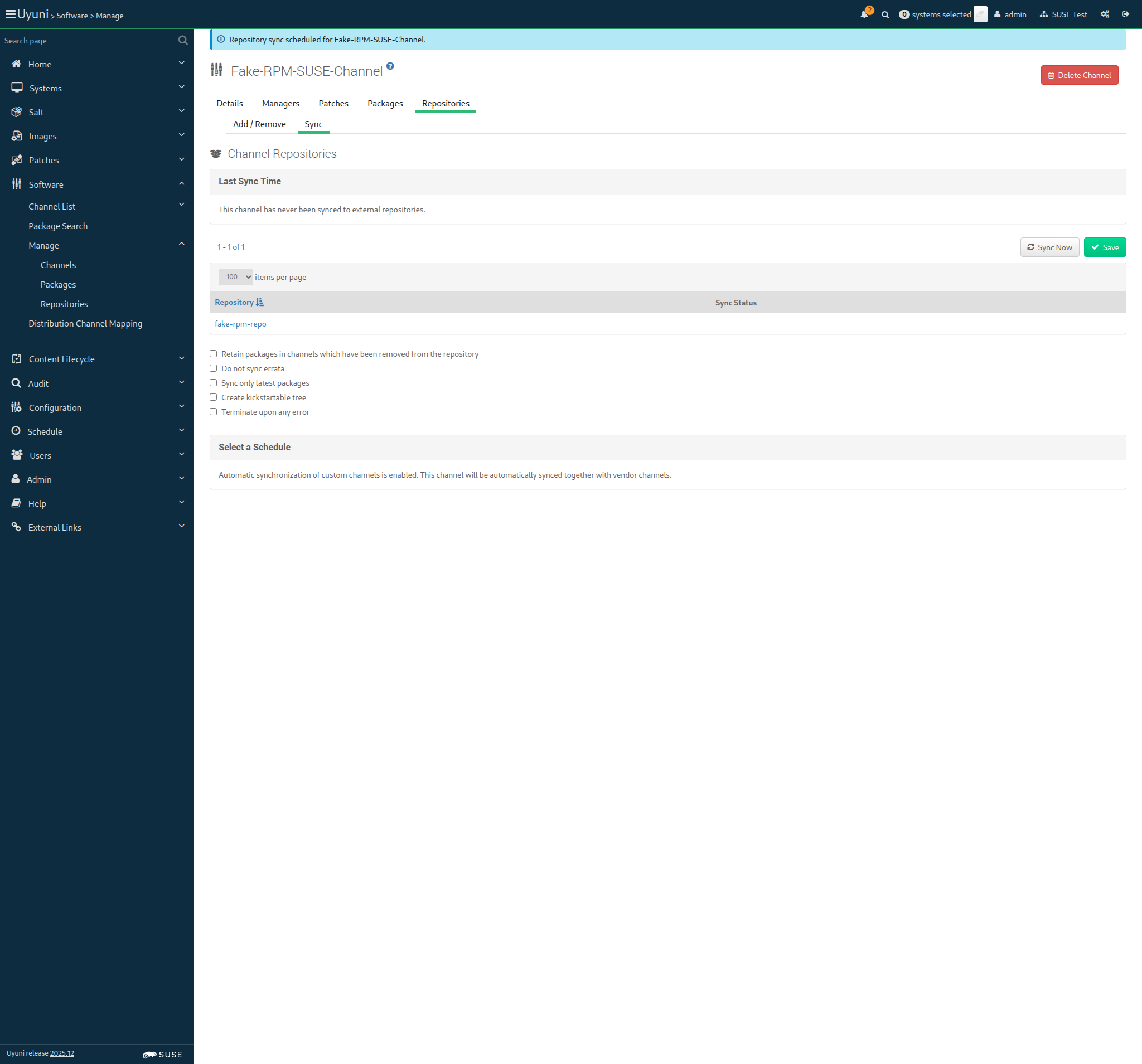
And solver file for "fake-rpm-suse-channel" should reference "orion-dummy-1.1-1.1.x86_64.rpm" 10m 579ms Show Error +
                                            
execution expired (Timeout::Error) ./features/support/commonlib.rb:95:in `repeat_until_timeout' ./features/step_definitions/command_steps.rb:420:in `/^solver file for "([^"]*)" should reference "([^"]*)"$/' features/reposync/srv_sync_fake_channels.feature:36:in `solver file for "fake-rpm-suse-channel" should reference "orion-dummy-1.1-1.1.x86_64.rpm"'

16s 783ms Show Info +
10:43:27:000 - 10:53:28:000 | Current URL: https://uyuni-master-server.sumaci.aws/rhn/channels/manage/Sync.do?cid=118
Screenshot +


Given I am authorized for the "Admin" section 956ms

When I follow the left menu "Software > Manage > Channels" 186ms

And I follow "Fake-Child-Channel-i586" 763ms

And I follow "Repositories" in the content area 68ms

And I follow "Sync" 690ms

And I wait at most 60 seconds until I do not see "Repository sync is running." text, refreshing the page 54ms

And I click on "Sync Now" 1s 931ms

Then I should see a "Repository sync scheduled for Fake-Child-Channel-i586." text 56ms

And I wait until the channel "fake-child-channel-i586" has been synced 925ms

Given I am authorized for the "Admin" section 721ms

When I follow the left menu "Software > Manage > Channels" 147ms

And I follow "Test-Child-Channel-x86_64" 937ms

And I follow "Repositories" in the content area 54ms

And I follow "Sync" 755ms

And I wait at most 60 seconds until I do not see "Repository sync is running." text, refreshing the page 56ms

And I click on "Sync Now" 2s 806ms

Then I should see a "Repository sync scheduled for Test-Child-Channel-x86_64." text 57ms

And I wait until the channel "test-child-channel-x86_64" has been synced 661ms

Given I am authorized for the "Admin" section 744ms

When I follow the left menu "Software > Manage > Channels" 141ms

And I follow "Fake-Child-Channel-SUSE-like" 675ms

And I follow "Repositories" in the content area 57ms

And I follow "Sync" 1s 81ms

And I wait at most 60 seconds until I do not see "Repository sync is running." text, refreshing the page 69ms

And I click on "Sync Now" 2s 738ms

Then I should see a "Repository sync scheduled for Fake-Child-Channel-SUSE-like." text 55ms

And I wait until the channel "fake-child-channel-suse-like" has been synced 829ms

Given I am authorized for the "Admin" section 749ms

When I follow the left menu "Software > Manage > Channels" 149ms

And I follow "Fake-Base-Channel-Debian-like" 771ms

And I follow "Repositories" in the content area 56ms

And I follow "Sync" 676ms

And I wait at most 60 seconds until I do not see "Repository sync is running." text, refreshing the page 57ms

And I click on "Sync Now" 2s 907ms

Then I should see a "Repository sync scheduled for Fake-Base-Channel-Debian-like." text 57ms

And I wait until the channel "fake-base-channel-debian-like" has been synced 767ms

Given I am authorized for the "Admin" section 729ms

When I follow the left menu "Software > Manage > Channels" 156ms

And I follow "Fake-Base-Channel-RH-like" 679ms

And I follow "Repositories" in the content area 55ms

And I follow "Sync" 524ms

And I wait at most 60 seconds until I do not see "Repository sync is running." text, refreshing the page 55ms

And I click on "Sync Now" 2s 890ms

Then I should see a "Repository sync scheduled for Fake-Base-Channel-RH-like." text 58ms

And I wait until the channel "fake-base-channel-rh-like" has been synced 733ms

Given I am authorized for the "Admin" section 679ms

When I follow the left menu "Software > Manage > Channels" 150ms

And I follow "Fake-Base-Channel-AppStream" 677ms

And I follow "Repositories" in the content area 56ms

And I follow "Sync" 685ms

And I wait at most 60 seconds until I do not see "Repository sync is running." text, refreshing the page 59ms

And I click on "Sync Now" 2s 997ms

Then I should see a "Repository sync scheduled for Fake-Base-Channel-AppStream." text 56ms

And I wait until the channel "fake-base-channel-appstream" has been synced 641ms

Given I am authorized for the "Admin" section 0s

And I follow the left menu "Software > Manage > Channels" 0s

And I follow "Fake-RPM-Terminal-Channel" 0s

And I follow "Repositories" in the content area 0s

And I follow "Sync" 0s

And I wait at most 60 seconds until I do not see "Repository sync is running." text, refreshing the page 0s

And I click on "Sync Now" 0s

Then I should see a "Repository sync scheduled for Fake-RPM-Terminal-Channel." text 0s

And I wait until the channel "fake-rpm-terminal-channel" has been synced 0s

Then "orion-dummy-1.1-1.1.x86_64.rpm" package should have been stored 0s

And solver file for "fake-rpm-terminal-channel" should reference "orion-dummy-1.1-1.1.x86_64.rpm" 0s

When I follow the left menu "Admin > Task Schedules" 110ms

And I follow "errata-cache-default" 1s 270ms

And I follow "errata-cache-bunch" 1s 331ms

And I click on "Single Run Schedule" 1s 431ms

Then I should see a "bunch was scheduled" text 153ms

And I wait until the table contains "FINISHED" or "SKIPPED" followed by "FINISHED" in its first rows 1s 792ms

When I follow the left menu "Admin > Task Schedules" 66ms

And I follow "channel-repodata-default" 1s 160ms

And I follow "channel-repodata-bunch" 1s 418ms

And I click on "Single Run Schedule" 1s 271ms

Then I should see a "bunch was scheduled" text 114ms

And I wait until the table contains "FINISHED" or "SKIPPED" followed by "FINISHED" in its first rows 1s 560ms

Then I disable source package syncing 1s 679ms

In order to use the content provided inside the repositories of the dev channels
As admin
I want to synchronize the dev channels

Given I am authorized for the "Admin" section 828ms

When I follow the left menu "Software > Manage > Channels" 173ms

And I follow "Devel-SUSE-Channel" 1s 126ms

And I follow "Repositories" in the content area 64ms

And I follow "Sync" 761ms

And I wait at most 60 seconds until I do not see "Repository sync is running." text, refreshing the page 58ms

And I click on "Sync Now" 2s 789ms

Then I should see a "Repository sync scheduled for Devel-SUSE-Channel." text 57ms

And I wait until the channel "devel-suse-channel" has been synced 725ms

Given I am authorized for the "Admin" section 844ms

When I follow the left menu "Software > Manage > Channels" 156ms

And I follow "Devel-Debian-like-Channel" 770ms

And I follow "Repositories" in the content area 55ms

And I follow "Sync" 536ms

And I wait at most 60 seconds until I do not see "Repository sync is running." text, refreshing the page 59ms

And I click on "Sync Now" 3s 345ms

Then I should see a "Repository sync scheduled for Devel-Debian-like-Channel." text 58ms

And I wait until the channel "devel-debian-like-channel" has been synced 1s 60ms

Given I am authorized for the "Admin" section 905ms

When I follow the left menu "Software > Manage > Channels" 148ms

And I follow "Devel-RH-like-Channel" 597ms

And I follow "Repositories" in the content area 56ms

And I follow "Sync" 454ms

And I wait at most 60 seconds until I do not see "Repository sync is running." text, refreshing the page 58ms

And I click on "Sync Now" 2s 933ms

Then I should see a "Repository sync scheduled for Devel-RH-like-Channel." text 57ms

And I wait until the channel "devel-rh-like-channel" has been synced 896ms

Given I am authorized for the "Admin" section 752ms

When I follow the left menu "Software > Manage > Channels" 147ms

And I follow "Devel-Build-Host-Channel" 877ms

And I follow "Repositories" in the content area 59ms

And I follow "Sync" 674ms

And I wait at most 60 seconds until I do not see "Repository sync is running." text, refreshing the page 56ms

And I click on "Sync Now" 1s 921ms

Then I should see a "Repository sync scheduled for Devel-Build-Host-Channel." text 59ms

And I wait until the channel "devel-build-host-channel" has been synced 848ms

In order to register systems to the server
As the testing user
I want to use activation keys

Given I am authorized for the "Admin" section 780ms

When I create an activation key with id "SUSE-KEY-x86_64", description "SUSE Test Key x86_64", limit of 20 and contact method "default" 2s 478ms

Then I should get the new activation key "1-SUSE-KEY-x86_64" 1s 28ms

When I create an activation key with id "RH-LIKE-KEY", description "RedHat like Test Key", base channel "fake-base-channel-rh-like", limit of 20 and contact method "default" 1s 929ms

Then I should get the new activation key "1-RH-LIKE-KEY" 1s 597ms

When I create an activation key with id "DEBLIKE-KEY", description "Debian-like Test Key", base channel "fake-base-channel-debian-like", limit of 20 and contact method "default" 1s 786ms

Then I should get the new activation key "1-DEBLIKE-KEY" 1s 993ms

When I create an activation key with id "SUSE-SSH-KEY-x86_64", description "SUSE SSH Test Key x86_64", limit of 20 and contact method "ssh-push" 1s 907ms

Then I should get the new activation key "1-SUSE-SSH-KEY-x86_64" 1s 687ms

When I create an activation key with id "SUSE-SSH-TUNNEL-KEY-x86_64", description "SUSE SSH Tunnel Test Key x86_64", limit of 20 and contact method "ssh-push-tunnel" 1s 877ms

Then I should get the new activation key "1-SUSE-SSH-TUNNEL-KEY-x86_64" 2s 70ms

When I create an activation key with id "PROXY-KEY-x86_64", description "Proxy Key x86_64", limit of 1 1s 915ms

Then I should get the new activation key "1-PROXY-KEY-x86_64" 2s 563ms

When I create an activation key with id "BUILD-HOST-KEY-x86_64", description "Build host Key x86_64" 1s 722ms

And I set the entitlements of the activation key "1-BUILD-HOST-KEY-x86_64" to "container_build_host, osimage_build_host" 1s 171ms

Then I should get the new activation key "1-BUILD-HOST-KEY-x86_64" 2s 572ms

When I create an activation key with id "TERMINAL-KEY-x86_64", description "Terminal Key x86_64" 1s 889ms

Then I should get the new activation key "1-TERMINAL-KEY-x86_64" 3s 409ms

In order to register systems to the spacewalk server
As admin
I want to update activation keys to use synchronized base products

Given I am authorized for the "Admin" section 802ms

When I follow the left menu "Systems > Activation Keys" 0s

And I follow "SUSE Test Key x86_64" in the content area 0s

And I wait for child channels to appear 0s

And I select the parent channel for the "sle_minion" from "selectedBaseChannel" 0s

And I wait for child channels to appear 0s

And I include the recommended child channels 0s

And I wait until "SLE-Module-Basesystem15-SP7-Pool for x86_64" has been checked 0s

And I wait until "SLE-Module-Basesystem15-SP7-Updates for x86_64" has been checked 0s

And I wait until "SLE-Module-Server-Applications15-SP7-Pool for x86_64" has been checked 0s

And I wait until "SLE-Module-Server-Applications15-SP7-Updates for x86_64" has been checked 0s

And I check "SLE-Module-DevTools15-SP7-Pool for x86_64" 0s

And I wait until "SLE-Module-DevTools15-SP7-Updates for x86_64" has been checked 0s

And I wait until "SLE-Module-Desktop-Applications15-SP7-Pool for x86_64" has been checked 0s

And I wait until "SLE-Module-Desktop-Applications15-SP7-Updates for x86_64" has been checked 0s

And I check "SLE-Module-Containers15-SP7-Pool for x86_64" 0s

And I wait until "SLE-Module-Containers15-SP7-Updates for x86_64" has been checked 0s

And I check "Fake-RPM-SUSE-Channel" 0s

And I wait until "Fake-RPM-SUSE-Channel" has been checked 0s

And I click on "Update Activation Key" 0s

Then I should see a "Activation key SUSE Test Key x86_64 has been modified" text 0s

When I follow the left menu "Systems > Activation Keys" 120ms

And I follow "SUSE Test Key x86_64" in the content area 72ms

And I wait until I do not see "Loading..." text 1s 172ms

And I select the parent channel for the "sle_minion" from "selectedBaseChannel" 55ms

And I wait until I do not see "Loading..." text 67ms

And I check "Uyuni Client Tools for openSUSE Tumbleweed (x86_64) (Development)" 880ms

And I check "Fake-RPM-SUSE-Channel" 95ms

And I wait until "Fake-RPM-SUSE-Channel" has been checked 16ms

And I click on "Update Activation Key" 1s 421ms

Then I should see a "Activation key SUSE Test Key x86_64 has been modified" text 71ms

When I follow the left menu "Systems > Activation Keys" 0s

And I follow "SUSE SSH Test Key x86_64" in the content area 0s

And I wait for child channels to appear 0s

And I select the parent channel for the "sle_minion" from "selectedBaseChannel" 0s

And I wait for child channels to appear 0s

And I include the recommended child channels 0s

And I check "SLE-Module-DevTools15-SP7-Pool for x86_64" 0s

And I wait until "SLE-Module-DevTools15-SP7-Updates for x86_64" has been checked 0s

And I wait until "SLE-Module-Desktop-Applications15-SP7-Pool for x86_64" has been checked 0s

And I wait until "SLE-Module-Desktop-Applications15-SP7-Updates for x86_64" has been checked 0s

And I check "Fake-RPM-SUSE-Channel" 0s

And I wait until "Fake-RPM-SUSE-Channel" has been checked 0s

And I click on "Update Activation Key" 0s

Then I should see a "Activation key SUSE SSH Test Key x86_64 has been modified" text 0s

When I follow the left menu "Systems > Activation Keys" 63ms

And I follow "SUSE SSH Test Key x86_64" in the content area 63ms

And I wait until I do not see "Loading..." text 1s 330ms

And I select the parent channel for the "sle_minion" from "selectedBaseChannel" 37ms

And I wait until I do not see "Loading..." text 63ms

And I check "Uyuni Client Tools for openSUSE Tumbleweed (x86_64) (Development)" 989ms

And I check "Fake-RPM-SUSE-Channel" 69ms

And I wait until "Fake-RPM-SUSE-Channel" has been checked 15ms

And I click on "Update Activation Key" 1s 131ms

Then I should see a "Activation key SUSE SSH Test Key x86_64 has been modified" text 65ms

When I follow the left menu "Systems > Activation Keys" 0s

And I follow "SUSE SSH Tunnel Test Key x86_64" in the content area 0s

And I wait for child channels to appear 0s

And I select the parent channel for the "sle_minion" from "selectedBaseChannel" 0s

And I wait for child channels to appear 0s

And I include the recommended child channels 0s

And I check "SLE-Module-DevTools15-SP7-Pool for x86_64" 0s

And I wait until "SLE-Module-DevTools15-SP7-Updates for x86_64" has been checked 0s

And I wait until "SLE-Module-Desktop-Applications15-SP7-Pool for x86_64" has been checked 0s

And I wait until "SLE-Module-Desktop-Applications15-SP7-Updates for x86_64" has been checked 0s

And I check "Fake-RPM-SUSE-Channel" 0s

And I wait until "Fake-RPM-SUSE-Channel" has been checked 0s

And I click on "Update Activation Key" 0s

Then I should see a "Activation key SUSE SSH Tunnel Test Key x86_64 has been modified" text 0s

When I follow the left menu "Systems > Activation Keys" 62ms

And I follow "SUSE SSH Tunnel Test Key x86_64" in the content area 66ms

And I wait until I do not see "Loading..." text 1s 573ms

And I select the parent channel for the "sle_minion" from "selectedBaseChannel" 35ms

And I wait until I do not see "Loading..." text 61ms

And I check "Uyuni Client Tools for openSUSE Tumbleweed (x86_64) (Development)" 1s 302ms

And I check "Fake-RPM-SUSE-Channel" 78ms

And I wait until "Fake-RPM-SUSE-Channel" has been checked 15ms

And I click on "Update Activation Key" 1s 102ms

Then I should see a "Activation key SUSE SSH Tunnel Test Key x86_64 has been modified" text 64ms

@scc_credentials @susemanager @proxy @containerized_server @transactional_server
Scenario:
Update the SLE Micro proxy key with synced base product
< 1ms 11

When I follow the left menu "Systems > Activation Keys" 0s

And I follow "Proxy Key x86_64" in the content area 0s

And I wait for child channels to appear 0s

And I select the parent channel for the "proxy_container" from "selectedBaseChannel" 0s

And I wait for child channels to appear 0s

And I include the recommended child channels 0s

And I wait until "ManagerTools-SL-Micro-6.1 for x86_64" has been checked 0s

And I check "SUSE-Multi-Linux-Manager-Proxy-5.1 for x86_64" 0s

And I check "SUSE-Multi-Linux-Manager-Retail-Branch-Server-5.1 for x86_64" 0s

And I click on "Update Activation Key" 0s

Then I should see a "Activation key Proxy Key x86_64 has been modified" text 0s

@scc_credentials @susemanager @proxy @containerized_server @skip_if_transactional_server
Scenario:
Update the SLES proxy key with synced base product
< 1ms 11

When I follow the left menu "Systems > Activation Keys" 0s

And I follow "Proxy Key x86_64" in the content area 0s

And I wait for child channels to appear 0s

And I select the parent channel for the "proxy_nontransactional" from "selectedBaseChannel" 0s

And I wait for child channels to appear 0s

And I include the recommended child channels 0s

And I wait until "ManagerTools-SLE15-Pool for x86_64 SP7" has been checked 0s

And I check "SUSE-Manager-Proxy-5.1-Pool for x86_64" 0s

And I check "SUSE-Manager-Proxy-5.1-Updates for x86_64" 0s

And I click on "Update Activation Key" 0s

Then I should see a "Activation key Proxy Key x86_64 has been modified" text 0s

When I follow the left menu "Systems > Activation Keys" 0s

And I follow "Proxy Key x86_64" in the content area 0s

And I wait for child channels to appear 0s

And I select the parent channel for the "proxy_container" from "selectedBaseChannel" 0s

And I wait for child channels to appear 0s

And I check "Uyuni Client Tools for openSUSE Tumbleweed (x86_64) (Development)" 0s

And I click on "Update Activation Key" 0s

Then I should see a "Activation key Proxy Key x86_64 has been modified" text 0s

When I follow the left menu "Systems > Activation Keys" 60ms

And I follow "Build host Key x86_64" in the content area 61ms

And I wait for child channels to appear 2s 604ms

And I select the parent channel for the "build_host" from "selectedBaseChannel" 47ms

And I wait for child channels to appear 797ms

And I include the recommended child channels 151ms

And I wait until "SLE-Module-Basesystem15-SP7-Pool for x86_64" has been checked 31ms

And I wait until "SLE-Module-Basesystem15-SP7-Updates for x86_64" has been checked 17ms

And I wait until "SLE-Module-Server-Applications15-SP7-Pool for x86_64" has been checked 17ms

And I wait until "SLE-Module-Server-Applications15-SP7-Updates for x86_64" has been checked 17ms

And I check "SLE-Module-DevTools15-SP7-Pool for x86_64" 73ms

And I wait until "SLE-Module-DevTools15-SP7-Updates for x86_64" has been checked 17ms

And I wait until "SLE-Module-Desktop-Applications15-SP7-Pool for x86_64" has been checked 17ms

And I wait until "SLE-Module-Desktop-Applications15-SP7-Updates for x86_64" has been checked 17ms

And I wait until "SLE-Module-Systems-Management-15-SP7-Pool for x86_64" has been checked 15s 8ms Show Error +
                                            
execution expired (Timeout::Error) ./features/support/commonlib.rb:95:in `repeat_until_timeout' ./features/step_definitions/setup_steps.rb:424:in `/^I wait until "([^"]*)" has been checked$/' features/reposync/allcli_update_activationkeys.feature:178:in `I wait until "SLE-Module-Systems-Management-15-SP7-Pool for x86_64" has been checked'

And I wait until "SLE-Module-Systems-Management-15-SP7-Updates for x86_64" has been checked 0s

And I wait until "SLE-Module-Python3-15-SP7-Pool for x86_64" has been checked 0s

And I wait until "SLE-Module-Python3-15-SP7-Updates for x86_64" has been checked 0s

And I click on "Update Activation Key" 0s

Then I should see a "Activation key Build host Key x86_64 has been modified" text 0s

16s 495ms Show Info +
10:56:16:000 - 10:56:36:000 | Current URL: https://uyuni-master-server.sumaci.aws/rhn/activationkeys/Edit.do?tid=7
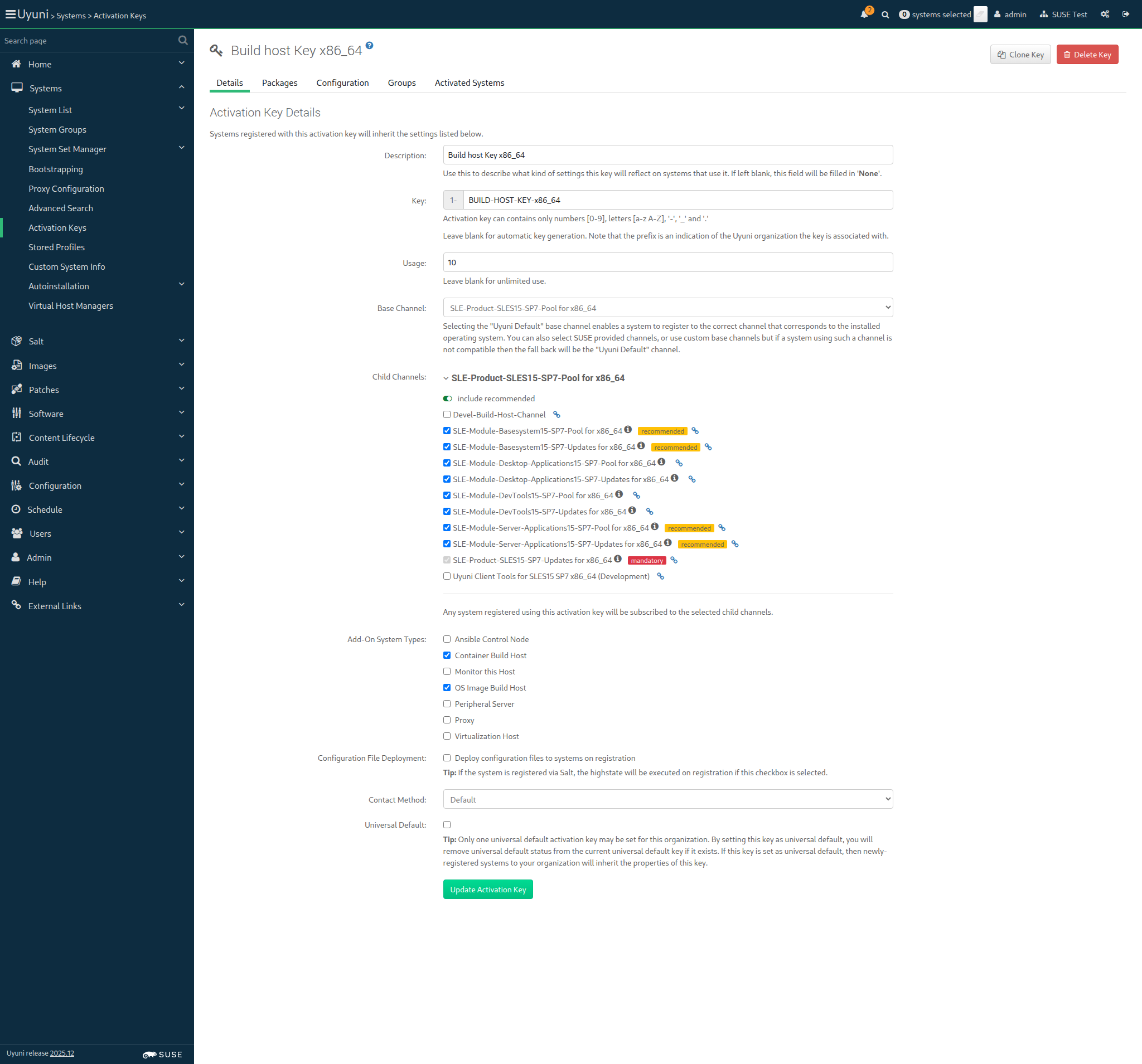
Screenshot +


When I follow the left menu "Systems > Activation Keys" 74ms

And I follow "Build host Key x86_64" in the content area 71ms

And I wait for child channels to appear 2s 600ms

And I select the parent channel for the "build_host" from "selectedBaseChannel" 72ms

And I wait for child channels to appear 905ms

And I check "Uyuni Client Tools for SLES15 SP7 x86_64 (Development)" 81ms

And I wait until "Uyuni Client Tools for SLES15 SP7 x86_64 (Development)" has been checked 15ms

And I click on "Update Activation Key" 1s 123ms

Then I should see a "Activation key Build host Key x86_64 has been modified" text 62ms

@skip_if_github_validation @scc_credentials @uyuni @build_host
Scenario:
Update build host key with dev child channel
3s 791ms 9

When I follow the left menu "Systems > Activation Keys" 58ms

And I follow "Build host Key x86_64" in the content area 59ms

And I wait for child channels to appear 2s 175ms

And I select the parent channel for the "build_host" from "selectedBaseChannel" 22ms

And I wait for child channels to appear 269ms

And I check "Devel-Build-Host-Channel" 78ms

And I wait until "Devel-Build-Host-Channel" has been checked 15ms

And I click on "Update Activation Key" 1s 45ms

Then I should see a "Activation key Build host Key x86_64 has been modified" text 66ms

When I follow the left menu "Systems > Activation Keys" 65ms

And I follow "Terminal Key x86_64" in the content area 65ms

And I wait for child channels to appear 2s 619ms

And I select the parent channel for the "pxeboot_minion" from "selectedBaseChannel" 43ms

And I wait for child channels to appear 1s 38ms

And I include the recommended child channels 157ms

And I wait until "SLE-Module-Basesystem15-SP7-Pool for x86_64" has been checked 17ms

And I wait until "SLE-Module-Basesystem15-SP7-Updates for x86_64" has been checked 17ms

And I wait until "SLE-Module-Server-Applications15-SP7-Pool for x86_64" has been checked 17ms

And I wait until "SLE-Module-Server-Applications15-SP7-Updates for x86_64" has been checked 17ms

And I check "SLE-Module-DevTools15-SP7-Pool for x86_64" 74ms

And I wait until "SLE-Module-DevTools15-SP7-Updates for x86_64" has been checked 17ms

And I wait until "SLE-Module-Desktop-Applications15-SP7-Pool for x86_64" has been checked 17ms

And I wait until "SLE-Module-Desktop-Applications15-SP7-Updates for x86_64" has been checked 17ms

And I click on "Update Activation Key" 1s 210ms

Then I should see a "Activation key Terminal Key x86_64 has been modified" text 67ms

When I follow the left menu "Systems > Activation Keys" 0s

And I follow "Terminal Key x86_64" in the content area 0s

And I wait for child channels to appear 0s

And I check "SLE-Module-Containers15-SP7-Pool for x86_64" 0s

And I wait until "SLE-Module-Containers15-SP7-Updates for x86_64" has been checked 0s

And I check "Fake-RPM-SUSE-Channel" 0s

And I wait until "Fake-RPM-SUSE-Channel" has been checked 0s

And I click on "Update Activation Key" 0s

Then I should see a "Activation key Terminal Key x86_64 has been modified" text 0s

@pxeboot_minion @uyuni @scc_credentials @build_host
Scenario:
Update terminal key with specific fake channel
< 1ms 9

When I follow the left menu "Systems > Activation Keys" 0s

And I follow "Terminal Key x86_64" in the content area 0s

And I wait for child channels to appear 0s

And I check "Fake-RPM-Terminal-Channel" 0s

And I wait until "Fake-RPM-Terminal-Channel" has been checked 0s

And I check "Uyuni Client Tools for SLES15 SP7 x86_64 (Development)" 0s

And I wait until "Uyuni Client Tools for SLES15 SP7 x86_64 (Development)" has been checked 0s

And I click on "Update Activation Key" 0s

Then I should see a "Activation key Terminal Key x86_64 has been modified" text 0s

When I follow the left menu "Systems > Activation Keys" 57ms

And I follow "SUSE Test Key x86_64" in the content area 67ms

And I wait for child channels to appear 1s 926ms

And I check "Devel-SUSE-Channel" 98ms

And I click on "Update Activation Key" 51ms

Then I should see a "Activation key SUSE Test Key x86_64 has been modified" text 1s 153ms

When I follow the left menu "Systems > Activation Keys" 57ms

And I follow "Debian-like Test Key" in the content area 66ms

And I wait for child channels to appear 2s 249ms

And I check "Devel-Debian-like-Channel" 107ms

And I click on "Update Activation Key" 936ms

Then I should see a "Activation key Debian-like Test Key has been modified" text 66ms

When I follow the left menu "Systems > Activation Keys" 61ms

And I follow "RedHat like Test Key" in the content area 71ms

And I wait for child channels to appear 1s 649ms

And I check "Devel-RH-like-Channel" 71ms

And I click on "Update Activation Key" 1s 150ms

Then I should see a "Activation key RedHat like Test Key has been modified" text 65ms

In order to be able to enroll clients with MU repositories
As the system administrator
I create all bootstrap repos with --with-custom-channels option

When I create the bootstrap repositories including custom channels 3s 560ms

base_channel: openSUSE Tumbleweed (x86_64)
channel: openSUSE-Tumbleweed-x86_64-uyuni
parent_channel:
Creating the bootstrap repository on the server:
mgr-create-bootstrap-repo --create openSUSE-Tumbleweed-x86_64-uyuni --with-custom-channels

When I create the bootstrap repository for "sle_minion" on the server 3s 294ms

base_channel: openSUSE Tumbleweed (x86_64)
channel: openSUSE-Tumbleweed-x86_64-uyuni
parent_channel:
Creating the bootstrap repository on the server:
mgr-create-bootstrap-repo --create openSUSE-Tumbleweed-x86_64-uyuni --with-custom-channels

When I create the bootstrap repository for "proxy" on the server 3s 261ms

base_channel: SLE-Product-SLES15-SP7-Pool for x86_64
channel: SLE-15-SP7-x86_64
parent_channel: sle-product-sles15-sp7-pool-x86_64
Creating the bootstrap repository on the server:
mgr-create-bootstrap-repo --create SLE-15-SP7-x86_64 --with-parent-channel sle-product-sles15-sp7-pool-x86_64 --with-custom-channels

When I create the bootstrap repository for "build_host" on the server 3s 76ms Show Error +
                                            
FAIL: mgrctl exec -it 'mgr-create-bootstrap-repo --create SLE-15-SP7-x86_64 --with-parent-channel sle-product-sles15-sp7-pool-x86_64 --with-custom-channels' returned status code = 1. Output: Creating bootstrap repo for SLE-15-SP7-x86_64 Directory walk started Directory walk done - 0 packages Temporary output repo path: /srv/www/htdocs/pub/repositories/sle/15/7/bootstrap.tmp/.repodata/ Preparing sqlite DBs Pool started (with 5 workers) Pool finished ERROR: package 'venv-salt-minion' not found ERROR: package 'dmidecode' not found ERROR: package 'libunwind' not found Suggestions: mgr-create-bootstrap-repo uses the locally synchronized versions of files from the Tools repository, and uses the locally synchronized pool channel for dependency resolution. Both should be fully synced before running the mgr-create-bootstrap-repo script. (ScriptError) ./features/support/remote_node.rb:169:in `run_local' ./features/support/remote_node.rb:117:in `run' ./features/step_definitions/command_steps.rb:1109:in `/^I create the bootstrap repository for "([^"]*)" on the server((?: without flushing)?)$/' features/reposync/srv_create_bootstrap_repositories.feature:22:in `I create the bootstrap repository for "build_host" on the server'

15s 890ms Show Info +
10:57:35:000 - 10:57:38:000 | Current URL: https://uyuni-master-server.sumaci.aws/rhn/activationkeys/Edit.do?tid=2
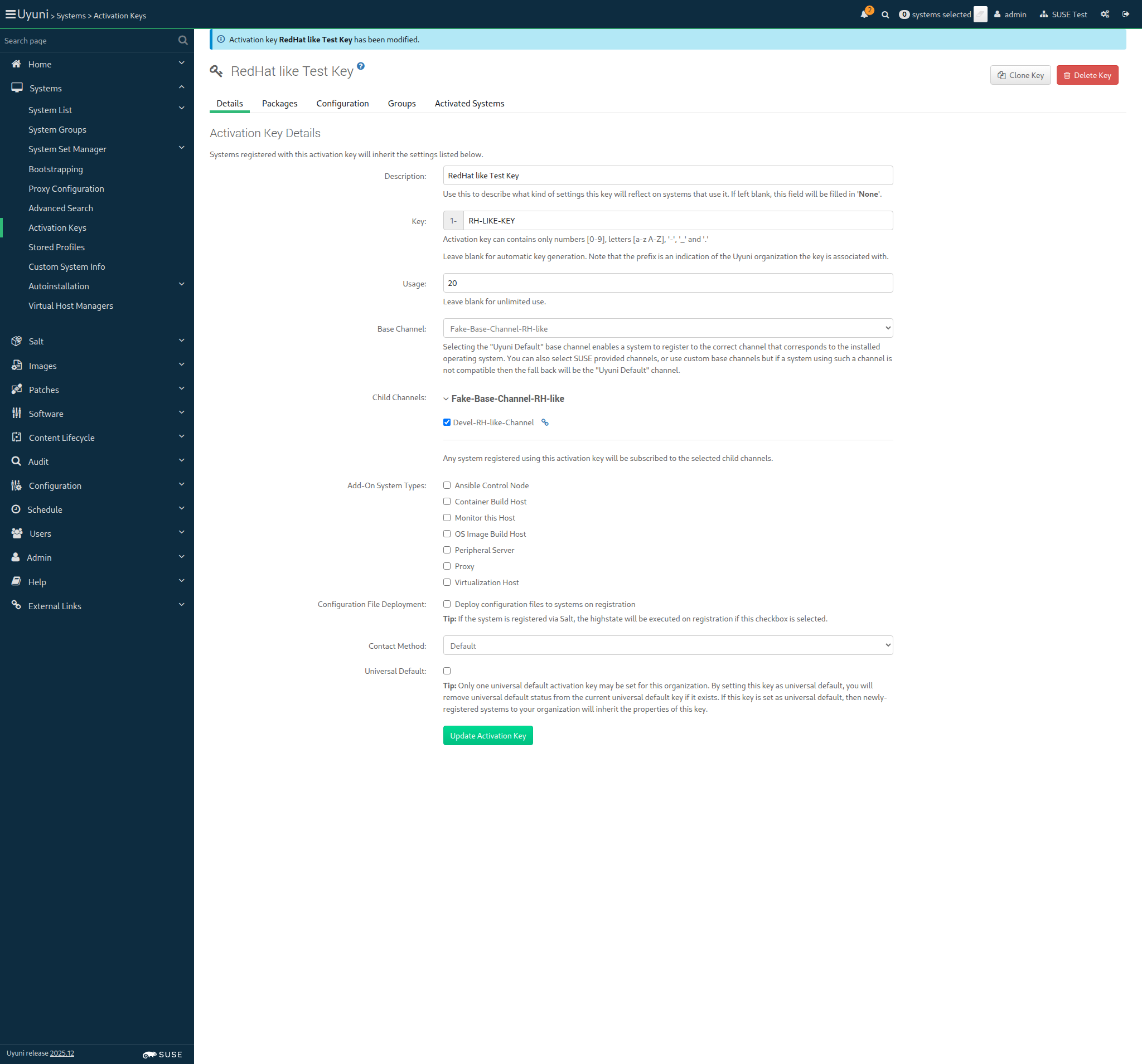
Screenshot +


In order for the server to behave correctly after a reboot
I want to be sure that there is no wrong SELinux label

Then files on container volumes should all have the proper SELinux label 0s

When I execute spacewalk-debug on the server 18s 62ms

Then the tomcat logs should not contain errors 1s 371ms

Then the salt event log on server should contain no failures 3s 347ms

Then the taskomatic logs should not contain errors 918ms

Then the log messages should not contain out of memory errors 932ms

Then the word "scc.suse.com" does not occur more than 100 times in "/var/log/rhn/rhn_web_ui.log" on "server" 0s

Then the word "scc.suse.com" does not occur more than 50 times in "/var/log/rhn/rhn_taskomatic_daemon.log" on "server" 0s