All Scenarios

152

Passed Scenarios

120

Failed Scenarios

2

Skipped Scenarios

30

Execution Time: 115m 3s 374ms

Expand All | Collapse All

In order to use the product
I want to be sure to use a sane environment

Then "server" should have a FQDN 179ms

And reverse resolution should work for "server" 418ms

And the clock from "server" should be exact 415ms

And service "apache2" is enabled on "server" 358ms

And service "apache2" is active on "server" 364ms

And service "cobblerd" is enabled on "server" 428ms

And service "cobblerd" is active on "server" 422ms

And service "rhn-search" is enabled on "server" 366ms

And service "rhn-search" is active on "server" 352ms

And service "salt-api" is enabled on "server" 413ms

And service "salt-api" is active on "server" 370ms

And service "salt-master" is enabled on "server" 435ms

And service "salt-master" is active on "server" 389ms

And service "taskomatic" is enabled on "server" 358ms

And service "taskomatic" is active on "server" 366ms

And socket "tftp" is enabled on "server" 358ms

And socket "tftp" is active on "server" 430ms

And service "tomcat" is enabled on "server" 437ms

And service "tomcat" is active on "server" 426ms

Then "proxy" should have a FQDN 1s 824ms

And reverse resolution should work for "proxy" 160ms

And "proxy" should communicate with the server using public interface 614ms

And the clock from "proxy" should be exact 163ms

Then "sle_minion" should have a FQDN 2s 683ms

And reverse resolution should work for "sle_minion" 240ms

And "sle_minion" should communicate with the server using public interface 661ms

And the clock from "sle_minion" should be exact 222ms

Then "build_host" should have a FQDN 1s 735ms

And reverse resolution should work for "build_host" 167ms

And "build_host" should communicate with the server using public interface 557ms

And the clock from "build_host" should be exact 182ms

Then "ssh_minion" should have a FQDN 3s 560ms

And reverse resolution should work for "ssh_minion" 375ms

And "ssh_minion" should communicate with the server using public interface 738ms

And the clock from "ssh_minion" should be exact 341ms

Then "rhlike_minion" should have a FQDN 2s 373ms

And reverse resolution should work for "rhlike_minion" 202ms

And "rhlike_minion" should communicate with the server using public interface 637ms

And the clock from "rhlike_minion" should be exact 210ms

Then "deblike_minion" should have a FQDN 4s 960ms

And reverse resolution should work for "deblike_minion" 289ms

And "deblike_minion" should communicate with the server using public interface 648ms

And the clock from "deblike_minion" should be exact 263ms

Then it should be possible to reach the test packages 0s

And it should be possible to reach the build sources 0s

And it should be possible to reach the Docker profiles 0s

Then it should be possible to use the HTTP proxy 0s

Then it should be possible to reach the authenticated registry 423ms

Then it should be possible to reach the not authenticated registry 414ms

Then it should be possible to use the custom download endpoint 391ms

In order to use the product
As the admin user
I want to create the organisation, the first users and set the HTTP proxy

When I run "rm -Rf /srv/salt/*" on "server" 423ms

Given I access the host the first time 0s

When I go to the home page 0s

And I enter "SUSE Test" as "orgName" 0s

And I enter "admin" as "login" 0s

And I enter "admin" as "desiredpassword" 0s

And I enter "admin" as "desiredpasswordConfirm" 0s

And I select "Mr." from "prefix" 0s

And I enter "Admin" as "firstNames" 0s

And I enter "Admin" as "lastName" 0s

And I enter "galaxy-noise@localhost" as "email" 0s

And I click on "Create Organization" 0s

Then I am logged in 0s

Given I am authorized for the "Admin" section 38s 812ms

When I wait until mgr-sync refresh is finished 2s 174ms

When I follow the left menu "Users > User List > Active" 188ms

And I follow "Create User" 410ms

And I enter "testing" as "login" 56ms

And I enter "testing" as "desiredpassword" 56ms

And I enter "testing" as "desiredpasswordConfirm" 67ms

And I select "Mr." from "prefix" 47ms

And I enter "Test" as "firstNames" 56ms

And I enter "User" as "lastName" 55ms

And I enter "galaxy-noise@localhost" as "email" 76ms

And I click on "Create Login" 1s 328ms

Then I should see a "Account testing created, login information sent to galaxy-noise@localhost" text 83ms

And I should see a "testing" link 12ms

When I follow the left menu "Users > User List > Active" 72ms

And I follow "testing" 417ms

And I check "role_org_admin" 88ms

And I check "role_system_group_admin" 82ms

And I check "role_channel_admin" 80ms

And I check "role_activation_key_admin" 79ms

And I check "role_config_admin" 78ms

And I click on "Update" 505ms

Then I should see a "User information updated" text 92ms

And I should see a "testing" text 83ms

When I follow the left menu "Admin > Setup Wizard > HTTP Proxy" 0s

Then I should see a "HTTP Proxy Hostname" text 0s

And I should see a "HTTP Proxy Username" text 0s

And I should see a "HTTP Proxy Password" text 0s

When I enter the address of the HTTP proxy as "HTTP Proxy Hostname" 0s

And I enter "suma2" as "HTTP Proxy Username" 0s

And I enter "P4$$wordWith%and&" as "HTTP Proxy Password" 0s

And I click on "Save and Verify" 0s

Then HTTP proxy verification should have succeeded 0s

* Fri Jul 04 2025 Victor Zhestkov
- Add `minion_legacy_req_warnings` option to avoid noisy warnings
- Require M2Crypto >= 0.44.0 for SUSE Family distros
- Added:
* add-minion_legacy_req_warnings-option-to-avoid-noisy.patch

* Fri Jun 27 2025 Pablo Suárez Hernández
- Prevent tests failures when pygit2 is not present
- Added:
* fix-tests-issues-in-salt-shaker-environments-721.patch

* Thu Jun 26 2025 Pablo Suárez Hernández
- Several fixes for security issues
(bsc#1244561, CVE-2024-38822)
(bsc#1244564, CVE-2024-38823)

When I query latest Salt changes on "server" 369ms

In order to test the product using shortcuts
As root user
I want to add pillar data to disable that feature

When I turn off disable_local_repos for all clients 2s 777ms

Given I am authorized for the "Admin" section 0s

When I follow the left menu "Admin > Setup Wizard > Organization Credentials" 0s

And I ask to add new credentials 0s

And I enter the SCC credentials 0s

And I click on "Save" 0s

And I wait until the SCC credentials are valid 0s

In order to set up my personal preferences
As admin
I want to navigate through "Home" submenus changing some settings

Given I am authorized as "admin" with password "admin" 409ms

When I follow the left menu "Home > My Preferences" 71ms

And I select "100" from "pagesize" 79ms

And I click on "Save Preferences" 439ms

Then I should see a "Preferences modified" text 132ms

Given I am authorized as "testing" with password "testing" 1s 783ms

When I follow the left menu "Home > My Preferences" 60ms

And I select "100" from "pagesize" 54ms

And I click on "Save Preferences" 485ms

Then I should see a "Preferences modified" text 122ms

Given I am authorized for the "Admin" section 1s 521ms

When I follow the left menu "Users > User List > Active" 153ms

And I follow "Create User" 393ms

And I enter "kiwikiwi" as "login" 55ms

And I enter "kiwikiwi" as "desiredpassword" 55ms

And I enter "kiwikiwi" as "desiredpasswordConfirm" 65ms

And I select "Mr." from "prefix" 38ms

And I enter "TestKiwi" as "firstNames" 69ms

And I enter "TestKiwi" as "lastName" 62ms

And I enter "kiwi@susy.de" as "email" 61ms

And I click on "Create Login" 937ms

Then I should see a "Account kiwikiwi created" text 86ms

And I should see a "kiwikiwi" link 13ms

And I should see a "normal user" text 73ms

And I follow "kiwikiwi" 249ms

And I check "role_image_admin" 80ms

And I click on "Update" 430ms

Given I am authorized for the "Admin" section 517ms

When I follow the left menu "Users > User List > Active" 155ms

And I follow "Create User" 392ms

And I enter "docker" as "login" 54ms

And I enter "docker" as "desiredpassword" 53ms

And I enter "docker" as "desiredpasswordConfirm" 61ms

And I select "Mr." from "prefix" 34ms

And I enter "TestDocky" as "firstNames" 55ms

And I enter "TestDocky" as "lastName" 56ms

And I enter "gino-ginae@susy.de" as "email" 66ms

And I click on "Create Login" 753ms

Then I should see a "Account docker created" text 82ms

And I should see a "docker" link 12ms

And I should see a "normal user" text 73ms

And I follow "docker" 258ms

And I check "role_image_admin" 70ms

And I click on "Update" 420ms

When I follow the left menu "Images > Stores" 127ms

And I follow "Create" 486ms

And I enter "galaxy-registry" as "label" 104ms

And I enter the URI of the registry as "uri" 143ms

And I click on "create-btn" 216ms

Then I wait until table row contains a "galaxy-registry" text 1s 673ms

And I should see a "Items 1 - 1 of 1" text 74ms

Given I am authorized for the "Admin" section 26s 654ms

When I follow the left menu "Admin > Task Schedules" 134ms

And I follow "mgr-sync-refresh-default" 1s 352ms

And I choose "disabled" 59ms

And I click on "Update Schedule" 1s 419ms

And I click on "Delete Schedule" 1s 621ms

When I follow the left menu "Admin > Task Schedules" 69ms

And I follow "cobbler-sync-default" 1s 291ms

And I choose "disabled" 48ms

And I click on "Update Schedule" 1s 458ms

And I click on "Delete Schedule" 1s 638ms

In order to use software channels
As root user
I want to list available channels and enable them

When I refresh SCC 13s 101ms

And I execute mgr-sync "list channels -e" with user "admin" and password "admin" 1s 400ms

Then I should get "[ ] SLE-Product-SLES15-SP4-Pool for x86_64 SUSE Linux Enterprise Server 15 SP4 x86_64 [sle-product-sles15-sp4-pool-x86_64]" < 1ms

And I should get " [ ] SLE-Product-SLES15-SP4-Updates for x86_64 SUSE Linux Enterprise Server 15 SP4 x86_64 [sle-product-sles15-sp4-updates-x86_64]" < 1ms

And I should get " [ ] SLE15-SP4-Installer-Updates for x86_64 SUSE Linux Enterprise Server 15 SP4 x86_64 [sle15-sp4-installer-updates-x86_64]" < 1ms

When I execute mgr-sync "list channels -e --no-optional" 869ms

Then I should get "[ ] SLE-Product-SLES15-SP4-Pool for x86_64 SUSE Linux Enterprise Server 15 SP4 x86_64 [sle-product-sles15-sp4-pool-x86_64]" < 1ms

And I should get " [ ] SLE-Product-SLES15-SP4-Updates for x86_64 SUSE Linux Enterprise Server 15 SP4 x86_64 [sle-product-sles15-sp4-updates-x86_64]" < 1ms

And I shouldn't get " [ ] SLE15-SP4-Installer-Updates for x86_64 SUSE Linux Enterprise Server 15 SP4 x86_64 [sle15-sp4-installer-updates-x86_64]" < 1ms

When I execute mgr-sync "list products" 871ms

Then I should get "[ ] SUSE Linux Enterprise Server 15 SP4 x86_64" < 1ms

When I execute mgr-sync "list products" 0s

Then I should get "[ ] SUSE Manager Proxy 4.3 x86_64" 0s

When I execute mgr-sync "list products --expand" 0s

Then I should get "[ ] SUSE Linux Enterprise Server 15 SP4 x86_64" 0s

And I should get "[ ] SUSE Manager Proxy 4.3 x86_64" 0s

And I should get " [ ] (R) SUSE Multi-Linux Manager Client Tools for SUSE Liberty Linux 7, RHEL and clones 7 x86_64 (BETA)" 0s

And I should get " [ ] (R) SUSE Multi-Linux Manager Client Tools for SLE 15 x86_64 (BETA)" 0s

When I execute mgr-sync "list products --expand --filter x86_64" 858ms

Then I should get "[ ] SUSE Linux Enterprise Server 15 SP4 x86_64" < 1ms

And I shouldn't get "ppc64" < 1ms

And I shouldn't get "s390x" < 1ms

When I remove the mgr-sync cache file 416ms

And I execute mgr-sync refresh 1m 506ms

Then I should get "Timeout. No user input for 60 seconds. Exiting..." < 1ms

When I refresh SCC 11s 618ms

Given I am authorized for the "Admin" section 389ms

When I follow the left menu "Admin > Setup Wizard > Products" 191ms

And I wait until I see "Product Description" text 824ms

Then I should see a "Arch" text 138ms

And I should see a "Channels" text 138ms

And I should not see a "WebYaST 1.3" text 137ms

When I follow the left menu "Admin > Setup Wizard > Products" 89ms

And I wait until I do not see "currently running" text 95ms

And I wait until I do not see "Loading" text 549ms

And I enter "RHEL and Liberty" as the filtered product description 153ms

Then I should see a "RHEL and Liberty 8 Base" text 106ms

When I select "x86_64" from "product-arch-filter" 1s 130ms

Then I should see a "RHEL and Liberty 8 Base" text 108ms

When I follow the left menu "Admin > Setup Wizard > Products" 0s

And I wait until I do not see "currently running" text 0s

And I wait until I do not see "Loading" text 0s

And I enter "SUSE Linux Enterprise Server for SAP Applications 15 x86_64" as the filtered product description 0s

And I click the channel list of product "SUSE Linux Enterprise Server for SAP Applications 15 x86_64" 0s

Then I should see a "Product Channels" text 0s

And I should see a "Mandatory Channels" text 0s

And I should see a "Optional Channels" text 0s

When I close the modal dialog 0s

Given I am authorized for the "Admin" section 0s

When I follow the left menu "Admin > Setup Wizard > Products" 0s

And I wait until I do not see "currently running" text 0s

And I wait until I do not see "Loading" text 0s

And I enter "SUSE Linux Enterprise Server 15 SP4" as the filtered product description 0s

And I wait until I see "SUSE Linux Enterprise Server 15 SP4 x86_64" text 0s

And I open the sub-list of the product "SUSE Linux Enterprise Server 15 SP4 x86_64" 0s

And I open the sub-list of the product "Basesystem Module 15 SP4 x86_64" 0s

And I open the sub-list of the product "Desktop Applications Module 15 SP4 x86_64" 0s

And I open the sub-list of the product "SUSE Multi-Linux Manager Client Tools for SLE 15 x86_64 (BETA)" if present 0s

Then I should see that the "Basesystem Module 15 SP4 x86_64" product is "recommended" 0s

And I should see that the "Server Applications Module 15 SP4 x86_64" product is "recommended" 0s

And I should see that the "SUSE Multi-Linux Manager Client Tools for SLE 15 x86_64 (BETA)" product is "recommended" 0s

When I select "SUSE Linux Enterprise Server 15 SP4 x86_64" as a product 0s

Then I should see the "SUSE Linux Enterprise Server 15 SP4 x86_64" selected 0s

And I should see the "Basesystem Module 15 SP4 x86_64" selected 0s

And I should see the "Server Applications Module 15 SP4 x86_64" selected 0s

And I should see the "SUSE Multi-Linux Manager Client Tools for SLE 15 x86_64 (BETA)" selected 0s

When I select "Desktop Applications Module 15 SP4 x86_64" as a product 0s

And I select "Development Tools Module 15 SP4 x86_64" as a product 0s

Then I should see the "Desktop Applications Module 15 SP4 x86_64" selected 0s

And I should see the "Development Tools Module 15 SP4 x86_64" selected 0s

When I select "Python 3 Module 15 SP4 x86_64" as a product 0s

Then I should see the "Python 3 Module 15 SP4 x86_64" selected 0s

When I select "Containers Module 15 SP4 x86_64" as a product 0s

Then I should see the "Containers Module 15 SP4 x86_64" selected 0s

When I select or deselect "SUSE Multi-Linux Manager Beta Client Tools for SLE 15 x86_64 (BETA)" beta client tools 0s

And I select "SUSE Linux Enterprise Server LTSS 15 SP4 x86_64" as a product 0s

Then I should see the "SUSE Linux Enterprise Server LTSS 15 SP4 x86_64" selected 0s

When I click the Add Product button 0s

And I wait until I see "SUSE Linux Enterprise Server 15 SP4 x86_64" product has been added 0s

Then the SLE15 SP4 product should be added 0s

When I wait until all synchronized channels for "sles15-sp4" have finished 0s

Reposync of channel opensuse_leap15_6-x86_64 killed
Channel opensuse_leap15_6-uyuni-client-x86_64 added
Channel opensuse_leap15_6-uyuni-client-devel-x86_64 added
WARN: Repository metadata for opensuse_leap15_6-uyuni-client-x86_64 seems not synchronized. Even if the reposync log says it is.
Channel synced, no .new files exist and number of solvables is bigger than 0
Channel opensuse_leap15_6-uyuni-client-x86_64 synchronized in 12 seconds
Channel opensuse_leap15_6-uyuni-client-x86_64 finished syncing
/var/cache/rhn/repodata/opensuse_leap15_6-uyuni-client-devel-x86_64/*primary.xml.gz contains 0 packages
WARN: Repository metadata for opensuse_leap15_6-uyuni-client-devel-x86_64 seems not synchronized. Even if the reposync log says it is.
1 minutes out of 19 waiting for 'leap15.6-client-tools-x86_64' channels to be synchronized
/var/cache/rhn/repodata/opensuse_leap15_6-uyuni-client-devel-x86_64/*primary.xml.gz contains 0 packages
WARN: Repository metadata for opensuse_leap15_6-uyuni-client-devel-x86_64 seems not synchronized. Even if the reposync log says it is.
/var/cache/rhn/repodata/opensuse_leap15_6-uyuni-client-devel-x86_64/*primary.xml.gz contains 0 packages
WARN: Repository metadata for opensuse_leap15_6-uyuni-client-devel-x86_64 seems not synchronized. Even if the reposync log says it is.
/var/cache/rhn/repodata/opensuse_leap15_6-uyuni-client-devel-x86_64/*primary.xml.gz contains 0 packages
WARN: Repository metadata for opensuse_leap15_6-uyuni-client-devel-x86_64 seems not synchronized. Even if the reposync log says it is.
Channel synced, no .new files exist and number of solvables is bigger than 0
Channel opensuse_leap15_6-uyuni-client-devel-x86_64 synchronized in 14 seconds
Channel opensuse_leap15_6-uyuni-client-devel-x86_64 finished syncing

When I use spacewalk-common-channel to add channel "opensuse_leap15_6" with arch "x86_64" 7s 736ms

And I kill running spacewalk-repo-sync for "opensuse_leap15_6-x86_64" channel 799ms

And I use spacewalk-repo-sync to sync channel "opensuse_leap15_6-x86_64" including "python3-ply dmidecode libunwind" packages 59s 617ms

And I use spacewalk-common-channel to add all "leap15.6-client-tools" channels with arch "x86_64" 17s 811ms

And I wait until all synchronized channels for "leap15.6-client-tools-x86_64" have finished 1m 48s 240ms

Channel opensuse_micro5_5-x86_64 added
Channel opensuse_micro5_5-x86_64-sle-updates added
Channel opensuse_micro5_5-uyuni-client-x86_64 added
Channel opensuse_micro5_5-uyuni-client-devel-x86_64 added
1 minutes out of 113 waiting for 'uyuni-proxy' channels to be synchronized
2 minutes out of 113 waiting for 'uyuni-proxy' channels to be synchronized
/var/cache/rhn/repodata/opensuse_micro5_5-x86_64/*primary.xml.gz contains 0 packages
WARN: Repository metadata for opensuse_micro5_5-x86_64 seems not synchronized. Even if the reposync log says it is.
/var/cache/rhn/repodata/opensuse_micro5_5-x86_64/*primary.xml.gz contains 0 packages
WARN: Repository metadata for opensuse_micro5_5-x86_64 seems not synchronized. Even if the reposync log says it is.
/var/cache/rhn/repodata/opensuse_micro5_5-uyuni-client-devel-x86_64/*primary.xml.gz contains 0 packages
WARN: Repository metadata for opensuse_micro5_5-uyuni-client-devel-x86_64 seems not synchronized. Even if the reposync log says it is.
/var/cache/rhn/repodata/opensuse_micro5_5-x86_64/*primary.xml.gz contains 0 packages
WARN: Repository metadata for opensuse_micro5_5-x86_64 seems not synchronized. Even if the reposync log says it is.
Channel synced, no .new files exist and number of solvables is bigger than 0
Channel opensuse_micro5_5-uyuni-client-devel-x86_64 synchronized in 2 seconds
Channel opensuse_micro5_5-uyuni-client-devel-x86_64 finished syncing
Channel synced, no .new files exist and number of solvables is bigger than 0
Channel opensuse_micro5_5-x86_64 synchronized in 196 seconds
Channel opensuse_micro5_5-x86_64 finished syncing
3 minutes out of 113 waiting for 'uyuni-proxy' channels to be synchronized
4 minutes out of 113 waiting for 'uyuni-proxy' channels to be synchronized
5 minutes out of 113 waiting for 'uyuni-proxy' channels to be synchronized
6 minutes out of 113 waiting for 'uyuni-proxy' channels to be synchronized
7 minutes out of 113 waiting for 'uyuni-proxy' channels to be synchronized
8 minutes out of 113 waiting for 'uyuni-proxy' channels to be synchronized
9 minutes out of 113 waiting for 'uyuni-proxy' channels to be synchronized
10 minutes out of 113 waiting for 'uyuni-proxy' channels to be synchronized
11 minutes out of 113 waiting for 'uyuni-proxy' channels to be synchronized
12 minutes out of 113 waiting for 'uyuni-proxy' channels to be synchronized
13 minutes out of 113 waiting for 'uyuni-proxy' channels to be synchronized
14 minutes out of 113 waiting for 'uyuni-proxy' channels to be synchronized
/var/cache/rhn/repodata/opensuse_micro5_5-x86_64-sle-updates/*primary.xml.gz contains 0 packages
WARN: Repository metadata for opensuse_micro5_5-x86_64-sle-updates seems not synchronized. Even if the reposync log says it is.
/var/cache/rhn/repodata/opensuse_micro5_5-uyuni-client-x86_64/*primary.xml.gz contains 0 packages
WARN: Repository metadata for opensuse_micro5_5-uyuni-client-x86_64 seems not synchronized. Even if the reposync log says it is.
/var/cache/rhn/repodata/opensuse_micro5_5-x86_64-sle-updates/*primary.xml.gz contains 0 packages
WARN: Repository metadata for opensuse_micro5_5-x86_64-sle-updates seems not synchronized. Even if the reposync log says it is.
/var/cache/rhn/repodata/opensuse_micro5_5-uyuni-client-x86_64/*primary.xml.gz contains 0 packages
WARN: Repository metadata for opensuse_micro5_5-uyuni-client-x86_64 seems not synchronized. Even if the reposync log says it is.
15 minutes out of 113 waiting for 'uyuni-proxy' channels to be synchronized
/var/cache/rhn/repodata/opensuse_micro5_5-x86_64-sle-updates/*primary.xml.gz contains 0 packages
WARN: Repository metadata for opensuse_micro5_5-x86_64-sle-updates seems not synchronized. Even if the reposync log says it is.
/var/cache/rhn/repodata/opensuse_micro5_5-uyuni-client-x86_64/*primary.xml.gz contains 0 packages
WARN: Repository metadata for opensuse_micro5_5-uyuni-client-x86_64 seems not synchronized. Even if the reposync log says it is.
/var/cache/rhn/repodata/opensuse_micro5_5-x86_64-sle-updates/*primary.xml.gz contains 0 packages
WARN: Repository metadata for opensuse_micro5_5-x86_64-sle-updates seems not synchronized. Even if the reposync log says it is.
/var/cache/rhn/repodata/opensuse_micro5_5-uyuni-client-x86_64/*primary.xml.gz contains 0 packages
WARN: Repository metadata for opensuse_micro5_5-uyuni-client-x86_64 seems not synchronized. Even if the reposync log says it is.
Channel synced, no .new files exist and number of solvables is bigger than 0
Channel opensuse_micro5_5-x86_64-sle-updates synchronized in 845 seconds
Channel opensuse_micro5_5-x86_64-sle-updates finished syncing
Channel synced, no .new files exist and number of solvables is bigger than 0
Channel opensuse_micro5_5-uyuni-client-x86_64 synchronized in 3 seconds
Channel opensuse_micro5_5-uyuni-client-x86_64 finished syncing

When I use spacewalk-common-channel to add all "uyuni-proxy" channels with arch "x86_64" 30s 912ms

And I wait until all synchronized channels for "uyuni-proxy" have finished 18m 54s 85ms

Products list: Available Channels: Status: - [I] - channel is installed - [ ] - channel is not installed, but is available - [U] - channel is unavailable [ ] EL9-Pool for x86_64 RHEL and Liberty 9 Base [el9-pool-x86_64] [ ] RHEL7-Pool for x86_64 RHEL7 Base x86_64 [rhel7-pool-x86_64] [ ] RHEL8-Pool for x86_64 RHEL and Liberty 8 Base [rhel8-pool-x86_64] [ ] SLE-Micro-5.3-Pool for x86_64 SUSE Linux Enterprise Micro 5.3 x86_64 [sle-micro-5.3-pool-x86_64] [ ] SLE-Product-SLED15-SP4-Pool for x86_64 SUSE Linux Enterprise Desktop 15 SP4 x86_64 [sle-product-sled15-sp4-pool-x86_64] [I] SLE-Product-SLES15-SP4-Pool for x86_64 SUSE Linux Enterprise Server 15 SP4 x86_64 [sle-product-sles15-sp4-pool-x86_64] [ ] SLE-15-SP4-Desktop-NVIDIA-Driver for x86_64 WE SUSE Linux Enterprise Workstation Extension 15 SP4 x86_64 [sle-15-sp4-desktop-nvidia-driver-x86_64-we] [I] SLE-Module-Basesystem15-SP4-Pool for x86_64 Basesystem Module 15 SP4 x86_64 [sle-module-basesystem15-sp4-pool-x86_64] [I] SLE-Module-Basesystem15-SP4-Updates for x86_64 Basesystem Module 15 SP4 x86_64 [sle-module-basesystem15-sp4-updates-x86_64] [I] SLE-Module-Containers15-SP4-Pool for x86_64 Containers Module 15 SP4 x86_64 [sle-module-containers15-sp4-pool-x86_64] [I] SLE-Module-Containers15-SP4-Updates for x86_64 Containers Module 15 SP4 x86_64 [sle-module-containers15-sp4-updates-x86_64] [I] SLE-Module-Desktop-Applications15-SP4-Pool for x86_64 Desktop Applications Module 15 SP4 x86_64 [sle-module-desktop-applications15-sp4-pool-x86_64] [I] SLE-Module-Desktop-Applications15-SP4-Updates for x86_64 Desktop Applications Module 15 SP4 x86_64 [sle-module-desktop-applications15-sp4-updates-x86_64] [I] SLE-Module-DevTools15-SP4-Pool for x86_64 Development Tools Module 15 SP4 x86_64 [sle-module-devtools15-sp4-pool-x86_64] [I] SLE-Module-DevTools15-SP4-Updates for x86_64 Development Tools Module 15 SP4 x86_64 [sle-module-devtools15-sp4-updates-x86_64] [ ] SLE-Module-Live-Patching15-SP4-Pool for x86_64 SUSE Linux Enterprise Live Patching 15 SP4 x86_64 [sle-module-live-patching15-sp4-pool-x86_64] [ ] SLE-Module-Live-Patching15-SP4-Updates for x86_64 SUSE Linux Enterprise Live Patching 15 SP4 x86_64 [sle-module-live-patching15-sp4-updates-x86_64] [ ] SLE-Module-Public-Cloud15-SP4-Pool for x86_64 Public Cloud Module 15 SP4 x86_64 [sle-module-public-cloud15-sp4-pool-x86_64] [ ] SLE-Module-Public-Cloud15-SP4-Updates for x86_64 Public Cloud Module 15 SP4 x86_64 [sle-module-public-cloud15-sp4-updates-x86_64] [I] SLE-Module-Server-Applications15-SP4-Pool for x86_64 Server Applications Module 15 SP4 x86_64 [sle-module-server-applications15-sp4-pool-x86_64] [I] SLE-Module-Server-Applications15-SP4-Updates for x86_64 Server Applications Module 15 SP4 x86_64 [sle-module-server-applications15-sp4-updates-x86_64] [ ] SLE-Module-Web-Scripting15-SP4-Pool for x86_64 Web and Scripting Module 15 SP4 x86_64 [sle-module-web-scripting15-sp4-pool-x86_64] [ ] SLE-Module-Web-Scripting15-SP4-Updates for x86_64 Web and Scripting Module 15 SP4 x86_64 [sle-module-web-scripting15-sp4-updates-x86_64] [I] SLE-Product-SLES15-SP4-LTSS-Updates for x86_64 SUSE Linux Enterprise Server LTSS 15 SP4 x86_64 [sle-product-sles15-sp4-ltss-updates-x86_64] [I] SLE-Product-SLES15-SP4-Updates for x86_64 SUSE Linux Enterprise Server 15 SP4 x86_64 [sle-product-sles15-sp4-updates-x86_64] [ ] SLE-Product-WE15-SP4-Pool for x86_64 SUSE Linux Enterprise Workstation Extension 15 SP4 x86_64 [sle-product-we15-sp4-pool-x86_64] [ ] SLE-Product-WE15-SP4-Updates for x86_64 SUSE Linux Enterprise Workstation Extension 15 SP4 x86_64 [sle-product-we15-sp4-updates-x86_64] [I] SLE15-SP4-Installer-Updates for x86_64 SUSE Linux Enterprise Server 15 SP4 x86_64 [sle15-sp4-installer-updates-x86_64] [ ] SLE-Product-SLES15-SP5-Pool for x86_64 SUSE Linux Enterprise Server 15 SP5 x86_64 [sle-product-sles15-sp5-pool-x86_64] [ ] SLE-Product-SLES15-SP6-Pool for x86_64 SUSE Linux Enterprise Server 15 SP6 x86_64 [sle-product-sles15-sp6-pool-x86_64] [ ] SUSE-MicroOS-5.2-Pool for x86_64 SUSE Linux Enterprise Micro 5.2 x86_64 [suse-microos-5.2-pool-x86_64]
WARN: Repository metadata for sle-product-sles15-sp4-pool-x86_64 seems not synchronized. Even if the reposync log says it is.
WARN: Repository metadata for sle-product-sles15-sp4-updates-x86_64 seems not synchronized. Even if the reposync log says it is.
Channel synced, no .new files exist and number of solvables is bigger than 0
Channel sle15-sp4-installer-updates-x86_64 synchronized in 10 seconds
Channel sle15-sp4-installer-updates-x86_64 finished syncing
Channel synced, no .new files exist and number of solvables is bigger than 0
Channel sle-product-sles15-sp4-pool-x86_64 synchronized in 4 seconds
Channel sle-product-sles15-sp4-pool-x86_64 finished syncing
Channel synced, no .new files exist and number of solvables is bigger than 0
Channel sle-product-sles15-sp4-updates-x86_64 synchronized in 3 seconds
Channel sle-product-sles15-sp4-updates-x86_64 finished syncing
1 minutes out of 114 waiting for 'sles15-sp4' channels to be synchronized
2 minutes out of 114 waiting for 'sles15-sp4' channels to be synchronized
WARN: Repository metadata for sle-module-basesystem15-sp4-pool-x86_64 seems not synchronized. Even if the reposync log says it is.
3 minutes out of 114 waiting for 'sles15-sp4' channels to be synchronized
WARN: Repository metadata for sle-module-basesystem15-sp4-pool-x86_64 seems not synchronized. Even if the reposync log says it is.
Channel synced, no .new files exist and number of solvables is bigger than 0
Channel sle-module-basesystem15-sp4-pool-x86_64 synchronized in 238 seconds
Channel sle-module-basesystem15-sp4-pool-x86_64 finished syncing
4 minutes out of 114 waiting for 'sles15-sp4' channels to be synchronized
5 minutes out of 114 waiting for 'sles15-sp4' channels to be synchronized
6 minutes out of 114 waiting for 'sles15-sp4' channels to be synchronized
7 minutes out of 114 waiting for 'sles15-sp4' channels to be synchronized
8 minutes out of 114 waiting for 'sles15-sp4' channels to be synchronized
9 minutes out of 114 waiting for 'sles15-sp4' channels to be synchronized
10 minutes out of 114 waiting for 'sles15-sp4' channels to be synchronized
11 minutes out of 114 waiting for 'sles15-sp4' channels to be synchronized
12 minutes out of 114 waiting for 'sles15-sp4' channels to be synchronized
13 minutes out of 114 waiting for 'sles15-sp4' channels to be synchronized
WARN: Repository metadata for sle-module-basesystem15-sp4-updates-x86_64 seems not synchronized. Even if the reposync log says it is.
14 minutes out of 114 waiting for 'sles15-sp4' channels to be synchronized
WARN: Repository metadata for sle-module-basesystem15-sp4-updates-x86_64 seems not synchronized. Even if the reposync log says it is.
WARN: Repository metadata for sle-module-server-applications15-sp4-updates-x86_64 seems not synchronized. Even if the reposync log says it is.
WARN: Repository metadata for sle-module-basesystem15-sp4-updates-x86_64 seems not synchronized. Even if the reposync log says it is.
WARN: Repository metadata for sle-module-server-applications15-sp4-updates-x86_64 seems not synchronized. Even if the reposync log says it is.
WARN: Repository metadata for sle-module-basesystem15-sp4-updates-x86_64 seems not synchronized. Even if the reposync log says it is.
WARN: Repository metadata for sle-module-server-applications15-sp4-pool-x86_64 seems not synchronized. Even if the reposync log says it is.
WARN: Repository metadata for sle-module-server-applications15-sp4-updates-x86_64 seems not synchronized. Even if the reposync log says it is.
Channel synced, no .new files exist and number of solvables is bigger than 0
Channel sle-module-basesystem15-sp4-updates-x86_64 synchronized in 1215 seconds
Channel sle-module-basesystem15-sp4-updates-x86_64 finished syncing
WARN: Repository metadata for sle-module-server-applications15-sp4-pool-x86_64 seems not synchronized. Even if the reposync log says it is.
WARN: Repository metadata for sle-module-server-applications15-sp4-updates-x86_64 seems not synchronized. Even if the reposync log says it is.
15 minutes out of 114 waiting for 'sles15-sp4' channels to be synchronized
WARN: Repository metadata for sle-module-server-applications15-sp4-pool-x86_64 seems not synchronized. Even if the reposync log says it is.
Channel synced, no .new files exist and number of solvables is bigger than 0
Channel sle-module-server-applications15-sp4-updates-x86_64 synchronized in 113 seconds
Channel sle-module-server-applications15-sp4-updates-x86_64 finished syncing
Channel synced, no .new files exist and number of solvables is bigger than 0
Channel sle-module-server-applications15-sp4-pool-x86_64 synchronized in 34 seconds
Channel sle-module-server-applications15-sp4-pool-x86_64 finished syncing
16 minutes out of 114 waiting for 'sles15-sp4' channels to be synchronized
WARN: Repository metadata for sle-module-desktop-applications15-sp4-pool-x86_64 seems not synchronized. Even if the reposync log says it is.
17 minutes out of 114 waiting for 'sles15-sp4' channels to be synchronized
WARN: Repository metadata for sle-module-desktop-applications15-sp4-pool-x86_64 seems not synchronized. Even if the reposync log says it is.
Channel synced, no .new files exist and number of solvables is bigger than 0
Channel sle-module-desktop-applications15-sp4-pool-x86_64 synchronized in 212 seconds
Channel sle-module-desktop-applications15-sp4-pool-x86_64 finished syncing
18 minutes out of 114 waiting for 'sles15-sp4' channels to be synchronized
WARN: Repository metadata for sle-module-desktop-applications15-sp4-updates-x86_64 seems not synchronized. Even if the reposync log says it is.
Channel synced, no .new files exist and number of solvables is bigger than 0
Channel sle-module-desktop-applications15-sp4-updates-x86_64 synchronized in 163 seconds
Channel sle-module-desktop-applications15-sp4-updates-x86_64 finished syncing
19 minutes out of 114 waiting for 'sles15-sp4' channels to be synchronized
WARN: Repository metadata for sle-module-devtools15-sp4-pool-x86_64 seems not synchronized. Even if the reposync log says it is.
20 minutes out of 114 waiting for 'sles15-sp4' channels to be synchronized
Channel synced, no .new files exist and number of solvables is bigger than 0
Channel sle-module-devtools15-sp4-pool-x86_64 synchronized in 90 seconds
Channel sle-module-devtools15-sp4-pool-x86_64 finished syncing
21 minutes out of 114 waiting for 'sles15-sp4' channels to be synchronized
22 minutes out of 114 waiting for 'sles15-sp4' channels to be synchronized
23 minutes out of 114 waiting for 'sles15-sp4' channels to be synchronized
24 minutes out of 114 waiting for 'sles15-sp4' channels to be synchronized
25 minutes out of 114 waiting for 'sles15-sp4' channels to be synchronized
26 minutes out of 114 waiting for 'sles15-sp4' channels to be synchronized
27 minutes out of 114 waiting for 'sles15-sp4' channels to be synchronized
28 minutes out of 114 waiting for 'sles15-sp4' channels to be synchronized
WARN: Repository metadata for sle-module-devtools15-sp4-updates-x86_64 seems not synchronized. Even if the reposync log says it is.
WARN: Repository metadata for sle-module-containers15-sp4-updates-x86_64 seems not synchronized. Even if the reposync log says it is.
WARN: Repository metadata for sle-module-devtools15-sp4-updates-x86_64 seems not synchronized. Even if the reposync log says it is.
WARN: Repository metadata for sle-module-containers15-sp4-pool-x86_64 seems not synchronized. Even if the reposync log says it is.
WARN: Repository metadata for sle-module-containers15-sp4-updates-x86_64 seems not synchronized. Even if the reposync log says it is.
29 minutes out of 114 waiting for 'sles15-sp4' channels to be synchronized
WARN: Repository metadata for sle-module-devtools15-sp4-updates-x86_64 seems not synchronized. Even if the reposync log says it is.
WARN: Repository metadata for sle-module-containers15-sp4-pool-x86_64 seems not synchronized. Even if the reposync log says it is.
WARN: Repository metadata for sle-module-containers15-sp4-updates-x86_64 seems not synchronized. Even if the reposync log says it is.
WARN: Repository metadata for sle-module-devtools15-sp4-updates-x86_64 seems not synchronized. Even if the reposync log says it is.
WARN: Repository metadata for sle-module-containers15-sp4-pool-x86_64 seems not synchronized. Even if the reposync log says it is.
WARN: Repository metadata for sle-module-containers15-sp4-updates-x86_64 seems not synchronized. Even if the reposync log says it is.
Channel synced, no .new files exist and number of solvables is bigger than 0
Channel sle-module-devtools15-sp4-updates-x86_64 synchronized in 741 seconds
Channel sle-module-devtools15-sp4-updates-x86_64 finished syncing
WARN: Repository metadata for sle-module-containers15-sp4-updates-x86_64 seems not synchronized. Even if the reposync log says it is.
WARN: Repository metadata for sle-module-containers15-sp4-pool-x86_64 seems not synchronized. Even if the reposync log says it is.
WARN: Repository metadata for sle-module-containers15-sp4-updates-x86_64 seems not synchronized. Even if the reposync log says it is.
Channel synced, no .new files exist and number of solvables is bigger than 0
Channel sle-module-containers15-sp4-pool-x86_64 synchronized in 6 seconds
Channel sle-module-containers15-sp4-pool-x86_64 finished syncing
Channel synced, no .new files exist and number of solvables is bigger than 0
Channel sle-module-containers15-sp4-updates-x86_64 synchronized in 49 seconds
Channel sle-module-containers15-sp4-updates-x86_64 finished syncing
30 minutes out of 114 waiting for 'sles15-sp4' channels to be synchronized
31 minutes out of 114 waiting for 'sles15-sp4' channels to be synchronized
32 minutes out of 114 waiting for 'sles15-sp4' channels to be synchronized
33 minutes out of 114 waiting for 'sles15-sp4' channels to be synchronized
34 minutes out of 114 waiting for 'sles15-sp4' channels to be synchronized
35 minutes out of 114 waiting for 'sles15-sp4' channels to be synchronized
36 minutes out of 114 waiting for 'sles15-sp4' channels to be synchronized
37 minutes out of 114 waiting for 'sles15-sp4' channels to be synchronized
38 minutes out of 114 waiting for 'sles15-sp4' channels to be synchronized
39 minutes out of 114 waiting for 'sles15-sp4' channels to be synchronized
40 minutes out of 114 waiting for 'sles15-sp4' channels to be synchronized
41 minutes out of 114 waiting for 'sles15-sp4' channels to be synchronized
42 minutes out of 114 waiting for 'sles15-sp4' channels to be synchronized
43 minutes out of 114 waiting for 'sles15-sp4' channels to be synchronized
44 minutes out of 114 waiting for 'sles15-sp4' channels to be synchronized
45 minutes out of 114 waiting for 'sles15-sp4' channels to be synchronized
46 minutes out of 114 waiting for 'sles15-sp4' channels to be synchronized
47 minutes out of 114 waiting for 'sles15-sp4' channels to be synchronized
48 minutes out of 114 waiting for 'sles15-sp4' channels to be synchronized
49 minutes out of 114 waiting for 'sles15-sp4' channels to be synchronized
50 minutes out of 114 waiting for 'sles15-sp4' channels to be synchronized
WARN: Repository metadata for sle-product-sles15-sp4-ltss-updates-x86_64 seems not synchronized. Even if the reposync log says it is.
51 minutes out of 114 waiting for 'sles15-sp4' channels to be synchronized
WARN: Repository metadata for sle-product-sles15-sp4-ltss-updates-x86_64 seems not synchronized. Even if the reposync log says it is.
/var/cache/rhn/repodata/sles15-sp4-devel-uyuni-client-x86_64/*primary.xml.gz contains 0 packages
WARN: Repository metadata for sles15-sp4-devel-uyuni-client-x86_64 seems not synchronized. Even if the reposync log says it is.
WARN: Repository metadata for sle-product-sles15-sp4-ltss-updates-x86_64 seems not synchronized. Even if the reposync log says it is.
/var/cache/rhn/repodata/sles15-sp4-devel-uyuni-client-x86_64/*primary.xml.gz contains 0 packages
WARN: Repository metadata for sles15-sp4-devel-uyuni-client-x86_64 seems not synchronized. Even if the reposync log says it is.
WARN: Repository metadata for sle-product-sles15-sp4-ltss-updates-x86_64 seems not synchronized. Even if the reposync log says it is.
Channel synced, no .new files exist and number of solvables is bigger than 0
Channel sles15-sp4-devel-uyuni-client-x86_64 synchronized in 12 seconds
Channel sles15-sp4-devel-uyuni-client-x86_64 finished syncing
WARN: Repository metadata for sle-product-sles15-sp4-ltss-updates-x86_64 seems not synchronized. Even if the reposync log says it is.
52 minutes out of 114 waiting for 'sles15-sp4' channels to be synchronized
WARN: Repository metadata for sle-product-sles15-sp4-ltss-updates-x86_64 seems not synchronized. Even if the reposync log says it is.
53 minutes out of 114 waiting for 'sles15-sp4' channels to be synchronized
WARN: Repository metadata for sle-product-sles15-sp4-ltss-updates-x86_64 seems not synchronized. Even if the reposync log says it is.
54 minutes out of 114 waiting for 'sles15-sp4' channels to be synchronized
Channel synced, no .new files exist and number of solvables is bigger than 0
Channel sle-product-sles15-sp4-ltss-updates-x86_64 synchronized in 1594 seconds
Channel sle-product-sles15-sp4-ltss-updates-x86_64 finished syncing

Given I am authorized for the "Admin" section 429ms

When I follow the left menu "Admin > Setup Wizard > Products" 163ms

And I wait until I do not see "currently running" text 99ms

And I wait until I do not see "Loading" text 456ms

And I enter "SUSE Linux Enterprise Server 15 SP4" as the filtered product description 125ms

And I wait until I see "SUSE Linux Enterprise Server 15 SP4 x86_64" text 101ms

And I open the sub-list of the product "SUSE Linux Enterprise Server 15 SP4 x86_64" 76ms

And I open the sub-list of the product "Basesystem Module 15 SP4 x86_64" 56ms

And I open the sub-list of the product "Desktop Applications Module 15 SP4 x86_64" 54ms

Then I should see that the "Basesystem Module 15 SP4 x86_64" product is "recommended" 11ms

And I should see that the "Server Applications Module 15 SP4 x86_64" product is "recommended" 11ms

When I select "SUSE Linux Enterprise Server 15 SP4 x86_64" as a product 69ms

Then I should see the "SUSE Linux Enterprise Server 15 SP4 x86_64" selected 26ms

And I should see the "Basesystem Module 15 SP4 x86_64" selected 23ms

And I should see the "Server Applications Module 15 SP4 x86_64" selected 24ms

When I select "Desktop Applications Module 15 SP4 x86_64" as a product 64ms

And I select "Development Tools Module 15 SP4 x86_64" as a product 66ms

Then I should see the "Desktop Applications Module 15 SP4 x86_64" selected 23ms

And I should see the "Development Tools Module 15 SP4 x86_64" selected 22ms

When I select "Containers Module 15 SP4 x86_64" as a product 74ms

Then I should see the "Containers Module 15 SP4 x86_64" selected 22ms

When I select "SUSE Linux Enterprise Server LTSS 15 SP4 x86_64" as a product 61ms

Then I should see the "SUSE Linux Enterprise Server LTSS 15 SP4 x86_64" selected 24ms

When I click the Add Product button 55ms

And I wait until I see "SUSE Linux Enterprise Server 15 SP4 x86_64" product has been added 5s 186ms

Then the SLE15 SP4 product should be added 1s 165ms

When I use spacewalk-common-channel to add channel "sles15-sp4-devel-uyuni-client" with arch "x86_64" 8s 802ms

And I wait until all synchronized channels for "sles15-sp4" have finished 79m 38s 120ms

@proxy @susemanager @transactional_server
Scenario:
Add SL Micro 6.1 as base OS for proxy
< 1ms 13

Given I am authorized for the "Admin" section 0s

When I follow the left menu "Admin > Setup Wizard > Products" 0s

And I wait until I do not see "currently running" text 0s

And I wait until I do not see "Loading" text 0s

And I enter "SUSE Linux Micro 6.1" as the filtered product description 0s

And I select "SUSE Linux Micro 6.1 x86_64" as a product 0s

Then I should see the "SUSE Linux Micro 6.1 x86_64" selected 0s

When I open the sub-list of the product "SUSE Linux Micro 6.1 x86_64" 0s

And I open the sub-list of the product "SUSE Multi-Linux Manager Client Tools for SL Micro 6 x86_64" if present 0s

And I click the Add Product button 0s

And I wait until I see "Selected channels/products were scheduled successfully for syncing." text 0s

And I wait until I see "SUSE Linux Micro 6.1 x86_64" product has been added 0s

And I wait until all synchronized channels for "sl-micro-6.1" have finished 0s

@proxy @susemanager @skip_if_transactional_server
Scenario:
Add SLES 15 SP7 as base OS for proxy
< 1ms 11

Given I am authorized for the "Admin" section 0s

When I follow the left menu "Admin > Setup Wizard > Products" 0s

And I wait until I do not see "currently running" text 0s

And I wait until I do not see "Loading" text 0s

And I enter "SUSE Linux Enterprise Server 15 SP7" as the filtered product description 0s

And I select "SUSE Linux Enterprise Server 15 SP7 (BETA)" as a product 0s

Then I should see the "SUSE Linux Enterprise Server 15 SP7 (BETA)" selected 0s

When I click the Add Product button 0s

And I wait until I see "Selected channels/products were scheduled successfully for syncing." text 0s

And I wait until I see "SUSE Linux Enterprise Server 15 SP7 (BETA)" product has been added 0s

And I wait until all synchronized channels for "sles15-sp7" have finished 0s

Given I am authorized for the "Admin" section 0s

When I follow the left menu "Admin > Setup Wizard > Products" 0s

And I wait until I do not see "currently running" text 0s

And I wait until I do not see "Loading" text 0s

And I enter "SUSE Linux Micro 6.1" as the filtered product description 0s

When I open the sub-list of the product "SUSE Linux Micro 6.1 x86_64" 0s

And I select "SUSE Linux Micro 6.1 x86_64" as a product 0s

And I select "SUSE Multi-Linux Manager Proxy Extension 5.1 x86_64 (BETA)" as a product 0s

Then I should see the "SUSE Multi-Linux Manager Proxy Extension 5.1 x86_64 (BETA)" selected 0s

When I click the Add Product button 0s

And I wait until I see "Selected channels/products were scheduled successfully for syncing." text 0s

And I wait until I see "SUSE Multi-Linux Manager Proxy Extension 5.1 x86_64 (BETA)" product has been added 0s

And I wait until all synchronized channels for "suse-multi-linux-manager-proxy-51" have finished 0s

Given I am authorized for the "Admin" section 0s

When I follow the left menu "Admin > Setup Wizard > Products" 0s

And I wait until I do not see "currently running" text 0s

And I wait until I do not see "Loading" text 0s

And I enter "SUSE Linux Enterprise Server 15 SP7" as the filtered product description 0s

When I open the sub-list of the product "SUSE Linux Enterprise Server 15 SP7 x86_64" 0s

And I select "SUSE Multi-Linux Manager Proxy Extension 5.1 x86_64 (BETA)" as a product 0s

Then I should see the "SUSE Multi-Linux Manager Proxy Extension 5.1 x86_64 (BETA)" selected 0s

When I click the Add Product button 0s

And I wait until I see "Selected channels/products were scheduled successfully for syncing." text 0s

And I wait until I see "SUSE Multi-Linux Manager Proxy Extension 5.1 x86_64 (BETA)" product has been added 0s

And I wait until all synchronized channels for "suse-multi-linux-manager-proxy-51-sp7" have finished 0s

Given I am authorized for the "Admin" section 0s

When I follow the left menu "Admin > Setup Wizard > Products" 0s

And I wait until I do not see "currently running" text 0s

And I wait until I do not see "Loading" text 0s

And I enter "SUSE Linux Micro 6.1" as the filtered product description 0s

When I open the sub-list of the product "SUSE Linux Micro 6.1 x86_64" 0s

And I select "SUSE Linux Micro 6.1 x86_64" as a product 0s

And I select "SUSE Multi-Linux Manager Retail Branch Server Extension 5.1 x86_64 (BETA)" as a product 0s

Then I should see the "SUSE Multi-Linux Manager Retail Branch Server Extension 5.1 x86_64 (BETA)" selected 0s

When I click the Add Product button 0s

And I wait until I see "Selected channels/products were scheduled successfully for syncing." text 0s

And I wait until I see "SUSE Multi-Linux Manager Retail Branch Server Extension 5.1 x86_64 (BETA)" product has been added 0s

And I wait until all synchronized channels for "suse-multi-linux-manager-retail-branch-server-51" have finished 0s

Given I am authorized for the "Admin" section 0s

When I follow the left menu "Admin > Setup Wizard > Products" 0s

And I wait until I do not see "currently running" text 0s

And I wait until I do not see "Loading" text 0s

And I enter "SUSE Linux Enterprise Server 15 SP7" as the filtered product description 0s

When I open the sub-list of the product "SUSE Linux Enterprise Server 15 SP7 x86_64 (BETA)" 0s

And I select "SUSE Multi-Linux Manager Retail Branch Server Extension 5.1 x86_64" as a product 0s

Then I should see the "SUSE Multi-Linux Manager Retail Branch Server Extension 5.1 x86_64" selected 0s

When I click the Add Product button 0s

And I wait until I see "Selected channels/products were scheduled successfully for syncing." text 0s

And I wait until I see "SUSE Multi-Linux Manager Retail Branch Server Extension 5.1 x86_64" product has been added 0s

And I wait until all synchronized channels for "suma-retail-branch-server-extension-51-sp7" have finished 0s

When I execute mgr-sync "list channels" with user "admin" and password "admin" 0s

And I should get " [I] SLE15-SP4-Installer-Updates for x86_64 SUSE Linux Enterprise Server 15 SP4 x86_64 [sle15-sp4-installer-updates-x86_64]" 0s

Given I am authorized for the "Admin" section 11s 459ms

When I follow the left menu "Admin > Setup Wizard > Products" 202ms

And I wait until I see "Setup Wizard" text 99ms

And I wait until I do not see "Loading" text 548ms

Then I should not see a "Operation not successful" text 139ms

And I select "250" from "pageSize" 82ms

And I should only see success signs in the product list 40s 40ms

When I report the synchronization duration for "sles15-sp4" < 1ms

In Order to distribute software to the clients
As an authorized user
I want to create fake channels for each distribution

Given I am authorized for the "Admin" section 424ms

When I follow the left menu "Software > Manage > Channels" 201ms

And I follow "Create Channel" 388ms

And I enter "Fake-Base-Channel-SUSE-like" as "Channel Name" 99ms

And I enter "fake-base-channel-suse-like" as "Channel Label" 85ms

And I select "None" from "Parent Channel" 55ms

And I select "x86_64" from "Architecture:" 44ms

And I enter "Base channel for testing" as "Channel Summary" 82ms

And I enter "No more description for base channel." as "Channel Description" 87ms

And I click on "Create Channel" 68ms

Then I should see a "Channel Fake-Base-Channel-SUSE-like created." text 107ms

When I follow the left menu "Software > Manage > Channels" 73ms

And I follow "Create Channel" 286ms

And I enter "Fake-Child-Channel-SUSE-like" as "Channel Name" 83ms

And I enter "fake-child-channel-suse-like" as "Channel Label" 79ms

And I select "Fake-Base-Channel-SUSE-like" from "Parent Channel" 67ms

And I select "x86_64" from "Architecture:" 36ms

And I enter "Child channel for testing" as "Channel Summary" 76ms

And I enter "Description for Fake Child Channel SUSE like." as "Channel Description" 91ms

And I click on "Create Channel" 56ms

Then I should see a "Channel Fake-Child-Channel-SUSE-like created." text 509ms

When I follow the left menu "Software > Manage > Channels" 73ms

And I follow "Create Channel" 263ms

And I enter "Fake-RPM-SUSE-Channel" as "Channel Name" 79ms

And I enter "fake-rpm-suse-channel" as "Channel Label" 73ms

And I select the parent channel for the "sle_minion" from "Parent Channel" 49ms

And I select "x86_64" from "Architecture:" 35ms

And I enter "Fake-RPM-SUSE-Channel for testing" as "Channel Summary" 84ms

And I enter "Description for Fake-RPM-SUSE-Channel Child Channel." as "Channel Description" 100ms

And I click on "Create Channel" 470ms

Then I should see a "Channel Fake-RPM-SUSE-Channel created." text 91ms

When I follow the left menu "Software > Manage > Channels" 72ms

And I follow "Create Channel" 265ms

And I enter "Fake-Base-Channel-i586" as "Channel Name" 74ms

And I enter "fake-base-channel-i586" as "Channel Label" 71ms

And I select "None" from "Parent Channel" 43ms

And I select "IA-32" from "Architecture:" 55ms

And I enter "Fake-Base-Channel-i586 channel for testing" as "Channel Summary" 92ms

And I enter "No more description for base channel." as "Channel Description" 82ms

And I click on "Create Channel" 433ms

Then I should see a "Channel Fake-Base-Channel-i586 created." text 91ms

When I follow the left menu "Software > Manage > Channels" 80ms

And I follow "Create Channel" 275ms

And I enter "Fake-Child-Channel-i586" as "Channel Name" 81ms

And I enter "fake-child-channel-i586" as "Channel Label" 86ms

And I select "Fake-Base-Channel-i586" from "Parent Channel" 67ms

And I select "IA-32" from "Architecture:" 36ms

And I enter "Fake Child Channel i586 for testing" as "Channel Summary" 85ms

And I enter "Description for Fake Child Channel i586." as "Channel Description" 87ms

And I click on "Create Channel" 445ms

Then I should see a "Channel Fake-Child-Channel-i586 created." text 92ms

When I follow the left menu "Software > Manage > Channels" 71ms

And I follow "Create Channel" 280ms

And I enter "Test-Base-Channel-x86_64" as "Channel Name" 77ms

And I enter "test-base-channel-x86_64" as "Channel Label" 75ms

And I select "None" from "Parent Channel" 39ms

And I select "x86_64" from "Architecture:" 34ms

And I enter "Test-Base-Channel-x86_64 channel for testing" as "Channel Summary" 93ms

And I enter "No more description for base channel." as "Channel Description" 83ms

And I click on "Create Channel" 57ms

Then I should see a "Channel Test-Base-Channel-x86_64 created." text 103ms

When I follow the left menu "Software > Manage > Channels" 78ms

And I follow "Create Channel" 280ms

And I enter "Test-Child-Channel-x86_64" as "Channel Name" 86ms

And I enter "test-child-channel-x86_64" as "Channel Label" 77ms

And I select "Test-Base-Channel-x86_64" from "Parent Channel" 61ms

And I select "x86_64" from "Architecture:" 36ms

And I enter "Test-Child-Channel-x86_64 channel for testing" as "Channel Summary" 94ms

And I enter "Description for Test-Child-Channel-x86_64 Channel." as "Channel Description" 94ms

And I click on "Create Channel" 477ms

Then I should see a "Channel Test-Child-Channel-x86_64 created." text 110ms

When I follow the left menu "Software > Manage > Channels" 0s

And I follow "Create Channel" 0s

And I enter "Fake-RPM-Terminal-Channel" as "Channel Name" 0s

And I enter "fake-rpm-terminal-channel" as "Channel Label" 0s

And I select the parent channel for the "pxeboot_minion" from "Parent Channel" 0s

And I select "x86_64" from "Architecture:" 0s

And I enter "Fake-RPM-Terminal-Channel for testing" as "Channel Summary" 0s

And I enter "Description for Fake-RPM-Terminal-Channel Child Channel." as "Channel Description" 0s

And I click on "Create Channel" 0s

Then I should see a "Channel Fake-RPM-Terminal-Channel created." text 0s

When I follow the left menu "Software > Manage > Channels" 70ms

And I follow "Create Channel" 279ms

And I enter "Fake-Base-Channel-Debian-like" as "Channel Name" 83ms

And I enter "fake-base-channel-debian-like" as "Channel Label" 77ms

And I select "None" from "Parent Channel" 39ms

And I select "AMD64 Debian" from "Architecture:" 53ms

And I enter "Fake-Base-Channel-Debian-like for testing" as "Channel Summary" 93ms

And I enter "No more description for base channel." as "Channel Description" 82ms

And I uncheck "gpg_check" 10s 87ms

And I click on "Create Channel" 469ms

Then I should see a "Channel Fake-Base-Channel-Debian-like created." text 95ms

When I follow the left menu "Software > Manage > Channels" 71ms

And I follow "Create Channel" 289ms

And I enter "Fake-Base-Channel-RH-like" as "Channel Name" 77ms

And I enter "fake-base-channel-rh-like" as "Channel Label" 74ms

And I select "None" from "Parent Channel" 39ms

And I select "x86_64" from "Architecture:" 40ms

And I enter "Fake-Base-Channel-RH-like for testing" as "Channel Summary" 88ms

And I enter "No more description for base channel." as "Channel Description" 81ms

And I click on "Create Channel" 445ms

Then I should see a "Channel Fake-Base-Channel-RH-like created." text 90ms

When I follow the left menu "Software > Manage > Channels" 79ms

And I follow "Create Channel" 294ms

And I enter "Fake-Base-Channel-AppStream" as "Channel Name" 80ms

And I enter "fake-base-channel-appstream" as "Channel Label" 77ms

And I select "None" from "Parent Channel" 39ms

And I select "x86_64" from "Architecture:" 33ms

And I enter "Fake-Base-Channel-AppStream for testing" as "Channel Summary" 89ms

And I enter "Description for Fake-Base-Channel-AppStream." as "Channel Description" 88ms

And I click on "Create Channel" 63ms

Then I should see a "Channel Fake-Base-Channel-AppStream created." text 99ms

In order to distribute software to the clients
As an authorized user
I want to create a fake repository per fake child channel

Given I am authorized for the "Admin" section 435ms

When I follow the left menu "Software > Manage > Repositories" 176ms

And I follow "Create Repository" 270ms

And I enter "fake-rpm-repo" as "label" 61ms

And I enter "http://localhost/pub/TestRepoRpmUpdates/" as "url" 87ms

And I click on "Create Repository" 403ms

Then I should see a "Repository created successfully" text 77ms

And I should see "metadataSigned" as checked 19ms

When I follow the left menu "Software > Manage > Repositories" 72ms

And I follow "fake-rpm-repo" 254ms

And I uncheck "metadataSigned" 10s 61ms

And I click on "Update Repository" 420ms

Then I should see a "Repository updated successfully" text 75ms

And I should see "metadataSigned" as unchecked 16ms

When I follow the left menu "Software > Manage > Repositories" 72ms

And I follow "Create Repository" 248ms

And I enter "fake-appstream-repo" as "label" 62ms

And I enter "http://localhost/pub/TestRepoAppStream/" as "url" 82ms

And I click on "Create Repository" 54ms

Then I should see a "Repository created successfully" text 412ms

And I should see "metadataSigned" as checked 23ms

When I follow the left menu "Software > Manage > Repositories" 70ms

And I follow "fake-appstream-repo" 257ms

And I uncheck "metadataSigned" 10s 61ms

And I click on "Update Repository" 412ms

Then I should see a "Repository updated successfully" text 75ms

And I should see "metadataSigned" as unchecked 15ms

When I follow the left menu "Software > Manage > Channels" 76ms

And I follow "Fake-RPM-SUSE-Channel" 317ms

And I enter "file:///etc/pki/rpm-gpg/uyuni-tools-gpg-pubkey-0d20833e.key" as "GPG key URL" 116ms

And I click on "Update Channel" 65ms

Then I should see a "Channel Fake-RPM-SUSE-Channel updated" text 102ms

When I follow "Repositories" in the content area 74ms

And I select the "fake-rpm-repo" repo 58ms

And I click on "Save Repositories" 580ms

Then I should see a "Fake-RPM-SUSE-Channel repository information was successfully updated" text 82ms

When I follow the left menu "Software > Manage > Channels" 70ms

And I follow "Test-Child-Channel-x86_64" 305ms

And I enter "file:///etc/pki/rpm-gpg/uyuni-tools-gpg-pubkey-0d20833e.key" as "GPG key URL" 109ms

And I click on "Update Channel" 57ms

Then I should see a "Channel Test-Child-Channel-x86_64 updated" text 546ms

When I follow "Repositories" in the content area 63ms

And I select the "fake-rpm-repo" repo 53ms

And I click on "Save Repositories" 1s 381ms

Then I should see a "Test-Child-Channel-x86_64 repository information was successfully updated" text 88ms

When I follow the left menu "Software > Manage > Channels" 68ms

And I follow "Fake-Base-Channel-RH-like" 294ms

And I enter "file:///etc/pki/rpm-gpg/uyuni-tools-gpg-pubkey-0d20833e.key" as "GPG key URL" 111ms

And I click on "Update Channel" 427ms

Then I should see a "Channel Fake-Base-Channel-RH-like updated" text 99ms

When I follow "Repositories" in the content area 66ms

And I select the "fake-rpm-repo" repo 51ms

And I click on "Save Repositories" 477ms

Then I should see a "Fake-Base-Channel-RH-like repository information was successfully updated" text 89ms

When I follow the left menu "Software > Manage > Channels" 68ms

And I follow "Fake-Base-Channel-AppStream" 304ms

And I enter "file:///etc/pki/rpm-gpg/uyuni-tools-gpg-pubkey-0d20833e.key" as "GPG key URL" 109ms

And I click on "Update Channel" 55ms

Then I should see a "Channel Fake-Base-Channel-AppStream updated" text 98ms

When I follow "Repositories" in the content area 67ms

And I select the "fake-appstream-repo" repo 57ms

And I click on "Save Repositories" 1s 473ms

Then I should see a "Fake-Base-Channel-AppStream repository information was successfully updated" text 87ms

When I follow the left menu "Software > Manage > Repositories" 75ms

And I follow "Create Repository" 261ms

And I enter "fake-i586-repo" as "label" 60ms

And I enter "file:///srv/www/htdocs/pub/TestRepoRpmUpdates/" as "url" 92ms

And I uncheck "metadataSigned" 10s 78ms

And I click on "Create Repository" 420ms

Then I should see a "Repository created successfully" text 75ms

When I follow the left menu "Software > Manage > Channels" 78ms

And I follow "Fake-Child-Channel-i586" 303ms

And I enter "file:///etc/pki/rpm-gpg/uyuni-tools-gpg-pubkey-0d20833e.key" as "GPG key URL" 116ms

And I click on "Update Channel" 455ms

Then I should see a "Channel Fake-Child-Channel-i586 updated" text 92ms

When I follow "Repositories" in the content area 70ms

And I select the "fake-i586-repo" repo 66ms

And I click on "Save Repositories" 465ms

Then I should see a "Fake-Child-Channel-i586 repository information was successfully updated" text 90ms

When I follow the left menu "Software > Manage > Channels" 72ms

And I follow "Fake-Child-Channel-SUSE-like" 315ms

And I follow "Repositories" in the content area 62ms

And I select the "fake-rpm-repo" repo 58ms

And I click on "Save Repositories" 1s 209ms

Then I should see a "Fake-Child-Channel-SUSE-like repository information was successfully updated" text 88ms

When I follow the left menu "Software > Manage > Repositories" 76ms

And I follow "Create Repository" 259ms

And I enter "fake-debian-repo" as "label" 65ms

And I select "deb" from "contenttype" 69ms

And I enter "http://localhost/pub/TestRepoDebUpdates/" as "url" 86ms

And I click on "Create Repository" 55ms

Then I should see a "Repository created successfully" text 77ms

When I follow the left menu "Software > Manage > Channels" 74ms

And I follow "Fake-Base-Channel-Debian-like" 305ms

And I follow "Repositories" in the content area 58ms

And I select the "fake-debian-repo" repo 58ms

And I click on "Save Repositories" 847ms

Then I should see a "Fake-Base-Channel-Debian-like repository information was successfully updated" text 96ms

When I follow the left menu "Software > Manage > Channels" 0s

And I follow "Fake-RPM-Terminal-Channel" 0s

And I enter "file:///etc/pki/rpm-gpg/uyuni-tools-gpg-pubkey-0d20833e.key" as "GPG key URL" 0s

And I click on "Update Channel" 0s

Then I should see a "Channel Fake-RPM-Terminal-Channel updated" text 0s

When I follow "Repositories" in the content area 0s

And I select the "fake-rpm-repo" repo 0s

And I click on "Save Repositories" 0s

Then I should see a "Fake-RPM-Terminal-Channel repository information was successfully updated" text 0s

In Order to use product packages in development to the clients
As an authorized user
I want to create custom channels for each distribution

Given I am authorized for the "Admin" section 435ms

When I follow the left menu "Software > Manage > Channels" 174ms

And I follow "Create Channel" 316ms

And I enter "Devel-SUSE-Channel" as "Channel Name" 86ms

And I enter "devel-suse-channel" as "Channel Label" 78ms

And I select the parent channel for the "sle_minion" from "Parent Channel" 58ms

And I select "x86_64" from "Architecture:" 46ms

And I enter "Devel-SUSE-Channel for development repositories" as "Channel Summary" 106ms

And I enter "Channel containing development repositories" as "Channel Description" 98ms

And I click on "Create Channel" 64ms

Then I should see a "Channel Devel-SUSE-Channel created." text 104ms

When I prepare the development repositories of "sle_minion" as part of "devel-suse-channel" channel 4s 467ms

When I follow the left menu "Software > Manage > Channels" 73ms

And I follow "Create Channel" 295ms

And I enter "Devel-Build-Host-Channel" as "Channel Name" 79ms

And I enter "devel-build-host-channel" as "Channel Label" 77ms

And I select the parent channel for the "build_host" from "Parent Channel" 50ms

And I select "x86_64" from "Architecture:" 34ms

And I enter "Devel-Build-Host-Channel for development repositories" as "Channel Summary" 104ms

And I enter "Channel containing development repositories" as "Channel Description" 92ms

And I click on "Create Channel" 434ms

Then I should see a "Channel Devel-Build-Host-Channel created." text 101ms

When I prepare the development repositories of "build_host" as part of "devel-build-host-channel" channel 2s 890ms

When I follow the left menu "Software > Manage > Channels" 73ms

And I follow "Create Channel" 319ms

And I enter "Devel-Debian-like-Channel" as "Channel Name" 78ms

And I enter "devel-debian-like-channel" as "Channel Label" 77ms

And I select "Fake-Base-Channel-Debian-like" from "Parent Channel" 63ms

And I select "AMD64 Debian" from "Architecture:" 44ms

And I enter "Devel-Debian-like-Channel for development repositories" as "Channel Summary" 101ms

And I enter "Channel containing development repositories" as "Channel Description" 87ms

And I click on "Create Channel" 572ms

Then I should see a "Channel Devel-Debian-like-Channel created." text 102ms

When I prepare the development repositories of "deblike_minion" as part of "devel-debian-like-channel" channel 7s 379ms

When I follow the left menu "Software > Manage > Channels" 79ms

And I follow "Create Channel" 306ms

And I enter "Devel-RH-like-Channel" as "Channel Name" 78ms

And I enter "devel-rh-like-channel" as "Channel Label" 76ms

And I select "Fake-Base-Channel-RH-like" from "Parent Channel" 63ms

And I select "x86_64" from "Architecture:" 70ms

And I enter "Devel-RH-like-Channel for development repositories" as "Channel Summary" 100ms

And I enter "Channel containing development repositories" as "Channel Description" 86ms

And I click on "Create Channel" 443ms

Then I should see a "Channel Devel-RH-like-Channel created." text 93ms

When I prepare the development repositories of "rhlike_minion" as part of "devel-rh-like-channel" channel 4s 657ms

In order to use the content provided inside the repositories of the fake channels
As admin
I want to synchronize the fake channels

Given I am authorized for the "Admin" section 372ms

And I enable source package syncing 936ms

Channel synced, no .new files exist and number of solvables is bigger than 0
Channel fake-rpm-suse-channel synchronized in 0 seconds

Given I am authorized for the "Admin" section 365ms

When I follow the left menu "Software > Manage > Channels" 168ms

And I follow "Fake-RPM-SUSE-Channel" 343ms

And I follow "Repositories" in the content area 60ms

And I follow "Sync" 286ms

And I wait at most 60 seconds until I do not see "Repository sync is running." text, refreshing the page 80ms

And I click on "Sync Now" 1s 816ms

Then I should see a "Repository sync scheduled for Fake-RPM-SUSE-Channel." text 82ms

And I wait until the channel "fake-rpm-suse-channel" has been synced 2s 39ms

Then "orion-dummy-1.1-1.1.x86_64.rpm" package should have been stored 3s 822ms

And solver file for "fake-rpm-suse-channel" should reference "orion-dummy-1.1-1.1.x86_64.rpm" 398ms

Channel synced, no .new files exist and number of solvables is bigger than 0
Channel fake-child-channel-i586 synchronized in 0 seconds

Given I am authorized for the "Admin" section 410ms

When I follow the left menu "Software > Manage > Channels" 170ms

And I follow "Fake-Child-Channel-i586" 346ms

And I follow "Repositories" in the content area 63ms

And I follow "Sync" 283ms

And I wait at most 60 seconds until I do not see "Repository sync is running." text, refreshing the page 81ms

And I click on "Sync Now" 1s 496ms

Then I should see a "Repository sync scheduled for Fake-Child-Channel-i586." text 87ms

And I wait until the channel "fake-child-channel-i586" has been synced 2s 49ms

Channel synced, no .new files exist and number of solvables is bigger than 0
Channel test-child-channel-x86_64 synchronized in 0 seconds

Given I am authorized for the "Admin" section 418ms

When I follow the left menu "Software > Manage > Channels" 163ms

And I follow "Test-Child-Channel-x86_64" 322ms

And I follow "Repositories" in the content area 59ms

And I follow "Sync" 382ms

And I wait at most 60 seconds until I do not see "Repository sync is running." text, refreshing the page 82ms

And I click on "Sync Now" 1s 464ms

Then I should see a "Repository sync scheduled for Test-Child-Channel-x86_64." text 81ms

And I wait until the channel "test-child-channel-x86_64" has been synced 2s 73ms

Channel synced, no .new files exist and number of solvables is bigger than 0
Channel fake-child-channel-suse-like synchronized in 0 seconds

Given I am authorized for the "Admin" section 409ms

When I follow the left menu "Software > Manage > Channels" 167ms

And I follow "Fake-Child-Channel-SUSE-like" 326ms

And I follow "Repositories" in the content area 62ms

And I follow "Sync" 395ms

And I wait at most 60 seconds until I do not see "Repository sync is running." text, refreshing the page 81ms

And I click on "Sync Now" 1s 542ms

Then I should see a "Repository sync scheduled for Fake-Child-Channel-SUSE-like." text 81ms

And I wait until the channel "fake-child-channel-suse-like" has been synced 1s 837ms

Debian-like channel synced, if Release and Packages files exist
Channel fake-base-channel-debian-like synchronized in 0 seconds

Given I am authorized for the "Admin" section 405ms

When I follow the left menu "Software > Manage > Channels" 161ms

And I follow "Fake-Base-Channel-Debian-like" 333ms

And I follow "Repositories" in the content area 61ms

And I follow "Sync" 688ms

And I wait at most 60 seconds until I do not see "Repository sync is running." text, refreshing the page 81ms

And I click on "Sync Now" 1s 722ms

Then I should see a "Repository sync scheduled for Fake-Base-Channel-Debian-like." text 82ms

And I wait until the channel "fake-base-channel-debian-like" has been synced 1s 962ms

Channel synced, no .new files exist and number of solvables is bigger than 0
Channel fake-base-channel-rh-like synchronized in 0 seconds

Given I am authorized for the "Admin" section 378ms

When I follow the left menu "Software > Manage > Channels" 171ms

And I follow "Fake-Base-Channel-RH-like" 331ms

And I follow "Repositories" in the content area 63ms

And I follow "Sync" 703ms

And I wait at most 60 seconds until I do not see "Repository sync is running." text, refreshing the page 82ms

And I click on "Sync Now" 1s 490ms

Then I should see a "Repository sync scheduled for Fake-Base-Channel-RH-like." text 81ms

And I wait until the channel "fake-base-channel-rh-like" has been synced 1s 916ms

Channel synced, no .new files exist and number of solvables is bigger than 0
Channel fake-base-channel-appstream synchronized in 0 seconds

Given I am authorized for the "Admin" section 404ms

When I follow the left menu "Software > Manage > Channels" 165ms

And I follow "Fake-Base-Channel-AppStream" 339ms

And I follow "Repositories" in the content area 60ms

And I follow "Sync" 586ms

And I wait at most 60 seconds until I do not see "Repository sync is running." text, refreshing the page 80ms

And I click on "Sync Now" 1s 753ms

Then I should see a "Repository sync scheduled for Fake-Base-Channel-AppStream." text 84ms

And I wait until the channel "fake-base-channel-appstream" has been synced 1s 920ms

Given I am authorized for the "Admin" section 0s

And I follow the left menu "Software > Manage > Channels" 0s

And I follow "Fake-RPM-Terminal-Channel" 0s

And I follow "Repositories" in the content area 0s

And I follow "Sync" 0s

And I wait at most 60 seconds until I do not see "Repository sync is running." text, refreshing the page 0s

And I click on "Sync Now" 0s

Then I should see a "Repository sync scheduled for Fake-RPM-Terminal-Channel." text 0s

And I wait until the channel "fake-rpm-terminal-channel" has been synced 0s

Then "orion-dummy-1.1-1.1.x86_64.rpm" package should have been stored 0s

And solver file for "fake-rpm-terminal-channel" should reference "orion-dummy-1.1-1.1.x86_64.rpm" 0s

When I follow the left menu "Admin > Task Schedules" 120ms

And I follow "errata-cache-default" 1s 258ms

And I follow "errata-cache-bunch" 359ms

And I click on "Single Run Schedule" 1s 444ms

Then I should see a "bunch was scheduled" text 311ms

And I wait until the table contains "FINISHED" or "SKIPPED" followed by "FINISHED" in its first rows 2s 136ms

When I follow the left menu "Admin > Task Schedules" 71ms

And I follow "channel-repodata-default" 1s 108ms

And I follow "channel-repodata-bunch" 315ms

And I click on "Single Run Schedule" 1s 440ms

Then I should see a "bunch was scheduled" text 327ms

And I wait until the table contains "FINISHED" or "SKIPPED" followed by "FINISHED" in its first rows 2s 99ms

Then I disable source package syncing 519ms

In order to use the content provided inside the repositories of the dev channels
As admin
I want to synchronize the dev channels
/var/cache/rhn/repodata/devel-suse-channel/*primary.xml.gz contains 0 packages
WARN: Repository metadata for devel-suse-channel seems not synchronized. Even if the reposync log says it is.
/var/cache/rhn/repodata/devel-suse-channel/*primary.xml.gz contains 0 packages
WARN: Repository metadata for devel-suse-channel seems not synchronized. Even if the reposync log says it is.
/var/cache/rhn/repodata/devel-suse-channel/*primary.xml.gz contains 0 packages
WARN: Repository metadata for devel-suse-channel seems not synchronized. Even if the reposync log says it is.
Channel synced, no .new files exist and number of solvables is bigger than 0
Channel devel-suse-channel synchronized in 1 seconds

Given I am authorized for the "Admin" section 398ms

When I follow the left menu "Software > Manage > Channels" 194ms

And I follow "Devel-SUSE-Channel" 356ms

And I follow "Repositories" in the content area 68ms

And I follow "Sync" 699ms

And I wait at most 60 seconds until I do not see "Repository sync is running." text, refreshing the page 85ms

And I click on "Sync Now" 1s 467ms

Then I should see a "Repository sync scheduled for Devel-SUSE-Channel." text 84ms

And I wait until the channel "devel-suse-channel" has been synced 46s 888ms

Debian-like channel synced, if Release and Packages files exist
Channel devel-debian-like-channel synchronized in 1 seconds

Given I am authorized for the "Admin" section 381ms

When I follow the left menu "Software > Manage > Channels" 162ms

And I follow "Devel-Debian-like-Channel" 333ms

And I follow "Repositories" in the content area 56ms

And I follow "Sync" 287ms

And I wait at most 60 seconds until I do not see "Repository sync is running." text, refreshing the page 85ms

And I click on "Sync Now" 1s 416ms

Then I should see a "Repository sync scheduled for Devel-Debian-like-Channel." text 82ms

And I wait until the channel "devel-debian-like-channel" has been synced 12s 522ms

/var/cache/rhn/repodata/devel-rh-like-channel/*primary.xml.gz contains 0 packages
WARN: Repository metadata for devel-rh-like-channel seems not synchronized. Even if the reposync log says it is.
/var/cache/rhn/repodata/devel-rh-like-channel/*primary.xml.gz contains 0 packages
WARN: Repository metadata for devel-rh-like-channel seems not synchronized. Even if the reposync log says it is.
Channel synced, no .new files exist and number of solvables is bigger than 0
Channel devel-rh-like-channel synchronized in 14 seconds

Given I am authorized for the "Admin" section 371ms

When I follow the left menu "Software > Manage > Channels" 161ms

And I follow "Devel-RH-like-Channel" 323ms

And I follow "Repositories" in the content area 58ms

And I follow "Sync" 282ms

And I wait at most 60 seconds until I do not see "Repository sync is running." text, refreshing the page 85ms

And I click on "Sync Now" 1s 516ms

Then I should see a "Repository sync scheduled for Devel-RH-like-Channel." text 83ms

And I wait until the channel "devel-rh-like-channel" has been synced 46s 20ms

/var/cache/rhn/repodata/devel-build-host-channel/*primary.xml.gz contains 0 packages
WARN: Repository metadata for devel-build-host-channel seems not synchronized. Even if the reposync log says it is.
/var/cache/rhn/repodata/devel-build-host-channel/*primary.xml.gz contains 0 packages
WARN: Repository metadata for devel-build-host-channel seems not synchronized. Even if the reposync log says it is.
/var/cache/rhn/repodata/devel-build-host-channel/*primary.xml.gz contains 0 packages
WARN: Repository metadata for devel-build-host-channel seems not synchronized. Even if the reposync log says it is.
Channel synced, no .new files exist and number of solvables is bigger than 0
Channel devel-build-host-channel synchronized in 1 seconds

Given I am authorized for the "Admin" section 381ms

When I follow the left menu "Software > Manage > Channels" 168ms

And I follow "Devel-Build-Host-Channel" 326ms

And I follow "Repositories" in the content area 62ms

And I follow "Sync" 287ms

And I wait at most 60 seconds until I do not see "Repository sync is running." text, refreshing the page 85ms

And I click on "Sync Now" 1s 512ms

Then I should see a "Repository sync scheduled for Devel-Build-Host-Channel." text 84ms

And I wait until the channel "devel-build-host-channel" has been synced 46s 602ms

In order to register systems to the spacewalk server
As the testing user
I want to use activation keys

Given I am authorized for the "Admin" section 372ms

When I follow the left menu "Systems > Activation Keys" 128ms

And I follow "Create Key" 349ms

And I wait until I do not see "Loading..." text 178ms

And I enter "SUSE Test Key x86_64" as "description" 84ms

And I enter "SUSE-KEY-x86_64" as "key" 122ms

And I enter "20" as "usageLimit" 62ms

And I click on "Create Activation Key" 519ms

Then I should see a "Activation key SUSE Test Key x86_64 has been created" text 95ms

And I should see a "Details" link 17ms

And I should see a "Packages" link 15ms

And I should see a "Configuration" link in the content area 24ms

And I should see a "Groups" link 12ms

And I should see a "Activated Systems" link 11ms

When I follow the left menu "Systems > Activation Keys" 70ms

And I follow "Create Key" 256ms

And I wait until I do not see "Loading..." text 270ms

And I enter "RedHat like Test Key" as "description" 68ms

And I enter "RH-LIKE-KEY" as "key" 89ms

And I select "Fake-Base-Channel-RH-like" from "selectedBaseChannel" 86ms

And I click on "Create Activation Key" 592ms

Then I should see a "Activation key RedHat like Test Key has been created" text 90ms

When I follow the left menu "Systems > Activation Keys" 73ms

And I follow "Create Key" 281ms

And I wait until I do not see "Loading..." text 266ms

And I enter "Debian-like Test Key" as "description" 72ms

And I enter "DEBLIKE-KEY" as "key" 97ms

And I select "Fake-Base-Channel-Debian-like" from "selectedBaseChannel" 75ms

And I click on "Create Activation Key" 59ms

Then I should see a "Activation key Debian-like Test Key has been created" text 92ms

When I follow the left menu "Systems > Activation Keys" 71ms

And I follow "Create Key" 262ms

And I wait until I do not see "Loading..." text 268ms

And I enter "SUSE SSH Test Key x86_64" as "description" 76ms

And I enter "SUSE-SSH-KEY-x86_64" as "key" 104ms

And I enter "20" as "usageLimit" 59ms

And I select "Push via SSH" from "contact-method" 92ms

And I click on "Create Activation Key" 98ms

Then I should see a "Activation key SUSE SSH Test Key x86_64 has been created" text 95ms

When I follow the left menu "Systems > Activation Keys" 68ms

And I follow "Create Key" 266ms

And I wait until I do not see "Loading..." text 269ms

And I enter "SUSE SSH Tunnel Test Key x86_64" as "description" 86ms

And I enter "SUSE-SSH-TUNNEL-KEY-x86_64" as "key" 126ms

And I enter "20" as "usageLimit" 64ms

And I select "Push via SSH tunnel" from "contact-method" 82ms

And I click on "Create Activation Key" 69ms

When I follow the left menu "Systems > Activation Keys" 73ms

And I follow "Create Key" 271ms

And I wait until I do not see "Loading..." text 260ms

And I enter "Proxy Key x86_64" as "description" 69ms

And I enter "PROXY-KEY-x86_64" as "key" 119ms

And I click on "Create Activation Key" 66ms

Then I should see a "Activation key Proxy Key x86_64 has been created" text 91ms

When I follow the left menu "Systems > Activation Keys" 65ms

And I follow "Create Key" 288ms

And I wait for child channels to appear 989ms

And I enter "Build host Key x86_64" as "description" 136ms

And I enter "BUILD-HOST-KEY-x86_64" as "key" 118ms

And I check "Container Build Host" 106ms

And I check "OS Image Build Host" 85ms

And I click on "Create Activation Key" 422ms

Then I should see a "Activation key Build host Key x86_64 has been created" text 95ms

When I follow the left menu "Systems > Activation Keys" 67ms

And I follow "Create Key" 278ms

And I wait for child channels to appear 992ms

And I enter "Terminal Key x86_64" as "description" 104ms

And I enter "TERMINAL-KEY-x86_64" as "key" 109ms

And I click on "Create Activation Key" 429ms

Then I should see a "Activation key Terminal Key x86_64 has been created" text 91ms

In order to register systems to the spacewalk server
As admin
I want to update activation keys to use synchronized base products

Given I am authorized for the "Admin" section 499ms

When I follow the left menu "Systems > Activation Keys" 0s

And I follow "SUSE Test Key x86_64" in the content area 0s

And I wait for child channels to appear 0s

And I select the parent channel for the "sle_minion" from "selectedBaseChannel" 0s

And I wait for child channels to appear 0s

And I include the recommended child channels 0s

And I wait until "SLE-Module-Basesystem15-SP4-Pool for x86_64" has been checked 0s

And I wait until "SLE-Module-Basesystem15-SP4-Updates for x86_64" has been checked 0s

And I wait until "SLE-Module-Server-Applications15-SP4-Pool for x86_64" has been checked 0s

And I wait until "SLE-Module-Server-Applications15-SP4-Updates for x86_64" has been checked 0s

And I check "SLE-Module-DevTools15-SP4-Pool for x86_64" 0s

And I wait until "SLE-Module-DevTools15-SP4-Updates for x86_64" has been checked 0s

And I wait until "SLE-Module-Desktop-Applications15-SP4-Pool for x86_64" has been checked 0s

And I wait until "SLE-Module-Desktop-Applications15-SP4-Updates for x86_64" has been checked 0s

And I check "SLE-Module-Containers15-SP4-Pool for x86_64" 0s

And I wait until "SLE-Module-Containers15-SP4-Updates for x86_64" has been checked 0s

And I check "SLE-Product-SLES15-SP4-LTSS-Updates for x86_64" 0s

And I wait until "SLE-Product-SLES15-SP4-LTSS-Updates for x86_64" has been checked 0s

And I check "Fake-RPM-SUSE-Channel" 0s

And I wait until "Fake-RPM-SUSE-Channel" has been checked 0s

And I click on "Update Activation Key" 0s

Then I should see a "Activation key SUSE Test Key x86_64 has been modified" text 0s

When I follow the left menu "Systems > Activation Keys" 123ms

And I follow "SUSE Test Key x86_64" in the content area 74ms

And I wait until I do not see "Loading..." text 389ms

And I select the parent channel for the "sle_minion" from "selectedBaseChannel" 46ms

And I wait until I do not see "Loading..." text 90ms

And I check "Uyuni Client Tools for openSUSE Leap 15.6 (x86_64) (Development)" 311ms

And I check "Fake-RPM-SUSE-Channel" 84ms

And I wait until "Fake-RPM-SUSE-Channel" has been checked 16ms

And I click on "Update Activation Key" 514ms

Then I should see a "Activation key SUSE Test Key x86_64 has been modified" text 92ms

When I follow the left menu "Systems > Activation Keys" 0s

And I follow "SUSE SSH Test Key x86_64" in the content area 0s

And I wait for child channels to appear 0s

And I select the parent channel for the "sle_minion" from "selectedBaseChannel" 0s

And I wait for child channels to appear 0s

And I include the recommended child channels 0s

And I check "SLE-Module-DevTools15-SP4-Pool for x86_64" 0s

And I wait until "SLE-Module-DevTools15-SP4-Updates for x86_64" has been checked 0s

And I wait until "SLE-Module-Desktop-Applications15-SP4-Pool for x86_64" has been checked 0s

And I wait until "SLE-Module-Desktop-Applications15-SP4-Updates for x86_64" has been checked 0s

And I check "SLE-Product-SLES15-SP4-LTSS-Updates for x86_64" 0s

And I wait until "SLE-Product-SLES15-SP4-LTSS-Updates for x86_64" has been checked 0s

And I check "Fake-RPM-SUSE-Channel" 0s

And I wait until "Fake-RPM-SUSE-Channel" has been checked 0s

And I click on "Update Activation Key" 0s

Then I should see a "Activation key SUSE SSH Test Key x86_64 has been modified" text 0s

When I follow the left menu "Systems > Activation Keys" 70ms

And I follow "SUSE SSH Test Key x86_64" in the content area 74ms

And I wait until I do not see "Loading..." text 470ms

And I select the parent channel for the "sle_minion" from "selectedBaseChannel" 45ms

And I wait until I do not see "Loading..." text 84ms

And I check "Uyuni Client Tools for openSUSE Leap 15.6 (x86_64) (Development)" 355ms

And I check "Fake-RPM-SUSE-Channel" 75ms

And I wait until "Fake-RPM-SUSE-Channel" has been checked 16ms

And I click on "Update Activation Key" 493ms

Then I should see a "Activation key SUSE SSH Test Key x86_64 has been modified" text 88ms

When I follow the left menu "Systems > Activation Keys" 0s

And I follow "SUSE SSH Tunnel Test Key x86_64" in the content area 0s

And I wait for child channels to appear 0s

And I select the parent channel for the "sle_minion" from "selectedBaseChannel" 0s

And I wait for child channels to appear 0s

And I include the recommended child channels 0s

And I check "SLE-Module-DevTools15-SP4-Pool for x86_64" 0s

And I wait until "SLE-Module-DevTools15-SP4-Updates for x86_64" has been checked 0s

And I wait until "SLE-Module-Desktop-Applications15-SP4-Pool for x86_64" has been checked 0s

And I wait until "SLE-Module-Desktop-Applications15-SP4-Updates for x86_64" has been checked 0s

And I check "SLE-Product-SLES15-SP4-LTSS-Updates for x86_64" 0s

And I wait until "SLE-Product-SLES15-SP4-LTSS-Updates for x86_64" has been checked 0s

And I check "Fake-RPM-SUSE-Channel" 0s

And I wait until "Fake-RPM-SUSE-Channel" has been checked 0s

And I click on "Update Activation Key" 0s

Then I should see a "Activation key SUSE SSH Tunnel Test Key x86_64 has been modified" text 0s

When I follow the left menu "Systems > Activation Keys" 67ms

And I follow "SUSE SSH Tunnel Test Key x86_64" in the content area 76ms

And I wait until I do not see "Loading..." text 550ms

And I select the parent channel for the "sle_minion" from "selectedBaseChannel" 45ms

And I wait until I do not see "Loading..." text 84ms

And I check "Uyuni Client Tools for openSUSE Leap 15.6 (x86_64) (Development)" 380ms

And I check "Fake-RPM-SUSE-Channel" 77ms

And I wait until "Fake-RPM-SUSE-Channel" has been checked 17ms

And I click on "Update Activation Key" 55ms

Then I should see a "Activation key SUSE SSH Tunnel Test Key x86_64 has been modified" text 574ms

@scc_credentials @susemanager @proxy @containerized_server @transactional_server
Scenario:
Update the SLE Micro proxy key with synced base product
< 1ms 9

When I follow the left menu "Systems > Activation Keys" 0s

And I follow "Proxy Key x86_64" in the content area 0s

And I wait for child channels to appear 0s

And I select the parent channel for the "proxy_container" from "selectedBaseChannel" 0s

And I wait for child channels to appear 0s

And I check "SUSE-Multi-Linux-Manager-Proxy-5.1 for x86_64" 0s

And I check "SUSE-Multi-Linux-Manager-Retail-Branch-Server-5.1 for x86_64" 0s

And I click on "Update Activation Key" 0s

Then I should see a "Activation key Proxy Key x86_64 has been modified" text 0s

@scc_credentials @susemanager @proxy @containerized_server @skip_if_transactional_server
Scenario:
Update the SLES proxy key with synced base product
< 1ms 11

When I follow the left menu "Systems > Activation Keys" 0s

And I follow "Proxy Key x86_64" in the content area 0s

And I wait for child channels to appear 0s

And I select the parent channel for the "proxy_nontransactional" from "selectedBaseChannel" 0s

And I wait for child channels to appear 0s

And I include the recommended child channels 0s

And I wait until "ManagerTools-SLE15-Pool for x86_64 SP7" has been checked 0s

And I check "SUSE-Manager-Proxy-5.1-Pool for x86_64" 0s

And I check "SUSE-Manager-Proxy-5.1-Updates for x86_64" 0s

And I click on "Update Activation Key" 0s

Then I should see a "Activation key Proxy Key x86_64 has been modified" text 0s

When I follow the left menu "Systems > Activation Keys" 69ms

And I follow "Proxy Key x86_64" in the content area 73ms

And I wait for child channels to appear 1s 197ms

And I select the parent channel for the "proxy_traditional" from "selectedBaseChannel" 50ms

And I wait for child channels to appear 275ms

And I check "Uyuni Client Tools for openSUSE Leap 15.6 (x86_64) (Development)" 74ms

And I check "Uyuni Proxy Devel for openSUSE Leap 15.6 (x86_64)" 10s 30ms Show Error +
                                            
Unable to find checkbox "Uyuni Proxy Devel for openSUSE Leap 15.6 (x86_64)" that is not disabled (Capybara::ElementNotFound) ./features/step_definitions/navigation_steps.rb:155:in `/^I check "([^"]*)"$/' features/reposync/allcli_update_activationkeys.feature:164:in `I check "Uyuni Proxy Devel for openSUSE Leap 15.6 (x86_64)"'

And I click on "Update Activation Key" 0s

Then I should see a "Activation key Proxy Key x86_64 has been modified" text 0s

13s 77ms Show Info +
12:21:27:000 - 12:21:39:000 | Current URL: https://uyuni-master-server.sumaci.aws/rhn/activationkeys/Edit.do?tid=6
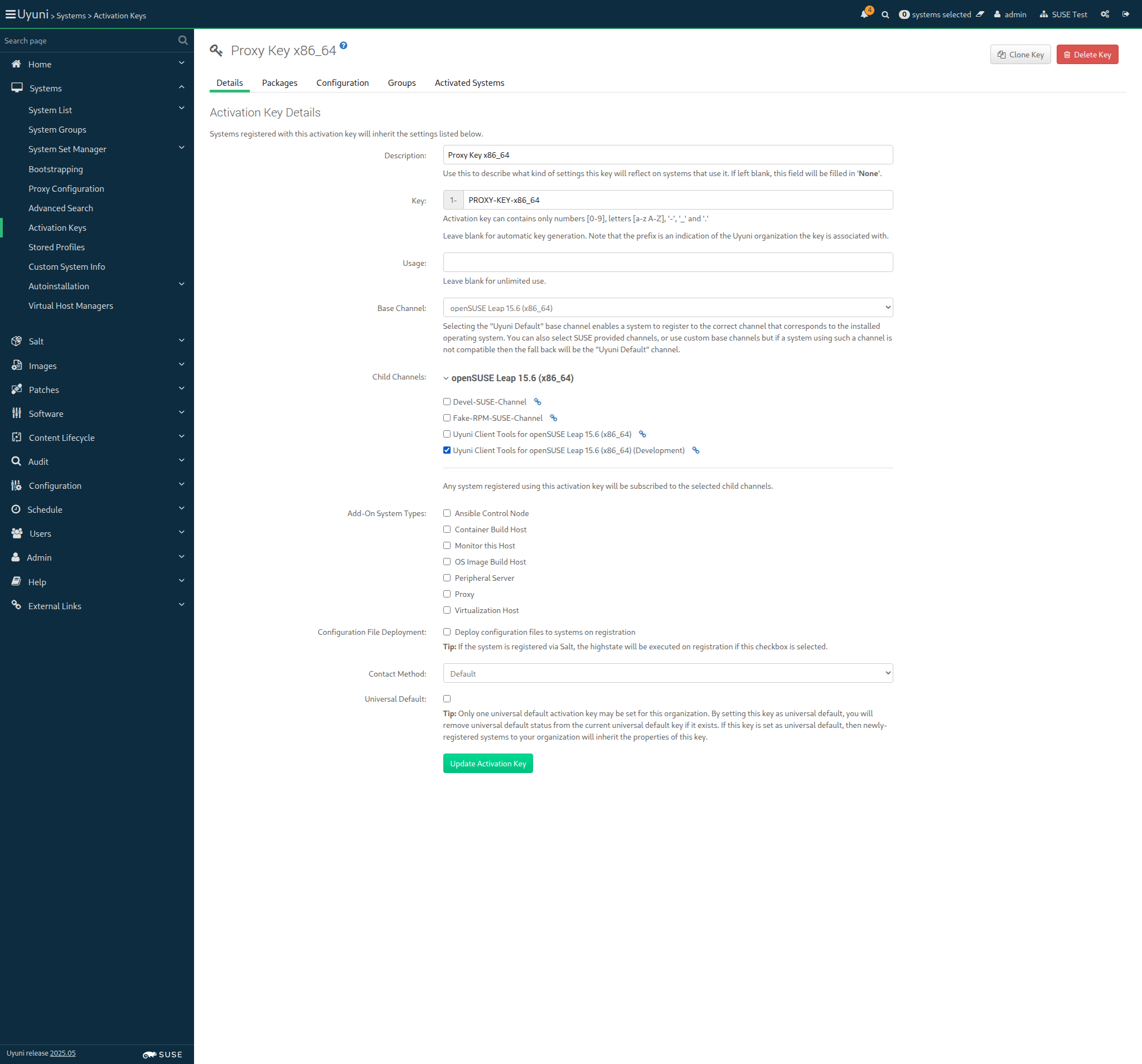
Screenshot +


When I follow the left menu "Systems > Activation Keys" 0s

And I follow "Proxy Key x86_64" in the content area 0s

And I wait for child channels to appear 0s

And I select the parent channel for the "proxy_container" from "selectedBaseChannel" 0s

And I wait for child channels to appear 0s

And I check "SLE Micro 5.5 Update Repository (x86_64)" 0s

And I check "Uyuni Client Tools for openSUSE Leap Micro 5.5 (x86_64)" 0s

And I check "Uyuni Client Tools for openSUSE Leap Micro 5.5 (x86_64) (Development)" 0s

And I click on "Update Activation Key" 0s

Then I should see a "Activation key Proxy Key x86_64 has been modified" text 0s

When I follow the left menu "Systems > Activation Keys" 70ms

And I follow "Build host Key x86_64" in the content area 74ms

And I wait for child channels to appear 1s 127ms

And I select the parent channel for the "build_host" from "selectedBaseChannel" 57ms

And I wait for child channels to appear 497ms

And I include the recommended child channels 195ms

And I wait until "SLE-Module-Basesystem15-SP4-Pool for x86_64" has been checked 21ms

And I wait until "SLE-Module-Basesystem15-SP4-Updates for x86_64" has been checked 21ms

And I wait until "SLE-Module-Server-Applications15-SP4-Pool for x86_64" has been checked 21ms

And I wait until "SLE-Module-Server-Applications15-SP4-Updates for x86_64" has been checked 21ms

And I check "SLE-Module-DevTools15-SP4-Pool for x86_64" 90ms

And I wait until "SLE-Module-DevTools15-SP4-Updates for x86_64" has been checked 21ms

And I wait until "SLE-Module-Desktop-Applications15-SP4-Pool for x86_64" has been checked 21ms

And I wait until "SLE-Module-Desktop-Applications15-SP4-Updates for x86_64" has been checked 23ms

And I check "SLE-Module-Containers15-SP4-Pool for x86_64" 89ms

And I wait until "SLE-Module-Containers15-SP4-Updates for x86_64" has been checked 21ms

And I check "SLE-Product-SLES15-SP4-LTSS-Updates for x86_64" 91ms

And I wait until "SLE-Product-SLES15-SP4-LTSS-Updates for x86_64" has been checked 42ms

And I click on "Update Activation Key" 547ms

Then I should see a "Activation key Build host Key x86_64 has been modified" text 88ms

When I follow the left menu "Systems > Activation Keys" 74ms

And I follow "Build host Key x86_64" in the content area 73ms

And I wait for child channels to appear 884ms

And I select the parent channel for the "build_host" from "selectedBaseChannel" 25ms

And I wait for child channels to appear 342ms

And I check "Uyuni Client Tools for SLES15 SP4 x86_64 (Development)" 108ms

And I wait until "Uyuni Client Tools for SLES15 SP4 x86_64 (Development)" has been checked 16ms

And I click on "Update Activation Key" 547ms

Then I should see a "Activation key Build host Key x86_64 has been modified" text 88ms

@skip_if_github_validation @scc_credentials @uyuni
Scenario:
Update build host key with dev child channel
2s 123ms 9

When I follow the left menu "Systems > Activation Keys" 69ms

And I follow "Build host Key x86_64" in the content area 66ms

And I wait for child channels to appear 888ms

And I select the parent channel for the "build_host" from "selectedBaseChannel" 25ms

And I wait for child channels to appear 350ms

And I check "Devel-Build-Host-Channel" 107ms

And I wait until "Devel-Build-Host-Channel" has been checked 17ms

And I click on "Update Activation Key" 507ms

Then I should see a "Activation key Build host Key x86_64 has been modified" text 89ms

When I follow the left menu "Systems > Activation Keys" 67ms

And I follow "Terminal Key x86_64" in the content area 78ms

And I wait for child channels to appear 1s 230ms

And I select the parent channel for the "pxeboot_minion" from "selectedBaseChannel" 53ms

And I wait for child channels to appear 493ms

And I include the recommended child channels 177ms

And I wait until "SLE-Module-Basesystem15-SP4-Pool for x86_64" has been checked 17ms

And I wait until "SLE-Module-Basesystem15-SP4-Updates for x86_64" has been checked 16ms

And I wait until "SLE-Module-Server-Applications15-SP4-Pool for x86_64" has been checked 16ms

And I wait until "SLE-Module-Server-Applications15-SP4-Updates for x86_64" has been checked 17ms

And I check "SLE-Module-DevTools15-SP4-Pool for x86_64" 77ms

And I wait until "SLE-Module-DevTools15-SP4-Updates for x86_64" has been checked 16ms

And I wait until "SLE-Module-Desktop-Applications15-SP4-Pool for x86_64" has been checked 16ms

And I wait until "SLE-Module-Desktop-Applications15-SP4-Updates for x86_64" has been checked 16ms

And I check "SLE-Module-Containers15-SP4-Pool for x86_64" 77ms

And I wait until "SLE-Module-Containers15-SP4-Updates for x86_64" has been checked 17ms

And I click on "Update Activation Key" 486ms

Then I should see a "Activation key Terminal Key x86_64 has been modified" text 93ms

When I follow the left menu "Systems > Activation Keys" 0s

And I follow "Terminal Key x86_64" in the content area 0s

And I wait for child channels to appear 0s

And I check "Fake-RPM-SUSE-Channel" 0s

And I wait until "Fake-RPM-SUSE-Channel" has been checked 0s

And I click on "Update Activation Key" 0s

Then I should see a "Activation key Terminal Key x86_64 has been modified" text 0s

When I follow the left menu "Systems > Activation Keys" 0s

And I follow "Terminal Key x86_64" in the content area 0s

And I wait for child channels to appear 0s

And I check "Fake-RPM-Terminal-Channel" 0s

And I wait until "Fake-RPM-Terminal-Channel" has been checked 0s

And I click on "Update Activation Key" 0s

Then I should see a "Activation key Terminal Key x86_64 has been modified" text 0s

When I follow the left menu "Systems > Activation Keys" 70ms

And I follow "SUSE Test Key x86_64" in the content area 74ms

And I wait for child channels to appear 769ms

And I check "Devel-SUSE-Channel" 112ms

And I click on "Update Activation Key" 527ms

Then I should see a "Activation key SUSE Test Key x86_64 has been modified" text 91ms

When I follow the left menu "Systems > Activation Keys" 70ms

And I follow "Debian-like Test Key" in the content area 78ms

And I wait for child channels to appear 770ms

And I check "Devel-Debian-like-Channel" 103ms

And I click on "Update Activation Key" 516ms

Then I should see a "Activation key Debian-like Test Key has been modified" text 91ms

When I follow the left menu "Systems > Activation Keys" 67ms

And I follow "RedHat like Test Key" in the content area 71ms

And I wait for child channels to appear 756ms

And I check "Devel-RH-like-Channel" 106ms

And I click on "Update Activation Key" 512ms

Then I should see a "Activation key RedHat like Test Key has been modified" text 90ms

In order to be able to enroll clients with MU repositories
As the system administrator
I create all bootstrap repos with --with-custom-channels option

When I create the bootstrap repositories including custom channels 1s 264ms

base_channel: openSUSE Leap 15.6 (x86_64)
channel: openSUSE-Leap-15.6-x86_64-uyuni
parent_channel:
Creating the bootstrap repository on the server:
mgr-create-bootstrap-repo --create openSUSE-Leap-15.6-x86_64-uyuni --with-custom-channels

When I create the bootstrap repository for "sle_minion" on the server 1s 479ms

base_channel:
channel:
parent_channel:
Creating the bootstrap repository on the server:
mgr-create-bootstrap-repo --create --with-custom-channels

When I create the bootstrap repository for "proxy" on the server 987ms Show Error +
                                            
FAIL: mgrctl exec -it 'mgr-create-bootstrap-repo --create --with-custom-channels' returned status code = 1. Output: '--with-custom-channels' not found (ScriptError) ./features/support/remote_node.rb:123:in `run_local' ./features/support/remote_node.rb:107:in `run' ./features/step_definitions/command_steps.rb:1150:in `/^I create the bootstrap repository for "([^"]*)" on the server((?: without flushing)?)$/' features/reposync/srv_create_bootstrap_repositories.feature:18:in `I create the bootstrap repository for "proxy" on the server'

12s 764ms Show Info +
12:22:15:000 - 12:22:16:000 | Current URL: https://uyuni-master-server.sumaci.aws/rhn/activationkeys/Edit.do?tid=2
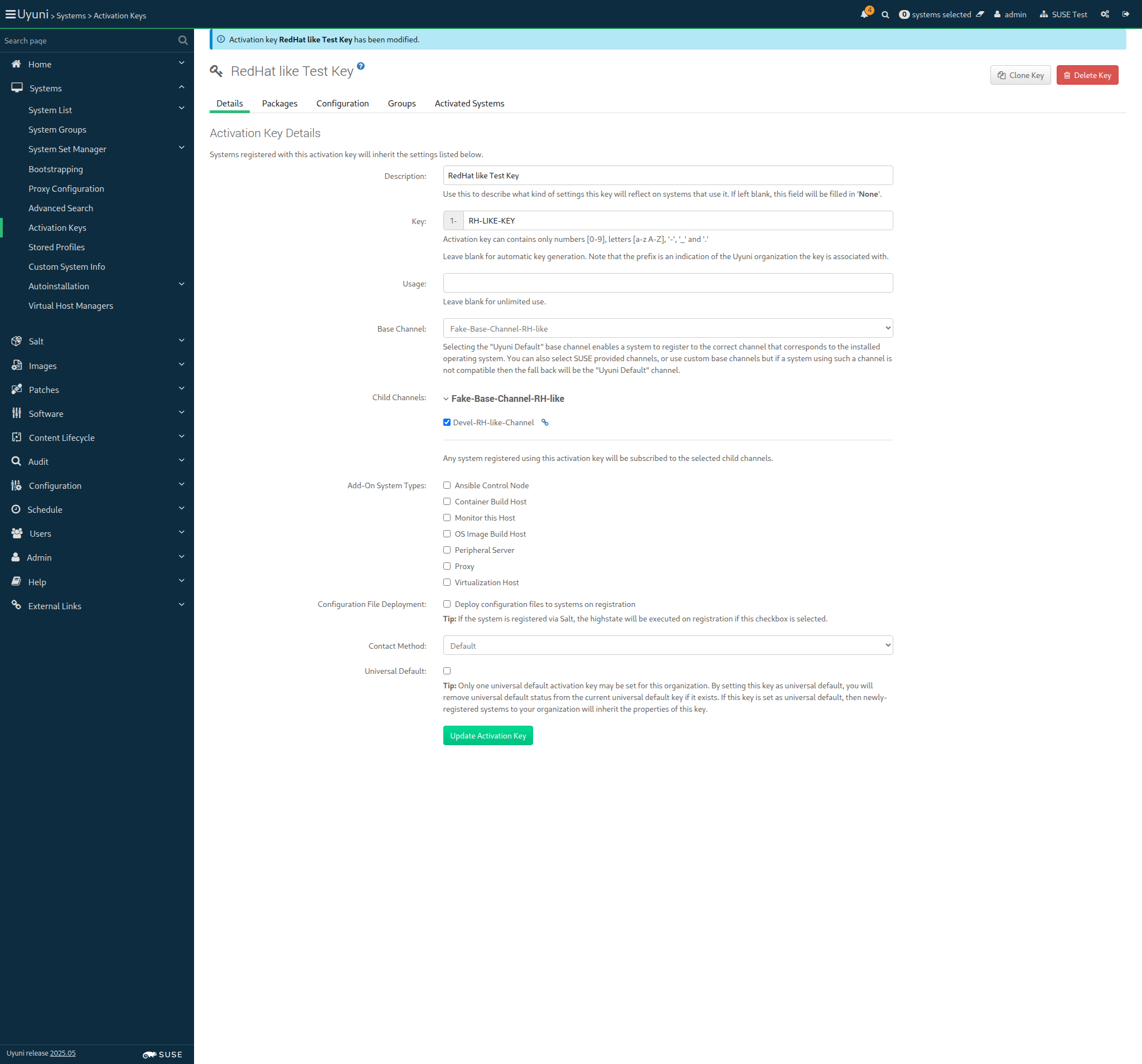
Screenshot +


base_channel: SLE-Product-SLES15-SP4-Pool for x86_64
channel: SLE-15-SP4-x86_64
parent_channel: sle-product-sles15-sp4-pool-x86_64
Creating the bootstrap repository on the server:
mgr-create-bootstrap-repo --create SLE-15-SP4-x86_64 --with-parent-channel sle-product-sles15-sp4-pool-x86_64 --with-custom-channels

When I create the bootstrap repository for "build_host" on the server 1s 404ms

In order for the server to behave correctly after a reboot
I want to be sure that there is no wrong SELinux label

Then files on container volumes should all have the proper SELinux label 184ms

When I execute spacewalk-debug on the server 9s 883ms

Then the tomcat logs should not contain errors 433ms

Then the salt event log on server should contain no failures 936ms

Then the taskomatic logs should not contain errors 486ms

Then the log messages should not contain out of memory errors 437ms

Then the word "scc.suse.com" does not occur more than 100 times in "/var/log/rhn/rhn_web_ui.log" on "server" 0s

Then the word "scc.suse.com" does not occur more than 50 times in "/var/log/rhn/rhn_taskomatic_daemon.log" on "server" 0s