All Scenarios

201

Passed Scenarios

138

Failed Scenarios

24

Skipped Scenarios

39

Execution Time: 70m 41s 847ms

Expand All | Collapse All

In order to use the product
I want to be sure to use a sane environment

Then "server" should have a FQDN 388ms

And reverse resolution should work for "server" 618ms

And the clock from "server" should be exact 653ms

And service "apache2" is enabled on "server" 617ms

And service "apache2" is active on "server" 660ms

And service "cobblerd" is enabled on "server" 618ms

And service "cobblerd" is active on "server" 693ms

And service "rhn-search" is enabled on "server" 677ms

And service "rhn-search" is active on "server" 658ms

And service "salt-api" is enabled on "server" 611ms

And service "salt-api" is active on "server" 664ms

And service "salt-master" is enabled on "server" 610ms

And service "salt-master" is active on "server" 620ms

And service "taskomatic" is enabled on "server" 610ms

And service "taskomatic" is active on "server" 613ms

And socket "tftp" is enabled on "server" 624ms

And socket "tftp" is active on "server" 688ms

And service "tomcat" is enabled on "server" 626ms

And service "tomcat" is active on "server" 621ms

Then "proxy" should have a FQDN 2s 984ms

And reverse resolution should work for "proxy" 311ms

And "proxy" should communicate with the server using public interface 937ms

And the clock from "proxy" should be exact 276ms

Then "sle_minion" should have a FQDN 5s 20ms

And reverse resolution should work for "sle_minion" 445ms

And "sle_minion" should communicate with the server using public interface 1s 101ms

And the clock from "sle_minion" should be exact 462ms

Then "build_host" should have a FQDN 2s 672ms

And reverse resolution should work for "build_host" 327ms

And "build_host" should communicate with the server using public interface 987ms

And the clock from "build_host" should be exact 259ms

Then "ssh_minion" should have a FQDN 4s 472ms

And reverse resolution should work for "ssh_minion" 479ms

And "ssh_minion" should communicate with the server using public interface 1s 37ms

And the clock from "ssh_minion" should be exact 417ms

Then "rhlike_minion" should have a FQDN 1s 881ms

And reverse resolution should work for "rhlike_minion" 183ms

And "rhlike_minion" should communicate with the server using public interface 843ms

And the clock from "rhlike_minion" should be exact 175ms

Then "deblike_minion" should have a FQDN 4s 366ms

And reverse resolution should work for "deblike_minion" 206ms

And "deblike_minion" should communicate with the server using public interface 872ms

And the clock from "deblike_minion" should be exact 201ms

Then it should be possible to reach the test packages 0s

And it should be possible to reach the build sources 0s

And it should be possible to reach the Docker profiles 0s

Then it should be possible to use the HTTP proxy 0s

Then it should be possible to reach the authenticated registry 647ms

Then it should be possible to reach the not authenticated registry 651ms

Then it should be possible to use the custom download endpoint 630ms

In order to use the product
As the admin user
I want to create the organisation, the first users and set the HTTP proxy

When I run "rm -Rf /srv/salt/*" on "server" 629ms

Given I access the host the first time 0s

When I go to the home page 0s

And I enter "SUSE Test" as "orgName" 0s

And I enter "admin" as "login" 0s

And I enter "admin" as "desiredpassword" 0s

And I enter "admin" as "desiredpasswordConfirm" 0s

And I select "Mr." from "prefix" 0s

And I enter "Admin" as "firstNames" 0s

And I enter "Admin" as "lastName" 0s

And I enter "galaxy-noise@localhost" as "email" 0s

And I click on "Create Organization" 0s

Then I am logged in 0s

Given I am authorized for the "Admin" section 40s 85ms

When I wait until mgr-sync refresh is finished 3s 860ms

When I follow the left menu "Users > User List > Active" 194ms

And I follow "Create User" 663ms

And I enter "testing" as "login" 66ms

And I enter "testing" as "desiredpassword" 68ms

And I enter "testing" as "desiredpasswordConfirm" 76ms

And I select "Mr." from "prefix" 50ms

And I enter "Test" as "firstNames" 63ms

And I enter "User" as "lastName" 60ms

And I enter "galaxy-noise@localhost" as "email" 101ms

And I click on "Create Login" 1s 6ms

Then I should see a "Account testing created, login information sent to galaxy-noise@localhost" text 68ms

And I should see a "testing" link 12ms

When I follow the left menu "Users > User List > Active" 74ms

And I follow "testing" 567ms

And I check "role_org_admin" 85ms

And I check "role_system_group_admin" 78ms

And I check "role_channel_admin" 78ms

And I check "role_activation_key_admin" 78ms

And I check "role_config_admin" 77ms

And I click on "Update" 611ms

Then I should see a "User information updated" text 74ms

And I should see a "testing" text 80ms

When I follow the left menu "Admin > Setup Wizard > HTTP Proxy" 0s

Then I should see a "HTTP Proxy Hostname" text 0s

And I should see a "HTTP Proxy Username" text 0s

And I should see a "HTTP Proxy Password" text 0s

When I enter the address of the HTTP proxy as "HTTP Proxy Hostname" 0s

And I enter "suma3" as "HTTP Proxy Username" 0s

And I enter "P4$$w/ord With%and&" as "HTTP Proxy Password" 0s

And I click on "Save and Verify" 0s

Then HTTP proxy verification should have succeeded 0s

* Mon Jan 19 2026 Marek Czernek
- Make syntax in httputil_test compatible with Python 3.6
- Fix KeyError in postgres module with PostgreSQL 17 (bsc#1254325)
- Added:
* fix-tornado-s-httputil_test-syntax-for-python-3.6.patch
* backport-add-maintain-m-privilege-to-postgres-module.patch

* Wed Jan 14 2026 Marek Czernek
- Use internal deb classes instead of external aptsource lib
- Speed up wheel key.finger call (bsc#1240532)
- Add security patches (bsc#1254903,bsc#1254905,bsc#1254904)
- Simplify and speed up utils.find_json function (bsc#1246130)
- Added:
* use-internal-salt.utils.pkg.deb-classes-instead-of-a.patch
* speedup-wheel-key.finger-call-bsc-1240532-713.patch

When I query latest Salt changes on "server" 694ms

In order to test the product using shortcuts
As root user
I want to add pillar data to disable that feature

When I turn off disable_local_repos for all clients 3s 722ms

Given I am authorized for the "Admin" section 0s

When I follow the left menu "Admin > Setup Wizard > Organization Credentials" 0s

And I ask to add new credentials 0s

And I enter the SCC credentials 0s

And I click on "Save" 0s

And I wait until the SCC credentials are valid 0s

In order to set up my personal preferences
As admin
I want to navigate through "Home" submenus changing some settings

Given I am authorized as "admin" with password "admin" 517ms

When I follow the left menu "Home > My Preferences" 68ms

And I select "100" from "pagesize" 67ms

And I click on "Save Preferences" 591ms

Then I should see a "Preferences modified" text 104ms

Given I am authorized as "testing" with password "testing" 2s 838ms

When I follow the left menu "Home > My Preferences" 61ms

And I select "100" from "pagesize" 50ms

And I click on "Save Preferences" 56ms

Then I should see a "Preferences modified" text 100ms

New user kiwikiwi created with roles: image_admin

Given I am authorized for the "Admin" section 2s 289ms

When I create a user with name "kiwikiwi" and password "kiwikiwi" with roles "image_admin" 1s 736ms

New user docker created with roles: image_admin

Given I am authorized for the "Admin" section 448ms

When I create a user with name "docker" and password "docker" with roles "image_admin" 1s 732ms

When I follow the left menu "Images > Stores" 118ms

And I follow "Create" 491ms

And I enter "galaxy-registry" as "label" 101ms

And I enter the URI of the registry as "uri" 173ms

And I click on "create-btn" 91ms

Then I wait until table row contains a "galaxy-registry" text 2s 116ms

And I should see a "Items 1 - 1 of 1" text 63ms

Given I am authorized for the "Admin" section 37s 530ms

When I follow the left menu "Admin > Task Schedules" 153ms

And I follow "mgr-sync-refresh-default" 1s 245ms

And I choose "disabled" 56ms

And I click on "Update Schedule" 1s 484ms

And I click on "Disable Schedule" 1s 641ms

When I follow the left menu "Admin > Task Schedules" 64ms

And I follow "cobbler-sync-default" 1s 353ms

And I choose "disabled" 48ms

And I click on "Update Schedule" 1s 479ms

And I click on "Disable Schedule" 1s 648ms

In order to use software channels
As root user
I want to list available channels and enable them

When I refresh SCC 30s 417ms

And I execute mgr-sync "list channels -e" with user "admin" and password "admin" 2s 260ms

Then I should get "[ ] SLE-Product-SLES15-SP7-Pool for x86_64 SUSE Linux Enterprise Server 15 SP7 x86_64 [sle-product-sles15-sp7-pool-x86_64]" < 1ms

And I should get " [ ] SLE-Product-SLES15-SP7-Updates for x86_64 SUSE Linux Enterprise Server 15 SP7 x86_64 [sle-product-sles15-sp7-updates-x86_64]" < 1ms

And I should get " [ ] SLE15-SP7-Installer-Updates for x86_64 SUSE Linux Enterprise Server 15 SP7 x86_64 [sle15-sp7-installer-updates-x86_64]" < 1ms

When I execute mgr-sync "list channels -e --no-optional" 1s 461ms

Then I should get "[ ] SLE-Product-SLES15-SP7-Pool for x86_64 SUSE Linux Enterprise Server 15 SP7 x86_64 [sle-product-sles15-sp7-pool-x86_64]" < 1ms

And I should get " [ ] SLE-Product-SLES15-SP7-Updates for x86_64 SUSE Linux Enterprise Server 15 SP7 x86_64 [sle-product-sles15-sp7-updates-x86_64]" < 1ms

And I shouldn't get " [ ] SLE15-SP7-Installer-Updates for x86_64 SUSE Linux Enterprise Server 15 SP7 x86_64 [sle15-sp7-installer-updates-x86_64]" < 1ms

When I execute mgr-sync "list products" 1s 464ms

Then I should get "[ ] SUSE Linux Enterprise Server 15 SP7 x86_64" < 1ms

When I execute mgr-sync "list products --expand" 0s

Then I should get "[ ] SUSE Linux Enterprise Server 15 SP7 x86_64" 0s

And I should get " [ ] SUSE Multi-Linux Manager Proxy Extension 5.1 x86_64" 0s

And I should get " [ ] SUSE Multi-Linux Manager Proxy Extension for SLE 5.1 x86_64" 0s

And I should get " [ ] (R) SUSE Multi-Linux Manager Client Tools for SUSE Liberty Linux 7, RHEL and clones 7 x86_64" 0s

And I should get " [ ] (R) SUSE Multi-Linux Manager Client Tools for SLE 15 x86_64" 0s

When I execute mgr-sync "list products --expand --filter x86_64" 1s 450ms

Then I should get "[ ] SUSE Linux Enterprise Server 15 SP7 x86_64" < 1ms

And I shouldn't get "ppc64" < 1ms

And I shouldn't get "s390x" < 1ms

When I remove the mgr-sync cache file 659ms

And I execute mgr-sync refresh 1m 766ms

Then I should get "Timeout. No user input for 60 seconds. Exiting..." < 1ms

When I refresh SCC 28s 100ms

Given I am authorized for the "Admin" section 475ms

When I follow the left menu "Admin > Setup Wizard > Products" 892ms

And I wait until I see "Product Description" text 1s 169ms

Then I should see a "Arch" text 122ms

And I should see a "Channels" text 126ms

And I should not see a "WebYaST 1.3" text 127ms

When I follow the left menu "Admin > Setup Wizard > Products" 69ms

And I wait until I do not see "currently running" text 77ms

And I wait until I do not see "Loading" text 682ms

And I enter "RHEL and Liberty" as the filtered product description 166ms

Then I should see a "RHEL and Liberty 8 Base" text 91ms

When I select "x86_64" from "product-arch-filter" 1s 130ms

Then I should see a "RHEL and Liberty 8 Base" text 94ms

When I follow the left menu "Admin > Setup Wizard > Products" 0s

And I wait until I do not see "currently running" text 0s

And I wait until I do not see "Loading" text 0s

And I enter "SUSE Linux Enterprise Server for SAP Applications 15 x86_64" as the filtered product description 0s

And I click the channel list of product "SUSE Linux Enterprise Server for SAP Applications 15 x86_64" 0s

Then I should see a "Product Channels" text 0s

And I should see a "Mandatory Channels" text 0s

And I should see a "Optional Channels" text 0s

When I close the modal dialog 0s

Given I am authorized for the "Admin" section 0s

When I follow the left menu "Admin > Setup Wizard > Products" 0s

And I wait until I do not see "currently running" text 0s

And I wait until I do not see "Loading" text 0s

And I enter "SUSE Linux Enterprise Server 15 SP7" as the filtered product description 0s

And I wait until I see "SUSE Linux Enterprise Server 15 SP7 x86_64" text 0s

And I open the sub-list of the product "SUSE Linux Enterprise Server 15 SP7 x86_64" 0s

And I open the sub-list of the product "Basesystem Module 15 SP7 x86_64" 0s

And I open the sub-list of the product "Desktop Applications Module 15 SP7 x86_64" 0s

And I open the sub-list of the product "SUSE Multi-Linux Manager Client Tools for SLE 15 x86_64" if present 0s

Then I should see that the "Basesystem Module 15 SP7 x86_64" product is "recommended" 0s

And I should see that the "Server Applications Module 15 SP7 x86_64" product is "recommended" 0s

And I should see that the "SUSE Multi-Linux Manager Client Tools for SLE 15 x86_64" product is "recommended" 0s

When I select "SUSE Linux Enterprise Server 15 SP7 x86_64" as a product 0s

Then I should see the "SUSE Linux Enterprise Server 15 SP7 x86_64" selected 0s

And I should see the "Basesystem Module 15 SP7 x86_64" selected 0s

And I should see the "Server Applications Module 15 SP7 x86_64" selected 0s

And I should see the "SUSE Multi-Linux Manager Client Tools for SLE 15 x86_64" selected 0s

When I select "Desktop Applications Module 15 SP7 x86_64" as a product 0s

And I select "Development Tools Module 15 SP7 x86_64" as a product 0s

Then I should see the "Desktop Applications Module 15 SP7 x86_64" selected 0s

And I should see the "Development Tools Module 15 SP7 x86_64" selected 0s

When I select "Python 3 Module 15 SP7 x86_64" as a product 0s

Then I should see the "Python 3 Module 15 SP7 x86_64" selected 0s

When I select "Containers Module 15 SP7 x86_64" as a product 0s

Then I should see the "Containers Module 15 SP7 x86_64" selected 0s

When I click the Add Product button 0s

And I wait until I see "SUSE Linux Enterprise Server 15 SP7 x86_64" product has been added 0s

Then the SLE15 SP7 product should be added 0s

When I wait until all synchronized channels for "sles15-sp7" have finished 0s

Reposync of channel opensuse_tumbleweed-x86_64 killed
Channel opensuse_tumbleweed-uyuni-client-x86_64 added
Channel opensuse_tumbleweed-uyuni-client-devel-x86_64 added

When I use spacewalk-common-channel to add channel "opensuse_tumbleweed" with arch "x86_64" 7s 881ms

And I kill running spacewalk-repo-sync for "opensuse_tumbleweed-x86_64" channel 1s 349ms

And I use spacewalk-repo-sync to sync channel "opensuse_tumbleweed-x86_64" including only client tools dependencies 1m 34s 992ms

And I use spacewalk-common-channel to add all "tumbleweed-client-tools-x86_64" channels with arch "x86_64" 15s 926ms

Channel opensuse_tumbleweed-x86_64 added
Channel opensuse_tumbleweed-uyuni-client-devel-x86_64 added
Channel uyuni-proxy-devel-tumbleweed-x86_64 added
Channel opensuse_tumbleweed-uyuni-client-devel-x86_64 finished reposync
Channel uyuni-proxy-devel-tumbleweed-x86_64 finished reposync
Channel opensuse_tumbleweed-x86_64 finished reposync
All channels for uyuni-proxy have been fully synced

When I use spacewalk-common-channel to add all "uyuni-proxy" channels with arch "x86_64" 22s 830ms

And I wait until all synchronized channels for "uyuni-proxy" have finished 34s 68ms

Products list: Available Channels: Status: - [I] - channel is installed - [ ] - channel is not installed, but is available - [U] - channel is unavailable [ ] EL9-Pool for x86_64 RHEL and Liberty 9 Base [el9-pool-x86_64] [ ] RHEL7-Pool for x86_64 RHEL7 Base x86_64 [rhel7-pool-x86_64] [ ] RHEL8-Pool for x86_64 RHEL and Liberty 8 Base [rhel8-pool-x86_64] [ ] SLE-Micro-5.3-Pool for x86_64 SUSE Linux Enterprise Micro 5.3 x86_64 [sle-micro-5.3-pool-x86_64] [ ] SLE-Product-SLED15-SP4-Pool for x86_64 SUSE Linux Enterprise Desktop 15 SP4 x86_64 [sle-product-sled15-sp4-pool-x86_64] [ ] SLE-Product-SLES15-SP4-Pool for x86_64 SUSE Linux Enterprise Server 15 SP4 x86_64 [sle-product-sles15-sp4-pool-x86_64] [ ] SLE-Product-SLES15-SP5-Pool for x86_64 SUSE Linux Enterprise Server 15 SP5 x86_64 [sle-product-sles15-sp5-pool-x86_64] [ ] SLE-Product-SLES15-SP6-Pool for x86_64 SUSE Linux Enterprise Server 15 SP6 x86_64 [sle-product-sles15-sp6-pool-x86_64] [I] SLE-Product-SLES15-SP7-Pool for x86_64 SUSE Linux Enterprise Server 15 SP7 x86_64 [sle-product-sles15-sp7-pool-x86_64] [I] SLE-Module-Basesystem15-SP7-Pool for x86_64 Basesystem Module 15 SP7 x86_64 [sle-module-basesystem15-sp7-pool-x86_64] [I] SLE-Module-Basesystem15-SP7-Updates for x86_64 Basesystem Module 15 SP7 x86_64 [sle-module-basesystem15-sp7-updates-x86_64] [ ] SLE-Module-Containers15-SP7-Pool for x86_64 Containers Module 15 SP7 x86_64 [sle-module-containers15-sp7-pool-x86_64] [ ] SLE-Module-Containers15-SP7-Updates for x86_64 Containers Module 15 SP7 x86_64 [sle-module-containers15-sp7-updates-x86_64] [I] SLE-Module-Desktop-Applications15-SP7-Pool for x86_64 Desktop Applications Module 15 SP7 x86_64 [sle-module-desktop-applications15-sp7-pool-x86_64] [I] SLE-Module-Desktop-Applications15-SP7-Updates for x86_64 Desktop Applications Module 15 SP7 x86_64 [sle-module-desktop-applications15-sp7-updates-x86_64] [I] SLE-Module-DevTools15-SP7-Pool for x86_64 Development Tools Module 15 SP7 x86_64 [sle-module-devtools15-sp7-pool-x86_64] [I] SLE-Module-DevTools15-SP7-Updates for x86_64 Development Tools Module 15 SP7 x86_64 [sle-module-devtools15-sp7-updates-x86_64] [ ] SLE-Module-Live-Patching15-SP7-Pool for x86_64 SUSE Linux Enterprise Live Patching 15 SP7 x86_64 [sle-module-live-patching15-sp7-pool-x86_64] [ ] SLE-Module-Live-Patching15-SP7-Updates for x86_64 SUSE Linux Enterprise Live Patching 15 SP7 x86_64 [sle-module-live-patching15-sp7-updates-x86_64] [ ] SLE-Module-Public-Cloud15-SP7-Pool for x86_64 Public Cloud Module 15 SP7 x86_64 [sle-module-public-cloud15-sp7-pool-x86_64] [ ] SLE-Module-Public-Cloud15-SP7-Updates for x86_64 Public Cloud Module 15 SP7 x86_64 [sle-module-public-cloud15-sp7-updates-x86_64] [I] SLE-Module-Python3-15-SP7-Pool for x86_64 Python 3 Module 15 SP7 x86_64 [sle-module-python3-15-sp7-pool-x86_64] [I] SLE-Module-Python3-15-SP7-Updates for x86_64 Python 3 Module 15 SP7 x86_64 [sle-module-python3-15-sp7-updates-x86_64] [I] SLE-Module-Server-Applications15-SP7-Pool for x86_64 Server Applications Module 15 SP7 x86_64 [sle-module-server-applications15-sp7-pool-x86_64] [I] SLE-Module-Server-Applications15-SP7-Updates for x86_64 Server Applications Module 15 SP7 x86_64 [sle-module-server-applications15-sp7-updates-x86_64] [I] SLE-Module-Systems-Management-15-SP7-Pool for x86_64 Systems Management Module 15 SP7 x86_64 [sle-module-systems-management-15-sp7-pool-x86_64] [I] SLE-Module-Systems-Management-15-SP7-Updates for x86_64 Systems Management Module 15 SP7 x86_64 [sle-module-systems-management-15-sp7-updates-x86_64] [ ] SLE-Module-Web-Scripting15-SP7-Pool for x86_64 Web and Scripting Module 15 SP7 x86_64 [sle-module-web-scripting15-sp7-pool-x86_64] [ ] SLE-Module-Web-Scripting15-SP7-Updates for x86_64 Web and Scripting Module 15 SP7 x86_64 [sle-module-web-scripting15-sp7-updates-x86_64] [I] SLE-Product-SLES15-SP7-Updates for x86_64 SUSE Linux Enterprise Server 15 SP7 x86_64 [sle-product-sles15-sp7-updates-x86_64] [I] SLE15-SP7-Installer-Updates for x86_64 SUSE Linux Enterprise Server 15 SP7 x86_64 [sle15-sp7-installer-updates-x86_64] [ ] SUSE-MicroOS-5.2-Pool for x86_64 SUSE Linux Enterprise Micro 5.2 x86_64 [suse-microos-5.2-pool-x86_64]
Channel sles15-sp7-devel-uyuni-client-x86_64 finished reposync
1 minutes out of 102 waiting for 'sles15-sp7' channels to finish reposync
2 minutes out of 102 waiting for 'sles15-sp7' channels to finish reposync
3 minutes out of 102 waiting for 'sles15-sp7' channels to finish reposync
4 minutes out of 102 waiting for 'sles15-sp7' channels to finish reposync
Channel sle-module-desktop-applications15-sp7-pool-x86_64 finished reposync
Channel sle-product-sles15-sp7-pool-x86_64 finished reposync
Channel sle-product-sles15-sp7-updates-x86_64 finished reposync
Channel sle15-sp7-installer-updates-x86_64 finished reposync
Channel sle-module-desktop-applications15-sp7-updates-x86_64 finished reposync
5 minutes out of 102 waiting for 'sles15-sp7' channels to finish reposync
6 minutes out of 102 waiting for 'sles15-sp7' channels to finish reposync
7 minutes out of 102 waiting for 'sles15-sp7' channels to finish reposync
8 minutes out of 102 waiting for 'sles15-sp7' channels to finish reposync
Channel sle-module-basesystem15-sp7-pool-x86_64 finished reposync
9 minutes out of 102 waiting for 'sles15-sp7' channels to finish reposync
10 minutes out of 102 waiting for 'sles15-sp7' channels to finish reposync
11 minutes out of 102 waiting for 'sles15-sp7' channels to finish reposync
12 minutes out of 102 waiting for 'sles15-sp7' channels to finish reposync
13 minutes out of 102 waiting for 'sles15-sp7' channels to finish reposync
14 minutes out of 102 waiting for 'sles15-sp7' channels to finish reposync
15 minutes out of 102 waiting for 'sles15-sp7' channels to finish reposync
Channel sle-module-basesystem15-sp7-updates-x86_64 finished reposync
16 minutes out of 102 waiting for 'sles15-sp7' channels to finish reposync
Channel sle-module-server-applications15-sp7-pool-x86_64 finished reposync
17 minutes out of 102 waiting for 'sles15-sp7' channels to finish reposync
Channel sle-module-server-applications15-sp7-updates-x86_64 finished reposync
Channel sle-module-python3-15-sp7-updates-x86_64 finished reposync
Channel sle-module-python3-15-sp7-pool-x86_64 finished reposync
18 minutes out of 102 waiting for 'sles15-sp7' channels to finish reposync
Channel sle-module-systems-management-15-sp7-pool-x86_64 finished reposync
Channel sle-module-systems-management-15-sp7-updates-x86_64 finished reposync
19 minutes out of 102 waiting for 'sles15-sp7' channels to finish reposync
20 minutes out of 102 waiting for 'sles15-sp7' channels to finish reposync
21 minutes out of 102 waiting for 'sles15-sp7' channels to finish reposync
Channel sle-module-devtools15-sp7-pool-x86_64 finished reposync
22 minutes out of 102 waiting for 'sles15-sp7' channels to finish reposync
23 minutes out of 102 waiting for 'sles15-sp7' channels to finish reposync
24 minutes out of 102 waiting for 'sles15-sp7' channels to finish reposync
25 minutes out of 102 waiting for 'sles15-sp7' channels to finish reposync
26 minutes out of 102 waiting for 'sles15-sp7' channels to finish reposync
27 minutes out of 102 waiting for 'sles15-sp7' channels to finish reposync
28 minutes out of 102 waiting for 'sles15-sp7' channels to finish reposync
29 minutes out of 102 waiting for 'sles15-sp7' channels to finish reposync
Channel sle-module-devtools15-sp7-updates-x86_64 finished reposync
All channels for sles15-sp7 have been fully synced

Given I am authorized for the "Admin" section 462ms

When I follow the left menu "Admin > Setup Wizard > Products" 1s 206ms

And I wait until I do not see "currently running" text 85ms

And I wait until I do not see "Loading" text 678ms

And I enter "SUSE Linux Enterprise Server 15 SP7 x86_64" as the filtered product description 126ms

And I select "SUSE Linux Enterprise Server 15 SP7 x86_64" as a product 72ms

Then I should see the "SUSE Linux Enterprise Server 15 SP7 x86_64" selected 27ms

When I open the sub-list of the product "SUSE Linux Enterprise Server 15 SP7 x86_64" 56ms

And I open the sub-list of the product "Basesystem Module 15 SP7 x86_64" 61ms

And I select "Desktop Applications Module 15 SP7 x86_64" as a product 62ms

Then I should see the "Desktop Applications Module 15 SP7 x86_64" selected 26ms

When I open the sub-list of the product "Desktop Applications Module 15 SP7 x86_64" 67ms

And I select "Development Tools Module 15 SP7 x86_64" as a product 64ms

Then I should see the "Development Tools Module 15 SP7 x86_64" selected 24ms

When I click the Add Product button 58ms

And I wait until I see "Selected channels/products were scheduled successfully for syncing." text 7s 547ms

Then the SLE15 SP7 product should be added 3s 81ms

When I use spacewalk-common-channel to add channel "sles15-sp7-devel-uyuni-client" with arch "x86_64" 8s 845ms

And I wait until I see "SUSE Linux Enterprise Server 15 SP7 x86_64" product has been added 12ms

And I wait until all synchronized channels for "sles15-sp7" have finished 41m 46s 95ms

@proxy @susemanager @transactional_server
Scenario:
Add SL Micro 6.1 as base OS for proxy
< 1ms 13

Given I am authorized for the "Admin" section 0s

When I follow the left menu "Admin > Setup Wizard > Products" 0s

And I wait until I do not see "currently running" text 0s

And I wait until I do not see "Loading" text 0s

And I enter "SUSE Linux Micro 6.1" as the filtered product description 0s

And I select "SUSE Linux Micro 6.1 x86_64" as a product 0s

Then I should see the "SUSE Linux Micro 6.1 x86_64" selected 0s

When I open the sub-list of the product "SUSE Linux Micro 6.1 x86_64" 0s

And I open the sub-list of the product "SUSE Multi-Linux Manager Client Tools for SL Micro 6 x86_64" if present 0s

And I click the Add Product button 0s

And I wait until I see "Selected channels/products were scheduled successfully for syncing." text 0s

And I wait until I see "SUSE Linux Micro 6.1 x86_64" product has been added 0s

And I wait until all synchronized channels for "sl-micro-6.1" have finished 0s

@proxy @susemanager @skip_if_transactional_server
Scenario:
Add SLES 15 SP7 as base OS for proxy
< 1ms 11

Given I am authorized for the "Admin" section 0s

When I follow the left menu "Admin > Setup Wizard > Products" 0s

And I wait until I do not see "currently running" text 0s

And I wait until I do not see "Loading" text 0s

And I enter "SUSE Linux Enterprise Server 15 SP7" as the filtered product description 0s

And I select "SUSE Linux Enterprise Server 15 SP7 (BETA)" as a product 0s

Then I should see the "SUSE Linux Enterprise Server 15 SP7 (BETA)" selected 0s

When I click the Add Product button 0s

And I wait until I see "Selected channels/products were scheduled successfully for syncing." text 0s

And I wait until I see "SUSE Linux Enterprise Server 15 SP7 (BETA)" product has been added 0s

And I wait until all synchronized channels for "sles15-sp7" have finished 0s

Given I am authorized for the "Admin" section 0s

When I follow the left menu "Admin > Setup Wizard > Products" 0s

And I wait until I do not see "currently running" text 0s

And I wait until I do not see "Loading" text 0s

And I enter "SUSE Linux Micro 6.1" as the filtered product description 0s

When I open the sub-list of the product "SUSE Linux Micro 6.1 x86_64" 0s

And I select "SUSE Linux Micro 6.1 x86_64" as a product 0s

And I select "SUSE Multi-Linux Manager Proxy Extension 5.1 x86_64" as a product 0s

Then I should see the "SUSE Multi-Linux Manager Proxy Extension 5.1 x86_64" selected 0s

When I click the Add Product button 0s

And I wait until I see "Selected channels/products were scheduled successfully for syncing." text 0s

And I wait until I see "SUSE Multi-Linux Manager Proxy Extension 5.1 x86_64" product has been added 0s

And I wait until all synchronized channels for "suse-multi-linux-manager-proxy-51" have finished 0s

Given I am authorized for the "Admin" section 0s

When I follow the left menu "Admin > Setup Wizard > Products" 0s

And I wait until I do not see "currently running" text 0s

And I wait until I do not see "Loading" text 0s

And I enter "SUSE Linux Enterprise Server 15 SP7" as the filtered product description 0s

When I open the sub-list of the product "SUSE Linux Enterprise Server 15 SP7 x86_64" 0s

And I select "SUSE Multi-Linux Manager Proxy Extension 5.1 x86_64" as a product 0s

Then I should see the "SUSE Multi-Linux Manager Proxy Extension 5.1 x86_64" selected 0s

When I click the Add Product button 0s

And I wait until I see "Selected channels/products were scheduled successfully for syncing." text 0s

And I wait until I see "SUSE Multi-Linux Manager Proxy Extension 5.1 x86_64" product has been added 0s

And I wait until all synchronized channels for "suse-multi-linux-manager-proxy-51-sp7" have finished 0s

Given I am authorized for the "Admin" section 0s

When I follow the left menu "Admin > Setup Wizard > Products" 0s

And I wait until I do not see "currently running" text 0s

And I wait until I do not see "Loading" text 0s

And I enter "SUSE Linux Micro 6.1" as the filtered product description 0s

When I open the sub-list of the product "SUSE Linux Micro 6.1 x86_64" 0s

And I select "SUSE Linux Micro 6.1 x86_64" as a product 0s

And I select "SUSE Multi-Linux Manager Retail Branch Server Extension 5.1 x86_64" as a product 0s

Then I should see the "SUSE Multi-Linux Manager Retail Branch Server Extension 5.1 x86_64" selected 0s

When I click the Add Product button 0s

And I wait until I see "Selected channels/products were scheduled successfully for syncing." text 0s

And I wait until I see "SUSE Multi-Linux Manager Retail Branch Server Extension 5.1 x86_64" product has been added 0s

And I wait until all synchronized channels for "suse-multi-linux-manager-retail-branch-server-51" have finished 0s

Given I am authorized for the "Admin" section 0s

When I follow the left menu "Admin > Setup Wizard > Products" 0s

And I wait until I do not see "currently running" text 0s

And I wait until I do not see "Loading" text 0s

And I enter "SUSE Linux Enterprise Server 15 SP7" as the filtered product description 0s

When I open the sub-list of the product "SUSE Linux Enterprise Server 15 SP7 x86_64" 0s

And I select "SUSE Multi-Linux Manager Retail Branch Server Extension 5.1 x86_64" as a product 0s

Then I should see the "SUSE Multi-Linux Manager Retail Branch Server Extension 5.1 x86_64" selected 0s

When I click the Add Product button 0s

And I wait until I see "Selected channels/products were scheduled successfully for syncing." text 0s

And I wait until I see "SUSE Multi-Linux Manager Retail Branch Server Extension 5.1 x86_64" product has been added 0s

And I wait until all synchronized channels for "suma-retail-branch-server-extension-51-sp7" have finished 0s

When I execute mgr-sync "list channels" with user "admin" and password "admin" 0s

And I should get " [I] SLE15-SP7-Installer-Updates for x86_64 SUSE Linux Enterprise Server 15 SP7 x86_64 [sle15-sp7-installer-updates-x86_64]" 0s

@scc_credentials @skip_if_github_validation
Scenario:
Detect product loading issues from the UI
43s 702ms 7

Given I am authorized for the "Admin" section 959ms

When I follow the left menu "Admin > Setup Wizard > Products" 665ms

And I wait until I see "Setup Wizard" text 82ms

And I wait until I do not see "Loading" text 670ms

Then I should not see a "Operation not successful" text 124ms

And I select "250" from "pageSize" 1s 144ms

And I should only see success signs in the product list 40s 54ms

When I report the synchronization duration for "sles15-sp7" < 1ms

In Order to distribute software to the clients
As an authorized user
I want to create fake channels for each distribution

Given I am authorized for the "Admin" section 494ms

When I follow the left menu "Software > Manage > Channels" 202ms

And I follow "Create Channel" 325ms

And I enter "Fake-Base-Channel-SUSE-like" as "Channel Name" 127ms

And I enter "fake-base-channel-suse-like" as "Channel Label" 122ms

And I select "None" from "Parent Channel" 56ms

And I select "x86_64" from "Architecture:" 47ms

And I enter "Base channel for testing" as "Channel Summary" 103ms

And I enter "No more description for base channel." as "Channel Description" 124ms

And I click on "Create Channel" 636ms

Then I should see a "Channel Fake-Base-Channel-SUSE-like created." text 83ms

When I follow the left menu "Software > Manage > Channels" 76ms

And I follow "Create Channel" 318ms

And I enter "Fake-Child-Channel-SUSE-like" as "Channel Name" 120ms

And I enter "fake-child-channel-suse-like" as "Channel Label" 112ms

And I select "Fake-Base-Channel-SUSE-like" from "Parent Channel" 73ms

And I select "x86_64" from "Architecture:" 37ms

And I enter "Child channel for testing" as "Channel Summary" 106ms

And I enter "Description for Fake Child Channel SUSE like." as "Channel Description" 140ms

And I click on "Create Channel" 57ms

Then I should see a "Channel Fake-Child-Channel-SUSE-like created." text 81ms

When I follow the left menu "Software > Manage > Channels" 75ms

And I follow "Create Channel" 315ms

And I enter "Fake-RPM-SUSE-Channel" as "Channel Name" 95ms

And I enter "fake-rpm-suse-channel" as "Channel Label" 92ms

And I select the parent channel for the "sle_minion" from "Parent Channel" 52ms

And I select "x86_64" from "Architecture:" 37ms

And I enter "Fake-RPM-SUSE-Channel for testing" as "Channel Summary" 117ms

And I enter "Description for Fake-RPM-SUSE-Channel Child Channel." as "Channel Description" 151ms

And I click on "Create Channel" 558ms

Then I should see a "Channel Fake-RPM-SUSE-Channel created." text 75ms

When I follow the left menu "Software > Manage > Channels" 72ms

And I follow "Create Channel" 319ms

And I enter "Fake-Base-Channel-i586" as "Channel Name" 96ms

And I enter "fake-base-channel-i586" as "Channel Label" 97ms

And I select "None" from "Parent Channel" 42ms

And I select "IA-32" from "Architecture:" 58ms

And I enter "Fake-Base-Channel-i586 channel for testing" as "Channel Summary" 133ms

And I enter "No more description for base channel." as "Channel Description" 119ms

And I click on "Create Channel" 57ms

Then I should see a "Channel Fake-Base-Channel-i586 created." text 77ms

When I follow the left menu "Software > Manage > Channels" 74ms

And I follow "Create Channel" 346ms

And I enter "Fake-Child-Channel-i586" as "Channel Name" 98ms

And I enter "fake-child-channel-i586" as "Channel Label" 95ms

And I select "Fake-Base-Channel-i586" from "Parent Channel" 64ms

And I select "IA-32" from "Architecture:" 38ms

And I enter "Fake Child Channel i586 for testing" as "Channel Summary" 119ms

And I enter "Description for Fake Child Channel i586." as "Channel Description" 123ms

And I click on "Create Channel" 543ms

Then I should see a "Channel Fake-Child-Channel-i586 created." text 76ms

When I follow the left menu "Software > Manage > Channels" 74ms

And I follow "Create Channel" 337ms

And I enter "Test-Base-Channel-x86_64" as "Channel Name" 101ms

And I enter "test-base-channel-x86_64" as "Channel Label" 101ms

And I select "None" from "Parent Channel" 41ms

And I select "x86_64" from "Architecture:" 36ms

And I enter "Test-Base-Channel-x86_64 channel for testing" as "Channel Summary" 133ms

And I enter "No more description for base channel." as "Channel Description" 161ms

And I click on "Create Channel" 509ms

Then I should see a "Channel Test-Base-Channel-x86_64 created." text 80ms

When I follow the left menu "Software > Manage > Channels" 72ms

And I follow "Create Channel" 253ms

And I enter "Test-Child-Channel-x86_64" as "Channel Name" 105ms

And I enter "test-child-channel-x86_64" as "Channel Label" 105ms

And I select "Test-Base-Channel-x86_64" from "Parent Channel" 64ms

And I select "x86_64" from "Architecture:" 37ms

And I enter "Test-Child-Channel-x86_64 channel for testing" as "Channel Summary" 138ms

And I enter "Description for Test-Child-Channel-x86_64 Channel." as "Channel Description" 140ms

And I click on "Create Channel" 58ms

Then I should see a "Channel Test-Child-Channel-x86_64 created." text 75ms

When I follow the left menu "Software > Manage > Channels" 0s

And I follow "Create Channel" 0s

And I enter "Fake-RPM-Terminal-Channel" as "Channel Name" 0s

And I enter "fake-rpm-terminal-channel" as "Channel Label" 0s

And I select the parent channel for the "pxeboot_minion" from "Parent Channel" 0s

And I select "x86_64" from "Architecture:" 0s

And I enter "Fake-RPM-Terminal-Channel for testing" as "Channel Summary" 0s

And I enter "Description for Fake-RPM-Terminal-Channel Child Channel." as "Channel Description" 0s

And I click on "Create Channel" 0s

Then I should see a "Channel Fake-RPM-Terminal-Channel created." text 0s

When I follow the left menu "Software > Manage > Channels" 73ms

And I follow "Create Channel" 250ms

And I enter "Fake-Base-Channel-Debian-like" as "Channel Name" 110ms

And I enter "fake-base-channel-debian-like" as "Channel Label" 109ms

And I select "None" from "Parent Channel" 41ms

And I select "AMD64 Debian" from "Architecture:" 57ms

And I enter "Fake-Base-Channel-Debian-like for testing" as "Channel Summary" 131ms

And I enter "No more description for base channel." as "Channel Description" 115ms

And I uncheck "gpg_check" 10s 68ms

And I click on "Create Channel" 600ms

Then I should see a "Channel Fake-Base-Channel-Debian-like created." text 75ms

When I follow the left menu "Software > Manage > Channels" 76ms

And I follow "Create Channel" 346ms

And I enter "Fake-Base-Channel-RH-like" as "Channel Name" 106ms

And I enter "fake-base-channel-rh-like" as "Channel Label" 102ms

And I select "None" from "Parent Channel" 40ms

And I select "x86_64" from "Architecture:" 44ms

And I enter "Fake-Base-Channel-RH-like for testing" as "Channel Summary" 124ms

And I enter "No more description for base channel." as "Channel Description" 119ms

And I click on "Create Channel" 57ms

Then I should see a "Channel Fake-Base-Channel-RH-like created." text 77ms

When I follow the left menu "Software > Manage > Channels" 71ms

And I follow "Create Channel" 267ms

And I enter "Fake-Base-Channel-AppStream" as "Channel Name" 105ms

And I enter "fake-base-channel-appstream" as "Channel Label" 106ms

And I select "None" from "Parent Channel" 41ms

And I select "x86_64" from "Architecture:" 35ms

And I enter "Fake-Base-Channel-AppStream for testing" as "Channel Summary" 127ms

And I enter "Description for Fake-Base-Channel-AppStream." as "Channel Description" 132ms

And I click on "Create Channel" 508ms

Then I should see a "Channel Fake-Base-Channel-AppStream created." text 76ms

In order to distribute software to the clients
As an authorized user
I want to create a fake repository per fake child channel

Given I am authorized for the "Admin" section 512ms

When I follow the left menu "Software > Manage > Repositories" 181ms

And I follow "Create Repository" 318ms

And I enter "fake-rpm-repo" as "label" 60ms

And I enter "http://localhost/pub/TestRepoRpmUpdates/" as "url" 88ms

And I click on "Create Repository" 61ms

Then I should see a "Repository created successfully" text 72ms

And I should see "metadataSigned" as checked 20ms

When I follow the left menu "Software > Manage > Repositories" 74ms

And I follow "fake-rpm-repo" 314ms

And I uncheck "metadataSigned" 10s 62ms

And I click on "Update Repository" 456ms

Then I should see a "Repository updated successfully" text 66ms

And I should see "metadataSigned" as unchecked 16ms

When I follow the left menu "Software > Manage > Repositories" 72ms

And I follow "Create Repository" 236ms

And I enter "fake-appstream-repo" as "label" 62ms

And I enter "http://localhost/pub/TestRepoAppStream/" as "url" 85ms

And I click on "Create Repository" 424ms

Then I should see a "Repository created successfully" text 75ms

And I should see "metadataSigned" as checked 16ms

When I follow the left menu "Software > Manage > Repositories" 71ms

And I follow "fake-appstream-repo" 229ms

And I uncheck "metadataSigned" 10s 55ms

And I click on "Update Repository" 442ms

Then I should see a "Repository updated successfully" text 64ms

And I should see "metadataSigned" as unchecked 16ms

When I follow the left menu "Software > Manage > Channels" 82ms

And I follow "Fake-RPM-SUSE-Channel" 375ms

And I enter "file:///etc/pki/rpm-gpg/uyuni-tools-gpg-pubkey-0d20833e.key" as "GPG key URL" 174ms

And I click on "Update Channel" 576ms

Then I should see a "Channel Fake-RPM-SUSE-Channel updated" text 79ms

When I follow "Repositories" in the content area 71ms

And I select the "fake-rpm-repo" repo 56ms

And I click on "Save Repositories" 588ms

Then I should see a "Fake-RPM-SUSE-Channel repository information was successfully updated" text 72ms

When I follow the left menu "Software > Manage > Channels" 69ms

And I follow "Test-Child-Channel-x86_64" 447ms

And I enter "file:///etc/pki/rpm-gpg/uyuni-tools-gpg-pubkey-0d20833e.key" as "GPG key URL" 170ms

And I click on "Update Channel" 616ms

Then I should see a "Channel Test-Child-Channel-x86_64 updated" text 76ms

When I follow "Repositories" in the content area 62ms

And I select the "fake-rpm-repo" repo 51ms

And I click on "Save Repositories" 1s 61ms

Then I should see a "Test-Child-Channel-x86_64 repository information was successfully updated" text 72ms

When I follow the left menu "Software > Manage > Channels" 74ms

And I follow "Fake-Base-Channel-RH-like" 433ms

And I enter "file:///etc/pki/rpm-gpg/uyuni-tools-gpg-pubkey-0d20833e.key" as "GPG key URL" 171ms

And I click on "Update Channel" 81ms

Then I should see a "Channel Fake-Base-Channel-RH-like updated" text 75ms

When I follow "Repositories" in the content area 64ms

And I select the "fake-rpm-repo" repo 51ms

And I click on "Save Repositories" 1s 131ms

Then I should see a "Fake-Base-Channel-RH-like repository information was successfully updated" text 73ms

When I follow the left menu "Software > Manage > Channels" 70ms

And I follow "Fake-Base-Channel-AppStream" 350ms

And I enter "file:///etc/pki/rpm-gpg/uyuni-tools-gpg-pubkey-0d20833e.key" as "GPG key URL" 167ms

And I click on "Update Channel" 81ms

Then I should see a "Channel Fake-Base-Channel-AppStream updated" text 80ms

When I follow "Repositories" in the content area 63ms

And I select the "fake-appstream-repo" repo 57ms

And I click on "Save Repositories" 1s 235ms

Then I should see a "Fake-Base-Channel-AppStream repository information was successfully updated" text 71ms

When I follow the left menu "Software > Manage > Repositories" 74ms

And I follow "Create Repository" 235ms

And I enter "fake-i586-repo" as "label" 61ms

And I enter "file:///srv/www/htdocs/pub/TestRepoRpmUpdates/" as "url" 93ms

And I uncheck "metadataSigned" 10s 63ms

And I click on "Create Repository" 436ms

Then I should see a "Repository created successfully" text 66ms

When I follow the left menu "Software > Manage > Channels" 80ms

And I follow "Fake-Child-Channel-i586" 363ms

And I enter "file:///etc/pki/rpm-gpg/uyuni-tools-gpg-pubkey-0d20833e.key" as "GPG key URL" 186ms

And I click on "Update Channel" 509ms

Then I should see a "Channel Fake-Child-Channel-i586 updated" text 76ms

When I follow "Repositories" in the content area 76ms

And I select the "fake-i586-repo" repo 56ms

And I click on "Save Repositories" 599ms

Then I should see a "Fake-Child-Channel-i586 repository information was successfully updated" text 78ms

When I follow the left menu "Software > Manage > Channels" 71ms

And I follow "Fake-Child-Channel-SUSE-like" 364ms

And I follow "Repositories" in the content area 62ms

And I select the "fake-rpm-repo" repo 58ms

And I click on "Save Repositories" 997ms

Then I should see a "Fake-Child-Channel-SUSE-like repository information was successfully updated" text 73ms

When I follow the left menu "Software > Manage > Repositories" 75ms

And I follow "Create Repository" 315ms

And I enter "fake-debian-repo" as "label" 63ms

And I select "deb" from "contenttype" 65ms

And I enter "http://localhost/pub/TestRepoDebUpdates/" as "url" 87ms

And I click on "Create Repository" 55ms

Then I should see a "Repository created successfully" text 449ms

When I follow the left menu "Software > Manage > Channels" 74ms

And I follow "Fake-Base-Channel-Debian-like" 375ms

And I follow "Repositories" in the content area 58ms

And I select the "fake-debian-repo" repo 54ms

And I click on "Save Repositories" 680ms

Then I should see a "Fake-Base-Channel-Debian-like repository information was successfully updated" text 74ms

When I follow the left menu "Software > Manage > Channels" 0s

And I follow "Fake-RPM-Terminal-Channel" 0s

And I enter "file:///etc/pki/rpm-gpg/uyuni-tools-gpg-pubkey-0d20833e.key" as "GPG key URL" 0s

And I click on "Update Channel" 0s

Then I should see a "Channel Fake-RPM-Terminal-Channel updated" text 0s

When I follow "Repositories" in the content area 0s

And I select the "fake-rpm-repo" repo 0s

And I click on "Save Repositories" 0s

Then I should see a "Fake-RPM-Terminal-Channel repository information was successfully updated" text 0s

In Order to use product packages in development to the clients
As an authorized user
I want to create custom channels for each distribution

Given I am authorized for the "Admin" section 533ms

When I follow the left menu "Software > Manage > Channels" 178ms

And I follow "Create Channel" 272ms

And I enter "Devel-SUSE-Channel" as "Channel Name" 105ms

And I enter "devel-suse-channel" as "Channel Label" 97ms

And I select the parent channel for the "sle_minion" from "Parent Channel" 58ms

And I select "x86_64" from "Architecture:" 47ms

And I enter "Devel-SUSE-Channel for development repositories" as "Channel Summary" 149ms

And I enter "Channel containing development repositories" as "Channel Description" 138ms

And I click on "Create Channel" 68ms

Then I should see a "Channel Devel-SUSE-Channel created." text 79ms

When I prepare the development repositories of "sle_minion" as part of "devel-suse-channel" channel 6s 987ms

When I follow the left menu "Software > Manage > Channels" 74ms

And I follow "Create Channel" 358ms

And I enter "Devel-Build-Host-Channel" as "Channel Name" 100ms

And I enter "devel-build-host-channel" as "Channel Label" 98ms

And I select the parent channel for the "build_host" from "Parent Channel" 53ms

And I select "x86_64" from "Architecture:" 66ms

And I enter "Devel-Build-Host-Channel for development repositories" as "Channel Summary" 158ms

And I enter "Channel containing development repositories" as "Channel Description" 138ms

And I click on "Create Channel" 59ms

Then I should see a "Channel Devel-Build-Host-Channel created." text 77ms

When I prepare the development repositories of "build_host" as part of "devel-build-host-channel" channel 4s 84ms

When I follow the left menu "Software > Manage > Channels" 73ms

And I follow "Create Channel" 271ms

And I enter "Devel-Debian-like-Channel" as "Channel Name" 102ms

And I enter "devel-debian-like-channel" as "Channel Label" 102ms

And I select "Fake-Base-Channel-Debian-like" from "Parent Channel" 65ms

And I select "AMD64 Debian" from "Architecture:" 55ms

And I enter "Devel-Debian-like-Channel for development repositories" as "Channel Summary" 153ms

And I enter "Channel containing development repositories" as "Channel Description" 129ms

And I click on "Create Channel" 57ms

Then I should see a "Channel Devel-Debian-like-Channel created." text 78ms

When I prepare the development repositories of "deblike_minion" as part of "devel-debian-like-channel" channel 7s 264ms

When I follow the left menu "Software > Manage > Channels" 72ms

And I follow "Create Channel" 272ms

And I enter "Devel-RH-like-Channel" as "Channel Name" 150ms

And I enter "devel-rh-like-channel" as "Channel Label" 118ms

And I select "Fake-Base-Channel-RH-like" from "Parent Channel" 68ms

And I select "x86_64" from "Architecture:" 37ms

And I enter "Devel-RH-like-Channel for development repositories" as "Channel Summary" 148ms

And I enter "Channel containing development repositories" as "Channel Description" 128ms

And I click on "Create Channel" 57ms

Then I should see a "Channel Devel-RH-like-Channel created." text 82ms

When I prepare the development repositories of "rhlike_minion" as part of "devel-rh-like-channel" channel 4s 412ms

In order to use the content provided inside the repositories of the fake channels
As admin
I want to synchronize the fake channels

Given I am authorized for the "Admin" section 429ms

And I enable source package syncing 1s 470ms

Given I am authorized for the "Admin" section 430ms

When I follow the left menu "Software > Manage > Channels" 164ms

And I follow "Fake-RPM-SUSE-Channel" 382ms

And I follow "Repositories" in the content area 57ms

And I follow "Sync" 345ms

And I wait at most 60 seconds until I do not see "Repository sync is running." text, refreshing the page 66ms

And I click on "Sync Now" 1s 834ms

Then I should see a "Repository sync scheduled for Fake-RPM-SUSE-Channel." text 70ms

And I wait until the channel "fake-rpm-suse-channel" has been synced 507ms

Then "orion-dummy-1.1-1.1.x86_64.rpm" package should have been stored 5s 73ms

And solver file for "fake-rpm-suse-channel" should reference "orion-dummy-1.1-1.1.x86_64.rpm" 661ms

Given I am authorized for the "Admin" section 465ms

When I follow the left menu "Software > Manage > Channels" 158ms

And I follow "Fake-Child-Channel-i586" 399ms

And I follow "Repositories" in the content area 62ms

And I follow "Sync" 339ms

And I wait at most 60 seconds until I do not see "Repository sync is running." text, refreshing the page 67ms

And I click on "Sync Now" 1s 774ms

Then I should see a "Repository sync scheduled for Fake-Child-Channel-i586." text 67ms

And I wait until the channel "fake-child-channel-i586" has been synced 373ms

Given I am authorized for the "Admin" section 464ms

When I follow the left menu "Software > Manage > Channels" 161ms

And I follow "Test-Child-Channel-x86_64" 374ms

And I follow "Repositories" in the content area 64ms

And I follow "Sync" 716ms

And I wait at most 60 seconds until I do not see "Repository sync is running." text, refreshing the page 68ms

And I click on "Sync Now" 1s 774ms

Then I should see a "Repository sync scheduled for Test-Child-Channel-x86_64." text 70ms

And I wait until the channel "test-child-channel-x86_64" has been synced 396ms

Given I am authorized for the "Admin" section 468ms

When I follow the left menu "Software > Manage > Channels" 165ms

And I follow "Fake-Child-Channel-SUSE-like" 397ms

And I follow "Repositories" in the content area 61ms

And I follow "Sync" 786ms

And I wait at most 60 seconds until I do not see "Repository sync is running." text, refreshing the page 69ms

And I click on "Sync Now" 1s 832ms

Then I should see a "Repository sync scheduled for Fake-Child-Channel-SUSE-like." text 71ms

And I wait until the channel "fake-child-channel-suse-like" has been synced 31s 340ms

Given I am authorized for the "Admin" section 456ms

When I follow the left menu "Software > Manage > Channels" 171ms

And I follow "Fake-Base-Channel-Debian-like" 390ms

And I follow "Repositories" in the content area 64ms

And I follow "Sync" 261ms

And I wait at most 60 seconds until I do not see "Repository sync is running." text, refreshing the page 70ms

And I click on "Sync Now" 1s 833ms

Then I should see a "Repository sync scheduled for Fake-Base-Channel-Debian-like." text 70ms

And I wait until the channel "fake-base-channel-debian-like" has been synced 453ms

Given I am authorized for the "Admin" section 467ms

When I follow the left menu "Software > Manage > Channels" 158ms

And I follow "Fake-Base-Channel-RH-like" 302ms

And I follow "Repositories" in the content area 66ms

And I follow "Sync" 782ms

And I wait at most 60 seconds until I do not see "Repository sync is running." text, refreshing the page 69ms

And I click on "Sync Now" 1s 893ms

Then I should see a "Repository sync scheduled for Fake-Base-Channel-RH-like." text 65ms

And I wait until the channel "fake-base-channel-rh-like" has been synced 386ms

Given I am authorized for the "Admin" section 467ms

When I follow the left menu "Software > Manage > Channels" 163ms

And I follow "Fake-Base-Channel-AppStream" 386ms

And I follow "Repositories" in the content area 59ms

And I follow "Sync" 699ms

And I wait at most 60 seconds until I do not see "Repository sync is running." text, refreshing the page 67ms

And I click on "Sync Now" 1s 765ms

Then I should see a "Repository sync scheduled for Fake-Base-Channel-AppStream." text 65ms

And I wait until the channel "fake-base-channel-appstream" has been synced 387ms

Given I am authorized for the "Admin" section 0s

And I follow the left menu "Software > Manage > Channels" 0s

And I follow "Fake-RPM-Terminal-Channel" 0s

And I follow "Repositories" in the content area 0s

And I follow "Sync" 0s

And I wait at most 60 seconds until I do not see "Repository sync is running." text, refreshing the page 0s

And I click on "Sync Now" 0s

Then I should see a "Repository sync scheduled for Fake-RPM-Terminal-Channel." text 0s

And I wait until the channel "fake-rpm-terminal-channel" has been synced 0s

Then "orion-dummy-1.1-1.1.x86_64.rpm" package should have been stored 0s

And solver file for "fake-rpm-terminal-channel" should reference "orion-dummy-1.1-1.1.x86_64.rpm" 0s

When I follow the left menu "Admin > Task Schedules" 116ms

And I follow "errata-cache-default" 1s 344ms

And I follow "errata-cache-bunch" 1s 294ms

And I click on "Single Run Schedule" 1s 271ms

Then I should see a "bunch was scheduled" text 269ms

And I wait until the table contains "FINISHED" or "SKIPPED" followed by "FINISHED" in its first rows 2s 317ms

When I follow the left menu "Admin > Task Schedules" 68ms

And I follow "channel-repodata-default" 375ms

And I follow "channel-repodata-bunch" 1s 390ms

And I click on "Single Run Schedule" 1s 139ms

Then I should see a "bunch was scheduled" text 193ms

And I wait until the table contains "FINISHED" or "SKIPPED" followed by "FINISHED" in its first rows 1s 950ms

Then I disable source package syncing 970ms

In order to use the content provided inside the repositories of the dev channels
As admin
I want to synchronize the dev channels

Given I am authorized for the "Admin" section 427ms

When I follow the left menu "Software > Manage > Channels" 191ms

And I follow "Devel-SUSE-Channel" 377ms

And I follow "Repositories" in the content area 78ms

And I follow "Sync" 434ms

And I wait at most 60 seconds until I do not see "Repository sync is running." text, refreshing the page 68ms

And I click on "Sync Now" 1s 861ms

Then I should see a "Repository sync scheduled for Devel-SUSE-Channel." text 70ms

And I wait until the channel "devel-suse-channel" has been synced 367ms

Given I am authorized for the "Admin" section 503ms

When I follow the left menu "Software > Manage > Channels" 158ms

And I follow "Devel-Debian-like-Channel" 372ms

And I follow "Repositories" in the content area 64ms

And I follow "Sync" 795ms

And I wait at most 60 seconds until I do not see "Repository sync is running." text, refreshing the page 68ms

And I click on "Sync Now" 1s 838ms

Then I should see a "Repository sync scheduled for Devel-Debian-like-Channel." text 69ms

And I wait until the channel "devel-debian-like-channel" has been synced 379ms

Given I am authorized for the "Admin" section 474ms

When I follow the left menu "Software > Manage > Channels" 153ms

And I follow "Devel-RH-like-Channel" 390ms

And I follow "Repositories" in the content area 59ms

And I follow "Sync" 884ms

And I wait at most 60 seconds until I do not see "Repository sync is running." text, refreshing the page 68ms

And I click on "Sync Now" 1s 863ms

Then I should see a "Repository sync scheduled for Devel-RH-like-Channel." text 67ms

And I wait until the channel "devel-rh-like-channel" has been synced 425ms

Given I am authorized for the "Admin" section 469ms

When I follow the left menu "Software > Manage > Channels" 162ms

And I follow "Devel-Build-Host-Channel" 394ms

And I follow "Repositories" in the content area 59ms

And I follow "Sync" 784ms

And I wait at most 60 seconds until I do not see "Repository sync is running." text, refreshing the page 66ms

And I click on "Sync Now" 1s 835ms

Then I should see a "Repository sync scheduled for Devel-Build-Host-Channel." text 67ms

And I wait until the channel "devel-build-host-channel" has been synced 525ms

In order to register systems to the server
As the testing user
I want to use activation keys

Given I am authorized for the "Admin" section 546ms

When I create an activation key with id "SUSE-KEY-x86_64", description "SUSE Test Key x86_64", limit of 20 and contact method "default" 1s 898ms

Then I should get the new activation key "1-SUSE-KEY-x86_64" 511ms

When I create an activation key with id "RH-LIKE-KEY", description "RedHat like Test Key", base channel "fake-base-channel-rh-like", limit of 20 and contact method "default" 2s 270ms

Then I should get the new activation key "1-RH-LIKE-KEY" 1s 108ms

When I create an activation key with id "DEBLIKE-KEY", description "Debian-like Test Key", base channel "fake-base-channel-debian-like", limit of 20 and contact method "default" 1s 222ms

Then I should get the new activation key "1-DEBLIKE-KEY" 832ms

When I create an activation key with id "SUSE-SSH-KEY-x86_64", description "SUSE SSH Test Key x86_64", limit of 20 and contact method "ssh-push" 997ms

Then I should get the new activation key "1-SUSE-SSH-KEY-x86_64" 941ms

When I create an activation key with id "SUSE-SSH-TUNNEL-KEY-x86_64", description "SUSE SSH Tunnel Test Key x86_64", limit of 20 and contact method "ssh-push-tunnel" 906ms

Then I should get the new activation key "1-SUSE-SSH-TUNNEL-KEY-x86_64" 1s 405ms

When I create an activation key with id "PROXY-KEY-x86_64", description "Proxy Key x86_64", limit of 1 882ms

Then I should get the new activation key "1-PROXY-KEY-x86_64" 1s 173ms

When I create an activation key with id "BUILD-HOST-KEY-x86_64", description "Build host Key x86_64" 838ms

And I set the entitlements of the activation key "1-BUILD-HOST-KEY-x86_64" to "container_build_host, osimage_build_host" 481ms

Then I should get the new activation key "1-BUILD-HOST-KEY-x86_64" 1s 258ms

When I create an activation key with id "TERMINAL-KEY-x86_64", description "Terminal Key x86_64" 788ms

Then I should get the new activation key "1-TERMINAL-KEY-x86_64" 1s 362ms

In order to register systems to the spacewalk server
As admin
I want to update activation keys to use synchronized base products

Given I am authorized for the "Admin" section 483ms

When I follow the left menu "Systems > Activation Keys" 0s

And I follow "SUSE Test Key x86_64" in the content area 0s

And I wait for child channels to appear 0s

And I select the parent channel for the "sle_minion" from "selectedBaseChannel" 0s

And I wait for child channels to appear 0s

And I include the recommended child channels 0s

And I wait until "SLE-Module-Basesystem15-SP7-Pool for x86_64" has been checked 0s

And I wait until "SLE-Module-Basesystem15-SP7-Updates for x86_64" has been checked 0s

And I wait until "SLE-Module-Server-Applications15-SP7-Pool for x86_64" has been checked 0s

And I wait until "SLE-Module-Server-Applications15-SP7-Updates for x86_64" has been checked 0s

And I check "SLE-Module-DevTools15-SP7-Pool for x86_64" 0s

And I wait until "SLE-Module-DevTools15-SP7-Updates for x86_64" has been checked 0s

And I wait until "SLE-Module-Desktop-Applications15-SP7-Pool for x86_64" has been checked 0s

And I wait until "SLE-Module-Desktop-Applications15-SP7-Updates for x86_64" has been checked 0s

And I check "SLE-Module-Containers15-SP7-Pool for x86_64" 0s

And I wait until "SLE-Module-Containers15-SP7-Updates for x86_64" has been checked 0s

And I check "Fake-RPM-SUSE-Channel" 0s

And I wait until "Fake-RPM-SUSE-Channel" has been checked 0s

And I click on "Update Activation Key" 0s

Then I should see a "Activation key SUSE Test Key x86_64 has been modified" text 0s

When I follow the left menu "Systems > Activation Keys" 123ms

And I follow "SUSE Test Key x86_64" in the content area 67ms

And I wait until I do not see "Loading..." text 597ms

And I select the parent channel for the "sle_minion" from "selectedBaseChannel" 61ms

And I wait until I do not see "Loading..." text 74ms

And I check "Uyuni Client Tools for openSUSE Tumbleweed (x86_64) (Development)" 686ms

And I check "Fake-RPM-SUSE-Channel" 94ms

And I wait until "Fake-RPM-SUSE-Channel" has been checked 17ms

And I click on "Update Activation Key" 67ms

Then I should see a "Activation key SUSE Test Key x86_64 has been modified" text 77ms

When I follow the left menu "Systems > Activation Keys" 0s

And I follow "SUSE SSH Test Key x86_64" in the content area 0s

And I wait for child channels to appear 0s

And I select the parent channel for the "sle_minion" from "selectedBaseChannel" 0s

And I wait for child channels to appear 0s

And I include the recommended child channels 0s

And I check "SLE-Module-DevTools15-SP7-Pool for x86_64" 0s

And I wait until "SLE-Module-DevTools15-SP7-Updates for x86_64" has been checked 0s

And I wait until "SLE-Module-Desktop-Applications15-SP7-Pool for x86_64" has been checked 0s

And I wait until "SLE-Module-Desktop-Applications15-SP7-Updates for x86_64" has been checked 0s

And I check "Fake-RPM-SUSE-Channel" 0s

And I wait until "Fake-RPM-SUSE-Channel" has been checked 0s

And I click on "Update Activation Key" 0s

Then I should see a "Activation key SUSE SSH Test Key x86_64 has been modified" text 0s

When I follow the left menu "Systems > Activation Keys" 68ms

And I follow "SUSE SSH Test Key x86_64" in the content area 71ms

And I wait until I do not see "Loading..." text 489ms

And I select the parent channel for the "sle_minion" from "selectedBaseChannel" 41ms

And I wait until I do not see "Loading..." text 73ms

And I check "Uyuni Client Tools for openSUSE Tumbleweed (x86_64) (Development)" 604ms

And I check "Fake-RPM-SUSE-Channel" 75ms

And I wait until "Fake-RPM-SUSE-Channel" has been checked 16ms

And I click on "Update Activation Key" 607ms

Then I should see a "Activation key SUSE SSH Test Key x86_64 has been modified" text 71ms

When I follow the left menu "Systems > Activation Keys" 0s

And I follow "SUSE SSH Tunnel Test Key x86_64" in the content area 0s

And I wait for child channels to appear 0s

And I select the parent channel for the "sle_minion" from "selectedBaseChannel" 0s

And I wait for child channels to appear 0s

And I include the recommended child channels 0s

And I check "SLE-Module-DevTools15-SP7-Pool for x86_64" 0s

And I wait until "SLE-Module-DevTools15-SP7-Updates for x86_64" has been checked 0s

And I wait until "SLE-Module-Desktop-Applications15-SP7-Pool for x86_64" has been checked 0s

And I wait until "SLE-Module-Desktop-Applications15-SP7-Updates for x86_64" has been checked 0s

And I check "Fake-RPM-SUSE-Channel" 0s

And I wait until "Fake-RPM-SUSE-Channel" has been checked 0s

And I click on "Update Activation Key" 0s

Then I should see a "Activation key SUSE SSH Tunnel Test Key x86_64 has been modified" text 0s

When I follow the left menu "Systems > Activation Keys" 61ms

And I follow "SUSE SSH Tunnel Test Key x86_64" in the content area 68ms

And I wait until I do not see "Loading..." text 574ms

And I select the parent channel for the "sle_minion" from "selectedBaseChannel" 42ms

And I wait until I do not see "Loading..." text 72ms

And I check "Uyuni Client Tools for openSUSE Tumbleweed (x86_64) (Development)" 565ms

And I check "Fake-RPM-SUSE-Channel" 70ms

And I wait until "Fake-RPM-SUSE-Channel" has been checked 15ms

And I click on "Update Activation Key" 636ms

Then I should see a "Activation key SUSE SSH Tunnel Test Key x86_64 has been modified" text 74ms

@scc_credentials @susemanager @proxy @containerized_server @transactional_server
Scenario:
Update the SLE Micro proxy key with synced base product
< 1ms 11

When I follow the left menu "Systems > Activation Keys" 0s

And I follow "Proxy Key x86_64" in the content area 0s

And I wait for child channels to appear 0s

And I select the parent channel for the "proxy_container" from "selectedBaseChannel" 0s

And I wait for child channels to appear 0s

And I include the recommended child channels 0s

And I wait until "ManagerTools-SL-Micro-6.1 for x86_64" has been checked 0s

And I check "SUSE-Multi-Linux-Manager-Proxy-5.1 for x86_64" 0s

And I check "SUSE-Multi-Linux-Manager-Retail-Branch-Server-5.1 for x86_64" 0s

And I click on "Update Activation Key" 0s

Then I should see a "Activation key Proxy Key x86_64 has been modified" text 0s

@scc_credentials @susemanager @proxy @containerized_server @skip_if_transactional_server
Scenario:
Update the SLES proxy key with synced base product
< 1ms 11

When I follow the left menu "Systems > Activation Keys" 0s

And I follow "Proxy Key x86_64" in the content area 0s

And I wait for child channels to appear 0s

And I select the parent channel for the "proxy_nontransactional" from "selectedBaseChannel" 0s

And I wait for child channels to appear 0s

And I include the recommended child channels 0s

And I wait until "ManagerTools-SLE15-Pool for x86_64 SP7" has been checked 0s

And I check "SUSE-Manager-Proxy-5.1-Pool for x86_64" 0s

And I check "SUSE-Manager-Proxy-5.1-Updates for x86_64" 0s

And I click on "Update Activation Key" 0s

Then I should see a "Activation key Proxy Key x86_64 has been modified" text 0s

When I follow the left menu "Systems > Activation Keys" 0s

And I follow "Proxy Key x86_64" in the content area 0s

And I wait for child channels to appear 0s

And I select the parent channel for the "proxy_container" from "selectedBaseChannel" 0s

And I wait for child channels to appear 0s

And I check "Uyuni Client Tools for openSUSE Tumbleweed (x86_64) (Development)" 0s

And I click on "Update Activation Key" 0s

Then I should see a "Activation key Proxy Key x86_64 has been modified" text 0s

When I follow the left menu "Systems > Activation Keys" 59ms

And I follow "Build host Key x86_64" in the content area 69ms

And I wait for child channels to appear 1s 577ms

And I select the parent channel for the "build_host" from "selectedBaseChannel" 53ms

And I wait for child channels to appear 637ms

And I include the recommended child channels 182ms

And I wait until "SLE-Module-Basesystem15-SP7-Pool for x86_64" has been checked 24ms

And I wait until "SLE-Module-Basesystem15-SP7-Updates for x86_64" has been checked 20ms

And I wait until "SLE-Module-Server-Applications15-SP7-Pool for x86_64" has been checked 19ms

And I wait until "SLE-Module-Server-Applications15-SP7-Updates for x86_64" has been checked 20ms

And I check "SLE-Module-DevTools15-SP7-Pool for x86_64" 83ms

And I wait until "SLE-Module-DevTools15-SP7-Updates for x86_64" has been checked 20ms

And I wait until "SLE-Module-Desktop-Applications15-SP7-Pool for x86_64" has been checked 19ms

And I wait until "SLE-Module-Desktop-Applications15-SP7-Updates for x86_64" has been checked 19ms

And I wait until "SLE-Module-Systems-Management-15-SP7-Pool for x86_64" has been checked 19ms

And I wait until "SLE-Module-Systems-Management-15-SP7-Updates for x86_64" has been checked 19ms

And I wait until "SLE-Module-Python3-15-SP7-Pool for x86_64" has been checked 20ms

And I wait until "SLE-Module-Python3-15-SP7-Updates for x86_64" has been checked 18ms

And I click on "Update Activation Key" 661ms

Then I should see a "Activation key Build host Key x86_64 has been modified" text 71ms

When I follow the left menu "Systems > Activation Keys" 62ms

And I follow "Build host Key x86_64" in the content area 61ms

And I wait for child channels to appear 937ms

And I select the parent channel for the "build_host" from "selectedBaseChannel" 24ms

And I wait for child channels to appear 316ms

And I check "Uyuni Client Tools for SLES15 SP7 x86_64 (Development)" 86ms

And I wait until "Uyuni Client Tools for SLES15 SP7 x86_64 (Development)" has been checked 16ms

And I click on "Update Activation Key" 56ms

Then I should see a "Activation key Build host Key x86_64 has been modified" text 614ms

@skip_if_github_validation @scc_credentials @uyuni @build_host
Scenario:
Update build host key with dev child channel
2s 236ms 9

When I follow the left menu "Systems > Activation Keys" 61ms

And I follow "Build host Key x86_64" in the content area 62ms

And I wait for child channels to appear 960ms

And I select the parent channel for the "build_host" from "selectedBaseChannel" 24ms

And I wait for child channels to appear 318ms

And I check "Devel-Build-Host-Channel" 120ms

And I wait until "Devel-Build-Host-Channel" has been checked 15ms

And I click on "Update Activation Key" 601ms

Then I should see a "Activation key Build host Key x86_64 has been modified" text 72ms

When I follow the left menu "Systems > Activation Keys" 62ms

And I follow "Terminal Key x86_64" in the content area 68ms

And I wait for child channels to appear 1s 412ms

And I select the parent channel for the "pxeboot_minion" from "selectedBaseChannel" 48ms

And I wait for child channels to appear 462ms

And I include the recommended child channels 163ms

And I wait until "SLE-Module-Basesystem15-SP7-Pool for x86_64" has been checked 16ms

And I wait until "SLE-Module-Basesystem15-SP7-Updates for x86_64" has been checked 15ms

And I wait until "SLE-Module-Server-Applications15-SP7-Pool for x86_64" has been checked 16ms

And I wait until "SLE-Module-Server-Applications15-SP7-Updates for x86_64" has been checked 16ms

And I check "SLE-Module-DevTools15-SP7-Pool for x86_64" 73ms

And I wait until "SLE-Module-DevTools15-SP7-Updates for x86_64" has been checked 16ms

And I wait until "SLE-Module-Desktop-Applications15-SP7-Pool for x86_64" has been checked 15ms

And I wait until "SLE-Module-Desktop-Applications15-SP7-Updates for x86_64" has been checked 15ms

And I click on "Update Activation Key" 643ms

Then I should see a "Activation key Terminal Key x86_64 has been modified" text 71ms

When I follow the left menu "Systems > Activation Keys" 0s

And I follow "Terminal Key x86_64" in the content area 0s

And I wait for child channels to appear 0s

And I check "SLE-Module-Containers15-SP7-Pool for x86_64" 0s

And I wait until "SLE-Module-Containers15-SP7-Updates for x86_64" has been checked 0s

And I check "Fake-RPM-SUSE-Channel" 0s

And I wait until "Fake-RPM-SUSE-Channel" has been checked 0s

And I click on "Update Activation Key" 0s

Then I should see a "Activation key Terminal Key x86_64 has been modified" text 0s

@pxeboot_minion @uyuni @scc_credentials @build_host
Scenario:
Update terminal key with specific fake channel
< 1ms 9

When I follow the left menu "Systems > Activation Keys" 0s

And I follow "Terminal Key x86_64" in the content area 0s

And I wait for child channels to appear 0s

And I check "Fake-RPM-Terminal-Channel" 0s

And I wait until "Fake-RPM-Terminal-Channel" has been checked 0s

And I check "Uyuni Client Tools for SLES15 SP7 x86_64 (Development)" 0s

And I wait until "Uyuni Client Tools for SLES15 SP7 x86_64 (Development)" has been checked 0s

And I click on "Update Activation Key" 0s

Then I should see a "Activation key Terminal Key x86_64 has been modified" text 0s

When I follow the left menu "Systems > Activation Keys" 65ms

And I follow "SUSE Test Key x86_64" in the content area 68ms

And I wait for child channels to appear 899ms

And I check "Devel-SUSE-Channel" 104ms

And I click on "Update Activation Key" 560ms

Then I should see a "Activation key SUSE Test Key x86_64 has been modified" text 75ms

When I follow the left menu "Systems > Activation Keys" 64ms

And I follow "Debian-like Test Key" in the content area 68ms

And I wait for child channels to appear 910ms

And I check "Devel-Debian-like-Channel" 102ms

And I click on "Update Activation Key" 564ms

Then I should see a "Activation key Debian-like Test Key has been modified" text 72ms

When I follow the left menu "Systems > Activation Keys" 63ms

And I follow "RedHat like Test Key" in the content area 70ms

And I wait for child channels to appear 996ms

And I check "Devel-RH-like-Channel" 97ms

And I click on "Update Activation Key" 616ms

Then I should see a "Activation key RedHat like Test Key has been modified" text 71ms

In order to be able to enroll clients with MU repositories
As the system administrator
I create all bootstrap repos with --with-custom-channels option

When I create the bootstrap repositories including custom channels 2s 160ms

base_channel: openSUSE Tumbleweed (x86_64)
channel: openSUSE-Tumbleweed-x86_64-uyuni
parent_channel:
Creating the bootstrap repository on the server:
mgr-create-bootstrap-repo --create openSUSE-Tumbleweed-x86_64-uyuni --with-custom-channels

When I create the bootstrap repository for "sle_minion" on the server 2s 61ms

base_channel: openSUSE Tumbleweed (x86_64)
channel: openSUSE-Tumbleweed-x86_64-uyuni
parent_channel:
Creating the bootstrap repository on the server:
mgr-create-bootstrap-repo --create openSUSE-Tumbleweed-x86_64-uyuni --with-custom-channels

When I create the bootstrap repository for "proxy" on the server 2s 28ms

base_channel: SLE-Product-SLES15-SP7-Pool for x86_64
channel: SLE-15-SP7-x86_64
parent_channel: sle-product-sles15-sp7-pool-x86_64
Creating the bootstrap repository on the server:
mgr-create-bootstrap-repo --create SLE-15-SP7-x86_64 --with-parent-channel sle-product-sles15-sp7-pool-x86_64 --with-custom-channels

When I create the bootstrap repository for "build_host" on the server 2s 399ms

@containerized_server @scope_containerized_proxy @proxy
Feature:Setup containerized proxy 3m 27s 167ms 10 2

In order to use a containerized proxy with the server
As the system administrator
I want to register the containerized proxy on the server

When I perform a full salt minion cleanup on "proxy" 6s 497ms

When I reboot the "proxy" host through SSH, waiting until it comes back 0s

Given I am authorized for the "Admin" section 37s 463ms

The hostname of proxy is uyuni-master-proxy.sumaci.aws

When I follow the left menu "Systems > Bootstrapping" 151ms

Then I should see a "Bootstrap Minions" text 74ms

When I enter the hostname of "proxy" as "hostname" 117ms

And I enter "22" as "port" 51ms

And I enter "root" as "user" 55ms

And I enter "linux" as "password" 55ms

And I select "1-PROXY-KEY-x86_64" from "activationKeys" 74ms

And I click on "Bootstrap" 65ms

And I wait until I see "Bootstrap process initiated." text 34s 783ms

@skip_if_cloud @transactional_server
Scenario:
Reboot the proxy host
< 1ms 1

When I reboot the "proxy" host through SSH, waiting until it comes back 0s

When I wait until onboarding is completed for "proxy" 1m 22s 700ms

When I generate the configuration "/tmp/proxy_container_config.tar.gz" of containerized proxy on the server 8s 330ms

And I copy the configuration "/tmp/proxy_container_config.tar.gz" of containerized proxy from the server to the proxy 2s 899ms

Record not added - avahi domain was not detected

When I add avahi hosts in containerized proxy configuration < 1ms

When I run "mgrpxy install podman /tmp/proxy_container_config.tar.gz" on "proxy" 18s 82ms

And I wait until "uyuni-proxy-pod" service is active on "proxy" 564ms

And I wait until "uyuni-proxy-httpd" service is active on "proxy" 561ms

And I wait until "uyuni-proxy-salt-broker" service is active on "proxy" 413ms

And I wait until "uyuni-proxy-squid" service is active on "proxy" 422ms

And I wait until "uyuni-proxy-ssh" service is active on "proxy" 393ms

And I wait until "uyuni-proxy-tftpd" service is active on "proxy" 304ms

And I wait until port "8022" is listening on "proxy" container 299ms

And I wait until port "80" is listening on "proxy" container 304ms

And I wait until port "443" is listening on "proxy" container 321ms

And I visit "Proxy" endpoint of this "proxy" 383ms

When I follow the left menu "Systems" 61ms

And I wait until I see the name of "proxy", refreshing the page 698ms

Given I am on the Systems overview page of this "proxy" 953ms

When I follow "Properties" in the content area 76ms

Then the "monitoring_entitled" checkbox should be disabled 10s 4ms

@containerized_server @scope_containerized_proxy @proxy @private_net
Feature:Prepare the containerized branch server for PXE booting < 1ms 3

In order to use a containerized proxy as a Retail Branch server
As the system administrator
I make sure the network setup is as expected

When I rename the proxy for Retail 0s

And I connect the second interface of the proxy to the private network 0s

And I restart all proxy containers 0s

Then the "dhcp_dns" host should be present on private network 0s

And name resolution should work on private network 0s

Given I am authorized for the "Admin" section 0s

When I am on the Systems overview page of this "proxy" 0s

And I follow "Details" in the content area 0s

And I follow "Hardware" in the content area 0s

And I click on "Schedule Hardware Refresh" 0s

Then I should see a "You have successfully scheduled a hardware profile refresh" text 0s

When I wait until event "Hardware List Refresh scheduled by admin" is completed 0s

And I wait until there is no Salt job calling the module "hardware.profileupdate" on "proxy" 0s

And I follow "Details" in the content area 0s

And I follow "Hardware" in the content area 0s

Then I should see a "proxy.example.org" text 0s

Given I am authorized for the "Admin" section 21s 664ms Show Error +
                                            
session not created: Chrome instance exited. Examine ChromeDriver verbose log to determine the cause. (Selenium::WebDriver::Error::SessionNotCreatedError) (internal:kernel):90:in `tap' ./features/step_definitions/navigation_steps.rb:585:in `/^I am authorized as "([^"]*)" with password "([^"]*)"$/' ./features/step_definitions/navigation_steps.rb:453:in `/^I am authorized for the "([^"]*)" section$/' features/init_clients/min_deblike_salt.feature:11:in `I am authorized for the "Admin" section'

When I follow the left menu "Systems > Bootstrapping" 42s 775ms Show Error +
                                            
session not created: Chrome instance exited. Examine ChromeDriver verbose log to determine the cause. (Selenium::WebDriver::Error::SessionNotCreatedError) (internal:kernel):90:in `tap' ./features/step_definitions/navigation_steps.rb:407:in `block (2 levels) in (top (required))' ./features/step_definitions/navigation_steps.rb:399:in `each' ./features/step_definitions/navigation_steps.rb:399:in `each_with_index' ./features/step_definitions/navigation_steps.rb:399:in `/^I follow the left menu "([^"]*)"$/' features/init_clients/min_deblike_salt.feature:14:in `I follow the left menu "Systems ) Bootstrapping"'

Then I should see a "Bootstrap Minions" text 0s

When I enter the hostname of "deblike_minion" as "hostname" 0s

And I enter "22" as "port" 0s

And I enter "root" as "user" 0s

And I enter "linux" as "password" 0s

And I select "1-DEBLIKE-KEY" from "activationKeys" 0s

And I select the hostname of "proxy" from "proxies" if present 0s

And I click on "Bootstrap" 0s

And I wait until I see "Bootstrap process initiated." text 0s

And I follow the left menu "Systems > System List > All" 0s

And I wait until I see the name of "deblike_minion", refreshing the page 0s

And I wait until onboarding is completed for "deblike_minion" 0s

And I query latest Salt changes on Debian-like system "deblike_minion" 0s

Given I am on the Systems overview page of this "deblike_minion" 4s 582ms Show Error +
                                            
No system found for hostname: uyuni-master-deblike-minion.sumaci.aws (RuntimeError) ./features/support/commonlib.rb:421:in `get_system_id' ./features/step_definitions/navigation_steps.rb:466:in `/^I am on the Systems overview page of this "([^"]*)"$/' features/init_clients/min_deblike_salt.feature:31:in `I am on the Systems overview page of this "deblike_minion"'

When I follow "Details" in the content area 0s

And I follow "Connection" in the content area 0s

Then I should see "proxy" short hostname 0s

Given I am on the Systems overview page of this "proxy" 3s 269ms Show Error +
                                            
session not created: Chrome instance exited. Examine ChromeDriver verbose log to determine the cause. (Selenium::WebDriver::Error::SessionNotCreatedError) (internal:kernel):90:in `tap' ./features/step_definitions/navigation_steps.rb:468:in `/^I am on the Systems overview page of this "([^"]*)"$/' features/init_clients/min_deblike_salt.feature:38:in `I am on the Systems overview page of this "proxy"'

When I follow "Details" in the content area 0s

And I follow "Proxy" in the content area 0s

Then I should see "deblike_minion" hostname 0s

Given I am on the Systems overview page of this "deblike_minion" 372ms Show Error +
                                            
No system found for hostname: uyuni-master-deblike-minion.sumaci.aws (RuntimeError) ./features/support/commonlib.rb:421:in `get_system_id' ./features/step_definitions/navigation_steps.rb:466:in `/^I am on the Systems overview page of this "([^"]*)"$/' features/init_clients/min_deblike_salt.feature:44:in `I am on the Systems overview page of this "deblike_minion"'

When I follow "Software" in the content area 0s

And I follow "Software Channels" in the content area 0s

And I wait until I do not see "Loading..." text 0s

And I check radio button "Fake-Base-Channel-Debian-like" 0s

And I wait until I do not see "Loading..." text 0s

And I click on "Next" 0s

Then I should see a "Confirm Software Channel Change" text 0s

When I click on "Confirm" 0s

Then I should see a "Changing the channels has been scheduled." text 0s

And I wait until event "Subscribe channels scheduled by admin" is completed 0s

* Mon Feb 2 2026 Michael Calmer
- Rebuild because of maintenance release
* Mon Jan 19 2026 Marek Czernek
- Make syntax in httputil_test compatible with Python 3.6
- Fix KeyError in postgres module with PostgreSQL 17 (bsc#1254325)
- Added:
* fix-tornado-s-httputil_test-syntax-for-python-3.6.patch
* backport-add-maintain-m-privilege-to-postgres-module.patch
* Wed Jan 14 2026 Marek Czernek
- Use internal deb classes instead of external aptsource lib
* Drop dependency on saltbundlepy-apt
- Speed up wheel key.finger call (bsc#1240532)
- Add security patches (bsc#1254903,bsc#1254905,bsc#1254904)
- Simplify and speed up utils.find_json function (bsc#1246130)
- Added:

When I query latest Salt changes on Debian-like system "deblike_minion" 202ms

Given I am on the Systems overview page of this "deblike_minion" 320ms Show Error +
                                            
No system found for hostname: uyuni-master-deblike-minion.sumaci.aws (RuntimeError) ./features/support/commonlib.rb:421:in `get_system_id' ./features/step_definitions/navigation_steps.rb:466:in `/^I am on the Systems overview page of this "([^"]*)"$/' features/init_clients/min_deblike_salt.feature:60:in `I am on the Systems overview page of this "deblike_minion"'

Then I check for failed events on history event page 0s

Given I am authorized for the "Admin" section 41s 778ms Show Error +
                                            
session not created: Chrome instance exited. Examine ChromeDriver verbose log to determine the cause. (Selenium::WebDriver::Error::SessionNotCreatedError) (internal:kernel):90:in `tap' ./features/step_definitions/navigation_steps.rb:585:in `/^I am authorized as "([^"]*)" with password "([^"]*)"$/' ./features/step_definitions/navigation_steps.rb:453:in `/^I am authorized for the "([^"]*)" section$/' features/init_clients/min_rhlike_salt.feature:11:in `I am authorized for the "Admin" section'

When I follow the left menu "Systems > Bootstrapping" 33s 676ms Show Error +
                                            
Unable to find xpath "//aside/div[@id='nav']/nav/ul/li/div/a[contains(.,'Systems')]/parent::div/parent::li" (Capybara::ElementNotFound) ./features/step_definitions/navigation_steps.rb:407:in `block (2 levels) in (top (required))' ./features/step_definitions/navigation_steps.rb:399:in `each' ./features/step_definitions/navigation_steps.rb:399:in `each_with_index' ./features/step_definitions/navigation_steps.rb:399:in `/^I follow the left menu "([^"]*)"$/' features/init_clients/min_rhlike_salt.feature:14:in `I follow the left menu "Systems ) Bootstrapping"'

Then I should see a "Bootstrap Minions" text 0s

When I enter the hostname of "rhlike_minion" as "hostname" 0s

And I enter "22" as "port" 0s

And I enter "root" as "user" 0s

And I enter "linux" as "password" 0s

And I select "1-RH-LIKE-KEY" from "activationKeys" 0s

And I select the hostname of "proxy" from "proxies" if present 0s

And I click on "Bootstrap" 0s

And I wait until I see "Bootstrap process initiated." text 0s

And I follow the left menu "Systems > System List > All" 0s

And I wait until I see the name of "rhlike_minion", refreshing the page 0s

And I wait until onboarding is completed for "rhlike_minion" 0s

Given I am on the Systems overview page of this "rhlike_minion" 2s 52ms Show Error +
                                            
No system found for hostname: uyuni-master-rhlike-minion.sumaci.aws (RuntimeError) ./features/support/commonlib.rb:421:in `get_system_id' ./features/step_definitions/navigation_steps.rb:466:in `/^I am on the Systems overview page of this "([^"]*)"$/' features/init_clients/min_rhlike_salt.feature:30:in `I am on the Systems overview page of this "rhlike_minion"'

When I follow "Details" in the content area 0s

And I follow "Connection" in the content area 0s

Then I should see "proxy" short hostname 0s

Requested /rhn/systems/details/Overview.do?sid=1000010000, got https://uyuni-master-server.sumaci.aws/rhn/manager/login?url_bounce=%2Frhn%2Fsystems%2Fdetails%2FOverview.do%3Fsid%3D1000010000&request_method=GET
Given I am on the Systems overview page of this "proxy" 3s 990ms

When I follow "Details" in the content area 10s 47ms Show Error +
                                            
Unable to find link "Details" within #(Capybara::Node::Element tag="section" path="/HTML/BODY[1]/DIV[1]/DIV[1]/SECTION[1]") (Capybara::ElementNotFound) ./features/support/commonlib.rb:198:in `click_link_and_wait' ./features/step_definitions/navigation_steps.rb:332:in `/^I follow "([^"]*)"$/' ./features/step_definitions/navigation_steps.rb:354:in `block (2 levels) in (top (required))' ./features/step_definitions/navigation_steps.rb:353:in `/^I follow "([^"]*)" in the (.+)$/' features/init_clients/min_rhlike_salt.feature:38:in `I follow "Details" in the content area'

And I follow "Proxy" in the content area 0s

Then I should see "rhlike_minion" hostname 0s

14s 394ms Show Info +
11:11:49:000 - 11:12:03:000 | Current URL: https://uyuni-master-server.sumaci.aws/rhn/manager/login?url_bounce=%2Frhn%2Fsystems%2Fdetails%2FOverview.do%3Fsid%3D1000010000&request_method=GET
Screenshot +


Given I am on the Systems overview page of this "rhlike_minion" 322ms Show Error +
                                            
No system found for hostname: uyuni-master-rhlike-minion.sumaci.aws (RuntimeError) ./features/support/commonlib.rb:421:in `get_system_id' ./features/step_definitions/navigation_steps.rb:466:in `/^I am on the Systems overview page of this "([^"]*)"$/' features/init_clients/min_rhlike_salt.feature:43:in `I am on the Systems overview page of this "rhlike_minion"'

When I follow "Software" in the content area 0s

And I follow "Software Channels" in the content area 0s

And I wait until I do not see "Loading..." text 0s

And I check radio button "Fake-Base-Channel-RH-like" 0s

And I wait until I do not see "Loading..." text 0s

And I click on "Next" 0s

Then I should see a "Confirm Software Channel Change" text 0s

When I click on "Confirm" 0s

Then I should see a "Changing the channels has been scheduled." text 0s

And I wait until event "Subscribe channels scheduled by admin" is completed 0s

13s 803ms Show Info +
11:12:18:000 - 11:12:18:000 | Current URL: https://uyuni-master-server.sumaci.aws/rhn/systems/details/Overview.do?sid=1000010000
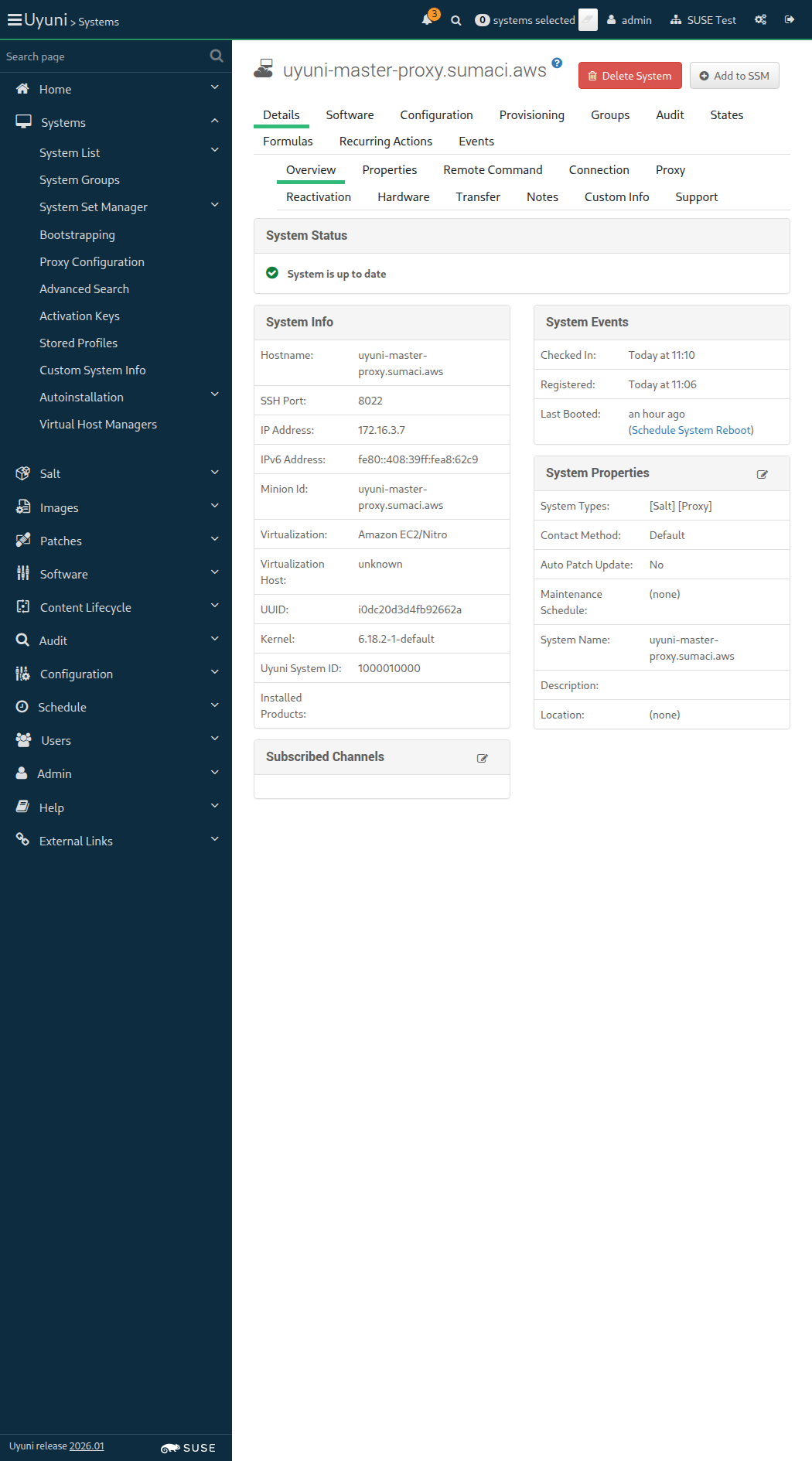
Screenshot +


* Mon Feb 02 2026 Michael Calmer
- Rebuild because of maintenance release

* Mon Jan 19 2026 Marek Czernek
- Make syntax in httputil_test compatible with Python 3.6
- Fix KeyError in postgres module with PostgreSQL 17 (bsc#1254325)
- Added:
* fix-tornado-s-httputil_test-syntax-for-python-3.6.patch
* backport-add-maintain-m-privilege-to-postgres-module.patch

* Wed Jan 14 2026 Marek Czernek
- Use internal deb classes instead of external aptsource lib
* Drop dependency on saltbundlepy-apt
- Speed up wheel key.finger call (bsc#1240532)
- Add security patches (bsc#1254903,bsc#1254905,bsc#1254904)

When I query latest Salt changes on "rhlike_minion" 307ms

Given I am on the Systems overview page of this "rhlike_minion" 303ms Show Error +
                                            
No system found for hostname: uyuni-master-rhlike-minion.sumaci.aws (RuntimeError) ./features/support/commonlib.rb:421:in `get_system_id' ./features/step_definitions/navigation_steps.rb:466:in `/^I am on the Systems overview page of this "([^"]*)"$/' features/init_clients/min_rhlike_salt.feature:59:in `I am on the Systems overview page of this "rhlike_minion"'

Then I check for failed events on history event page 0s

14s 492ms Show Info +
11:12:32:000 - 11:12:32:000 | Current URL: https://uyuni-master-server.sumaci.aws/rhn/systems/details/Overview.do?sid=1000010000
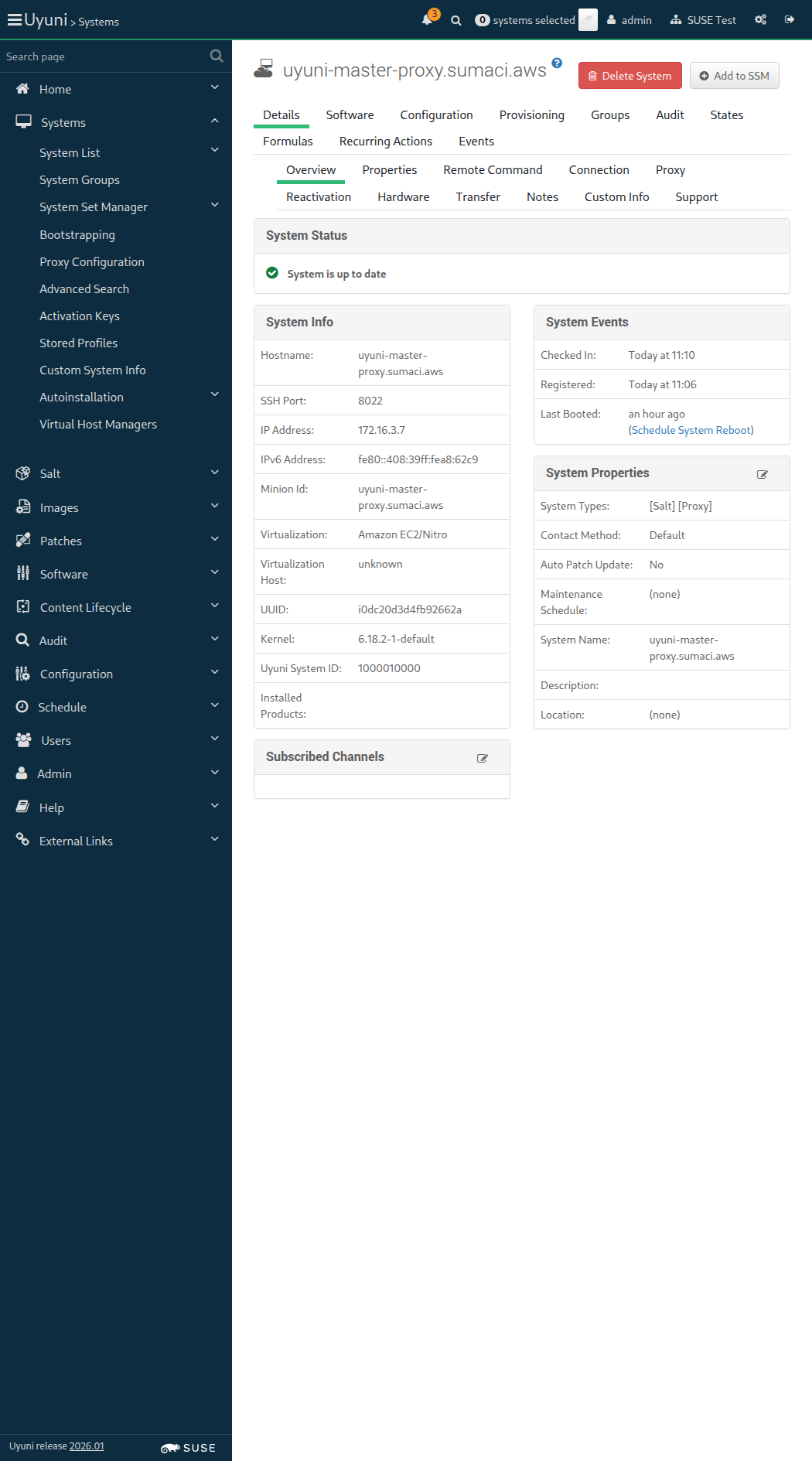
Screenshot +


When I perform a full salt minion cleanup on "build_host" 9s 790ms

Given I am authorized for the "Admin" section 42s 107ms Show Error +
                                            
session not created: Chrome instance exited. Examine ChromeDriver verbose log to determine the cause. (Selenium::WebDriver::Error::SessionNotCreatedError) (internal:kernel):90:in `tap' ./features/step_definitions/navigation_steps.rb:585:in `/^I am authorized as "([^"]*)" with password "([^"]*)"$/' ./features/step_definitions/navigation_steps.rb:453:in `/^I am authorized for the "([^"]*)" section$/' features/init_clients/buildhost_bootstrap.feature:11:in `I am authorized for the "Admin" section'

When I follow the left menu "Systems > Bootstrapping" 24s 165ms Show Error +
                                            
Unable to find xpath "//aside/div[@id='nav']/nav/ul/li/div/a[contains(.,'Systems')]/parent::div/parent::li" (Capybara::ElementNotFound) ./features/step_definitions/navigation_steps.rb:407:in `block (2 levels) in (top (required))' ./features/step_definitions/navigation_steps.rb:399:in `each' ./features/step_definitions/navigation_steps.rb:399:in `each_with_index' ./features/step_definitions/navigation_steps.rb:399:in `/^I follow the left menu "([^"]*)"$/' features/init_clients/buildhost_bootstrap.feature:14:in `I follow the left menu "Systems ) Bootstrapping"'

Then I should see a "Bootstrap Minions" text 0s

When I enter the hostname of "build_host" as "hostname" 0s

And I enter "22" as "port" 0s

And I enter "root" as "user" 0s

And I enter "linux" as "password" 0s

And I select "1-BUILD-HOST-KEY-x86_64" from "activationKeys" 0s

And I select the hostname of "proxy" from "proxies" if present 0s

And I click on "Bootstrap" 0s

And I wait until I see "Bootstrap process initiated." text 0s

When I follow the left menu "Salt > Keys" 10s 3ms Show Error +
                                            
Unable to find xpath "//aside/div[@id='nav']/nav/ul/li/div/a[contains(.,'Salt')]/parent::div/parent::li" (Capybara::ElementNotFound) ./features/step_definitions/navigation_steps.rb:407:in `block (2 levels) in (top (required))' ./features/step_definitions/navigation_steps.rb:399:in `each' ./features/step_definitions/navigation_steps.rb:399:in `each_with_index' ./features/step_definitions/navigation_steps.rb:399:in `/^I follow the left menu "([^"]*)"$/' features/init_clients/buildhost_bootstrap.feature:26:in `I follow the left menu "Salt ) Keys"'

Then I should see a "accepted" text 0s

When I follow the left menu "Systems > System List > All" 0s

And I wait at most 500 seconds until I see the name of "build_host", refreshing the page 0s

And I wait at most 500 seconds until onboarding is completed for "build_host" 0s

Then the Salt master can reach "build_host" 0s

Given I am on the Systems overview page of this "build_host" 392ms Show Error +
                                            
No system found for hostname: uyuni-master-build-host.sumaci.aws (RuntimeError) ./features/support/commonlib.rb:421:in `get_system_id' ./features/step_definitions/navigation_steps.rb:466:in `/^I am on the Systems overview page of this "([^"]*)"$/' features/init_clients/buildhost_bootstrap.feature:36:in `I am on the Systems overview page of this "build_host"'

When I follow "Details" in the content area 0s

And I follow "Connection" in the content area 0s

Then I should see "proxy" short hostname 0s

Requested /rhn/systems/details/Overview.do?sid=1000010000, got https://uyuni-master-server.sumaci.aws/rhn/manager/login?url_bounce=%2Frhn%2Fsystems%2Fdetails%2FOverview.do%3Fsid%3D1000010000&request_method=GET
Given I am on the Systems overview page of this "proxy" 3s 948ms

When I follow "Details" in the content area 10s 25ms Show Error +
                                            
Unable to find link "Details" within #(Capybara::Node::Element tag="section" path="/HTML/BODY[1]/DIV[1]/DIV[1]/SECTION[1]") (Capybara::ElementNotFound) ./features/support/commonlib.rb:198:in `click_link_and_wait' ./features/step_definitions/navigation_steps.rb:332:in `/^I follow "([^"]*)"$/' ./features/step_definitions/navigation_steps.rb:354:in `block (2 levels) in (top (required))' ./features/step_definitions/navigation_steps.rb:353:in `/^I follow "([^"]*)" in the (.+)$/' features/init_clients/buildhost_bootstrap.feature:44:in `I follow "Details" in the content area'

And I follow "Proxy" in the content area 0s

Then I should see "build_host" hostname 0s

14s 824ms Show Info +
11:12:19:000 - 11:12:33:000 | Current URL: https://uyuni-master-server.sumaci.aws/rhn/manager/login?url_bounce=%2Frhn%2Fsystems%2Fdetails%2FOverview.do%3Fsid%3D1000010000&request_method=GET
Screenshot +


When I query latest Salt changes on "build_host" 559ms Show Error +
                                            
FAIL: LANG=en_US.UTF-8 rpm -q --changelog venv-salt-minion returned status code = 1. Output: package venv-salt-minion is not installed (ScriptError) ./features/support/remote_node.rb:169:in `run_local' ./features/support/remote_node.rb:117:in `run' ./features/step_definitions/command_steps.rb:246:in `/^I query latest Salt changes on "(.*?)"$/' features/init_clients/buildhost_bootstrap.feature:49:in `I query latest Salt changes on "build_host"'

13s 625ms Show Info +
11:12:48:000 - 11:12:49:000 | Current URL: https://uyuni-master-server.sumaci.aws/rhn/systems/details/Overview.do?sid=1000010000
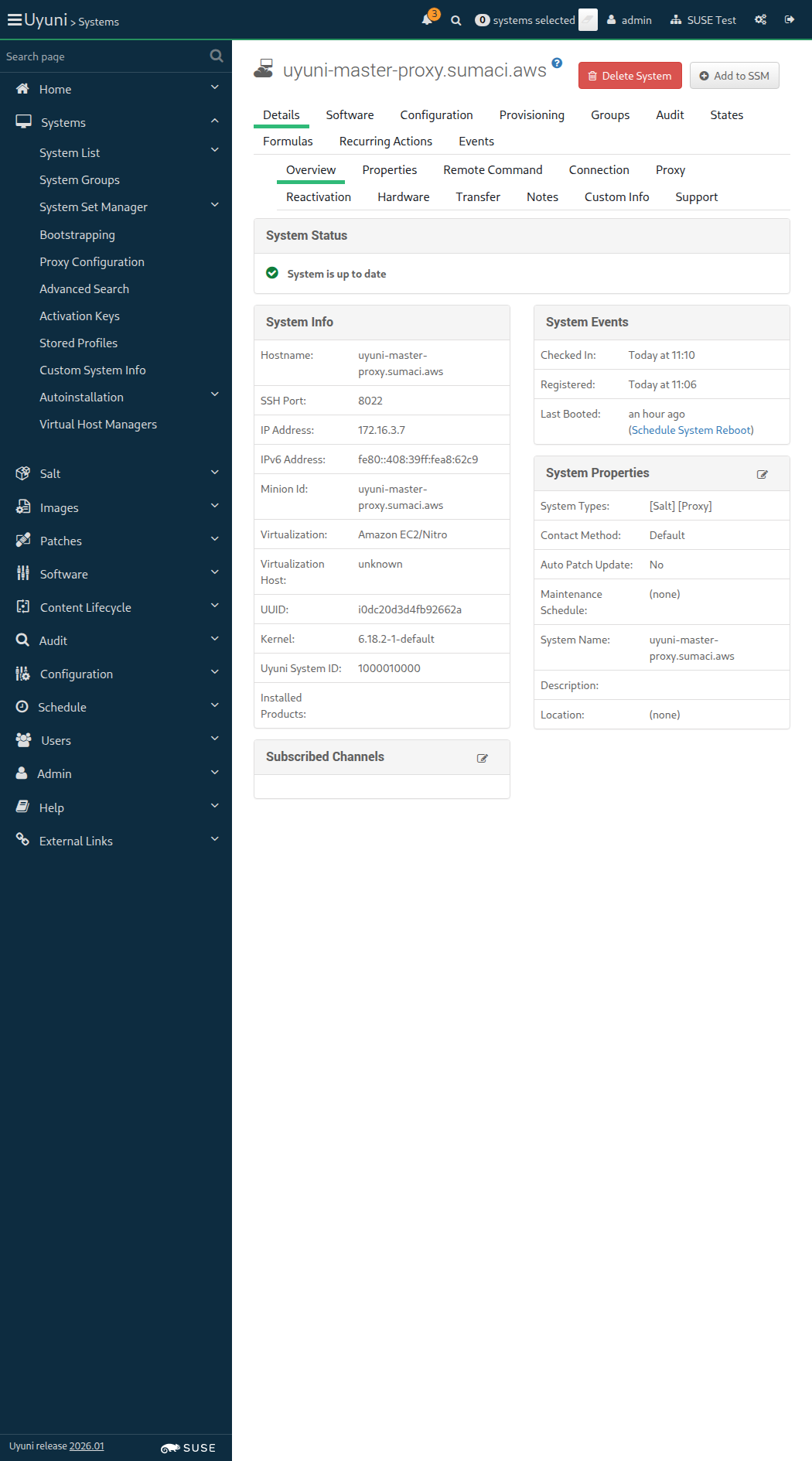
Screenshot +


Given I am on the Systems overview page of this "build_host" 315ms Show Error +
                                            
No system found for hostname: uyuni-master-build-host.sumaci.aws (RuntimeError) ./features/support/commonlib.rb:421:in `get_system_id' ./features/step_definitions/navigation_steps.rb:466:in `/^I am on the Systems overview page of this "([^"]*)"$/' features/init_clients/buildhost_bootstrap.feature:52:in `I am on the Systems overview page of this "build_host"'

Then I should see a "[Container Build Host]" text 0s

Then I should see a "[OS Image Build Host]" text 0s

13s 633ms Show Info +
11:13:02:000 - 11:13:02:000 | Current URL: https://uyuni-master-server.sumaci.aws/rhn/systems/details/Overview.do?sid=1000010000
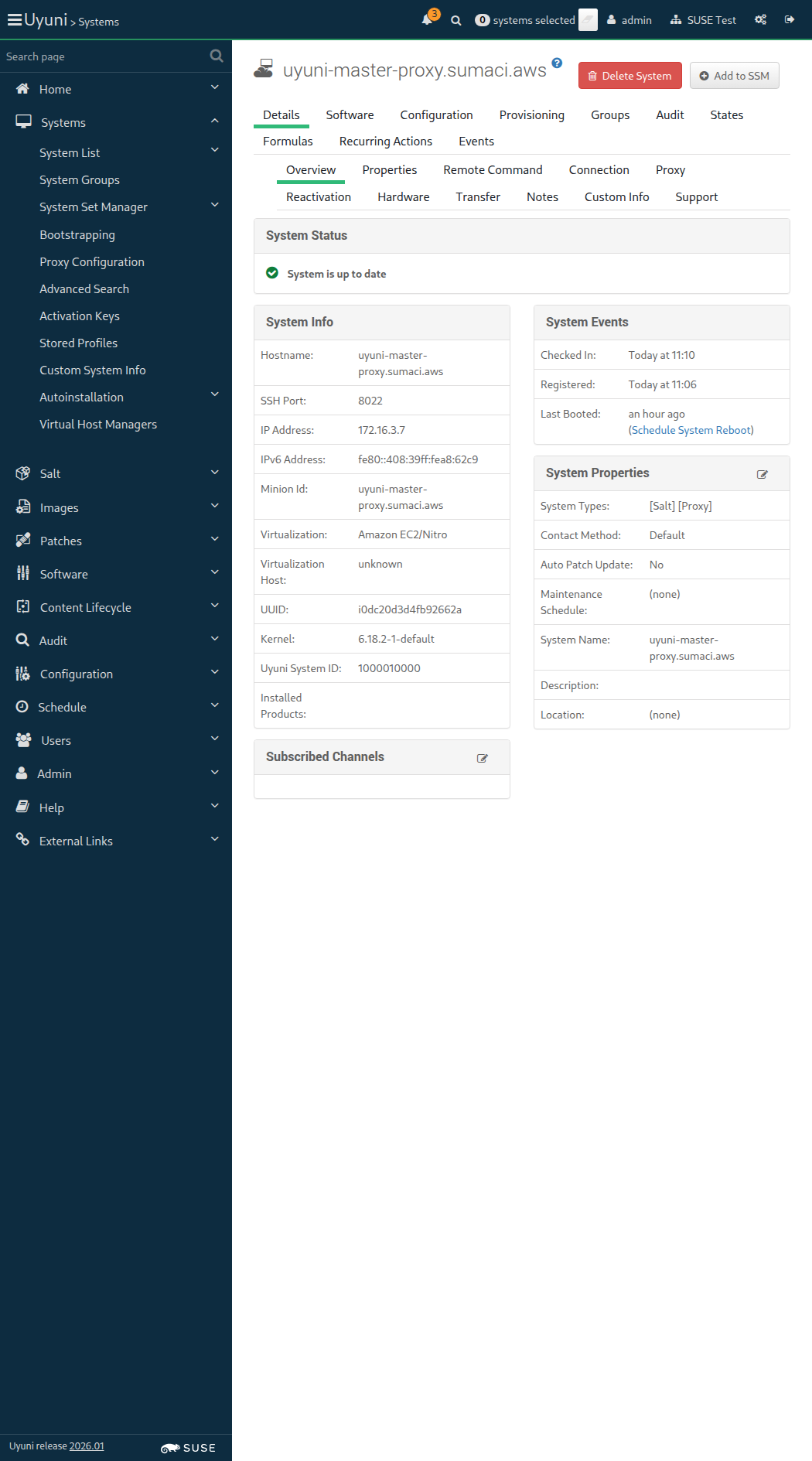
Screenshot +


Given I am on the Systems overview page of this "build_host" 307ms Show Error +
                                            
No system found for hostname: uyuni-master-build-host.sumaci.aws (RuntimeError) ./features/support/commonlib.rb:421:in `get_system_id' ./features/step_definitions/navigation_steps.rb:466:in `/^I am on the Systems overview page of this "([^"]*)"$/' features/init_clients/buildhost_bootstrap.feature:57:in `I am on the Systems overview page of this "build_host"'

Then I check for failed events on history event page 0s

13s 681ms Show Info +
11:13:16:000 - 11:13:16:000 | Current URL: https://uyuni-master-server.sumaci.aws/rhn/systems/details/Overview.do?sid=1000010000
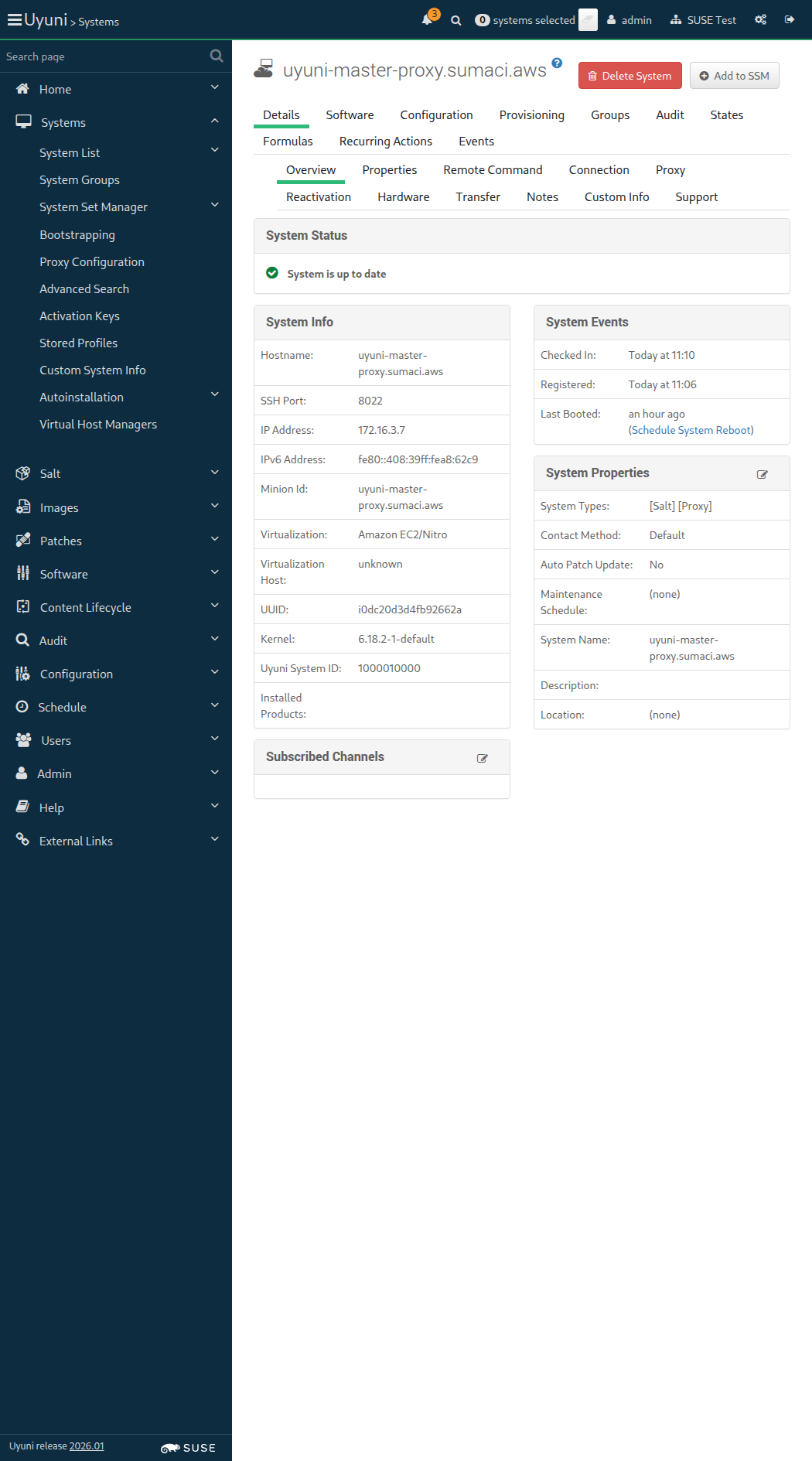
Screenshot +


When I perform a full salt minion cleanup on "sle_minion" 12s 822ms

Given I am authorized for the "Admin" section 37s 511ms

The hostname of sle_minion is uyuni-master-suse-minion.sumaci.aws

When I follow the left menu "Systems > Bootstrapping" 151ms

Then I should see a "Bootstrap Minions" text 75ms

When I enter the hostname of "sle_minion" as "hostname" 140ms

And I enter "22" as "port" 77ms

And I enter "root" as "user" 59ms

And I enter "linux" as "password" 61ms

And I select "1-SUSE-KEY-x86_64" from "activationKeys" 78ms

And I select the hostname of "proxy" from "proxies" if present 2s 765ms

And I click on "Bootstrap" 66ms

And I wait until I see "Bootstrap process initiated." text 46s 833ms

And I report the bootstrap duration for "sle_minion" < 1ms

It took 2 seconds to contact the minion

When I follow the left menu "Salt > Keys" 139ms

And I wait until I do not see "Loading..." text 355ms

Then I should see a "accepted" text 70ms

When I follow the left menu "Systems > System List > All" 189ms

And I wait until I see the name of "sle_minion", refreshing the page 31s 61ms

And I wait until onboarding is completed for "sle_minion" 52s 732ms

Then the Salt master can reach "sle_minion" 1s 870ms

And I report the onboarding duration for "sle_minion" < 1ms

When I remove package "kernel-default-base" from this "sle_minion" 0s

And I install package "kernel-default" on this "sle_minion" 0s

When I reboot the "sle_minion" host through SSH, waiting until it comes back 0s

Given I am on the Systems overview page of this "sle_minion" 846ms

When I follow "Details" in the content area 83ms

And I follow "Connection" in the content area 83ms

Then I should see "proxy" short hostname 100ms

Given I am on the Systems overview page of this "proxy" 1s 669ms

When I follow "Details" in the content area 69ms

And I follow "Proxy" in the content area 69ms

Then I should see "sle_minion" hostname 91ms

When I perform a full salt minion cleanup on "ssh_minion" 9s 621ms

Given I am authorized for the "Admin" section 20s 649ms Show Error +
                                            
session not created: Chrome instance exited. Examine ChromeDriver verbose log to determine the cause. (Selenium::WebDriver::Error::SessionNotCreatedError) (internal:kernel):90:in `tap' ./features/step_definitions/navigation_steps.rb:585:in `/^I am authorized as "([^"]*)" with password "([^"]*)"$/' ./features/step_definitions/navigation_steps.rb:453:in `/^I am authorized for the "([^"]*)" section$/' features/init_clients/sle_ssh_minion.feature:11:in `I am authorized for the "Admin" section'

When I follow the left menu "Systems > Bootstrapping" 42s 493ms Show Error +
                                            
session not created: Chrome instance exited. Examine ChromeDriver verbose log to determine the cause. (Selenium::WebDriver::Error::SessionNotCreatedError) (internal:kernel):90:in `tap' ./features/step_definitions/navigation_steps.rb:407:in `block (2 levels) in (top (required))' ./features/step_definitions/navigation_steps.rb:399:in `each' ./features/step_definitions/navigation_steps.rb:399:in `each_with_index' ./features/step_definitions/navigation_steps.rb:399:in `/^I follow the left menu "([^"]*)"$/' features/init_clients/sle_ssh_minion.feature:14:in `I follow the left menu "Systems ) Bootstrapping"'

Then I should see a "Bootstrap Minions" text 0s

When I check "manageWithSSH" 0s

And I enter the hostname of "ssh_minion" as "hostname" 0s

And I enter "linux" as "password" 0s

And I select the hostname of "proxy" from "proxies" if present 0s

And I click on "Bootstrap" 0s

And I wait until I see "Bootstrap process initiated." text 0s

And I follow the left menu "Systems > System List > All" 0s

And I wait until I see the name of "ssh_minion", refreshing the page 0s

And I wait until onboarding is completed for "ssh_minion" 0s

When I remove package "kernel-default-base" from this "ssh_minion" 0s

And I install package "kernel-default" on this "ssh_minion" 0s

When I reboot the "ssh_minion" host through SSH, waiting until it comes back 0s

Given I am on the Systems overview page of this "ssh_minion" 308ms Show Error +
                                            
No system found for hostname: uyuni-master-suse-sshminion.sumaci.aws (RuntimeError) ./features/support/commonlib.rb:421:in `get_system_id' ./features/step_definitions/navigation_steps.rb:466:in `/^I am on the Systems overview page of this "([^"]*)"$/' features/init_clients/sle_ssh_minion.feature:37:in `I am on the Systems overview page of this "ssh_minion"'

When I follow "Details" in the content area 0s

And I follow "Connection" in the content area 0s

Then I should see "proxy" short hostname 0s

Given I am on the Systems overview page of this "proxy" 3s 559ms Show Error +
                                            
session not created: Chrome instance exited. Examine ChromeDriver verbose log to determine the cause. (Selenium::WebDriver::Error::SessionNotCreatedError) (internal:kernel):90:in `tap' ./features/step_definitions/navigation_steps.rb:468:in `/^I am on the Systems overview page of this "([^"]*)"$/' features/init_clients/sle_ssh_minion.feature:44:in `I am on the Systems overview page of this "proxy"'

When I follow "Details" in the content area 0s

And I follow "Proxy" in the content area 0s

Then I should see "ssh_minion" hostname 0s

In order for the server to behave correctly after a reboot
I want to be sure that there is no wrong SELinux label

Then files on container volumes should all have the proper SELinux label 0s

When I execute spacewalk-debug on the server 13s 728ms

Then the tomcat logs should not contain errors 661ms

Then the salt event log on server should contain no failures 1s 836ms

Then the taskomatic logs should not contain errors 671ms

Then the log messages should not contain out of memory errors 657ms

Then the word "scc.suse.com" does not occur more than 100 times in "/var/log/rhn/rhn_web_ui.log" on "server" 0s

Then the word "scc.suse.com" does not occur more than 50 times in "/var/log/rhn/rhn_taskomatic_daemon.log" on "server" 0s